That’s why measuring the true impact of Google Ads in a B2B context is so challenging. Clicks and conversions only tell part of the story, and that story is often incomplete. Valuable engagements go untracked. Marketing teams can’t see which accounts are warming up, let alone tie ad spend to pipeline or revenue with confidence.
This is where Leadfeeder comes in. With its Leadfeeder integration for Google Ads, B2B marketers gain the ability to identify anonymous website visitors, uncover buying intent, and connect ad interactions with actual business outcomes. The result? Clearer insights, smarter optimization, and a far stronger case for ROI.
The problem with B2B Google Ads tracking
B2B marketers face a fundamental mismatch between how Google Ads tracks performance and how B2B buying actually happens. While the platform is designed to deliver quick, conversion-focused insights, B2B journeys are anything but linear, or short.
B2B ad attribution falls short
Google Ads typically uses first-touch or last-touch attribution models. That means it either gives all the credit to the first click or the final conversion step, ignoring everything in between. But in B2B, those “in-between” touchpoints often represent the most meaningful moments: the display ad that sparked curiosity, the second search that drove a return visit, or the landing page read by someone else on the buying committee.
To make matters worse, Google's default 90-day attribution window simply isn’t long enough for B2B. Sales cycles can span months, or even years, and involve multiple return visits across different channels and devices. By the time a deal closes, much of the digital trail has gone cold or disappeared entirely from standard reporting.
Invisible touchpoints cost pipeline
In a typical B2B sale, multiple stakeholders will visit your website at different times. Maybe one downloads a whitepaper, another watches a demo video, and a third fills in the form. But Google Ads only logs the final form submission as a conversion, leaving every prior touchpoint unrecognized and unattributed.
Worse still, ad-driven interest often spreads via dark social channels like Slack, email forwards, or internal chat threads. These actions rarely leave a trace in your analytics, even though they’re a direct result of your campaign.
And what about the conversions that happen offline? Sales calls, product demos, or even in-person meetings that were sparked by an ad click won’t show up in your reports unless the prospect happened to complete a tracked form. That means missed attribution and a skewed understanding of what’s truly driving engagement.
Redefining B2B Google Ads Attribution with Leadfeeder
Traditional Google Ads tracking falls short in the B2B world—but Leadfeeder's integration changes the game. By connecting your Google Ads campaigns with Leadfeeder's rich account intelligence, you can finally see the full picture: who’s engaging, what’s working, and how your ads influence pipeline and revenue.
Here’s how Leadfeeder helps you track what really matters:
1. Identify all companies engaging with your ads
Go beyond anonymous clicks. Leadfeeder reveals the actual companies visiting your website after interacting with your ads, whether or not they convert. This lets you connect ad spend to real buyer interest and uncover hidden engagement from high-value accounts.
2. Discover the keywords attracting your ideal buyers
Understand which search terms are driving visits from your target accounts, not just from any user. Leadfeeder helps you focus budget on the keywords that attract quality traffic and real buying intent.
3. Track the full B2B customer journey
Get visibility into the entire path your prospects take, from the first ad click through to multiple site visits, content engagement, and offline interactions. Leadfeeder fills in the gaps that Google’s attribution models miss, especially across long, multi-touch buying journeys.
Discover accounts that are ready to buy
Prioritize your outreach when you notice buying signals from your prospects and expand your target list using machine learning.
Boost your sales4. Monitor the behavior of multiple stakeholders
In B2B, buying decisions involve more than one person. Leadfeeder detects repeat visits from different people at the same company, giving you a fuller picture of stakeholder engagement and showing you when interest is building behind the scenes.
5. Extend tracking beyond Google’s 90-day limit
Your sales cycle doesn’t end in three months, and now, neither does your tracking. Leadfeeder links visits and activity over a much longer time frame, helping you understand the long-term impact of awareness and nurture-stage campaigns.
By bridging the gap between ad clicks and actual business outcomes, Leadfeeder empowers both in-house B2B marketers and agencies to prove the value of their campaigns, not just in traffic, but in revenue. With clearer attribution and deeper insight, you can optimize your Google Ads strategy for what really counts: driving growth.
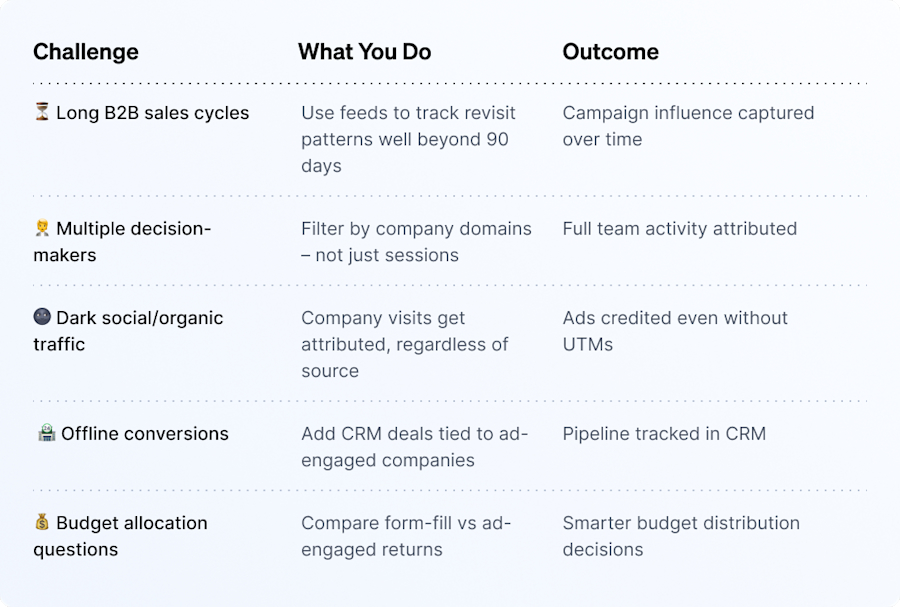
How Leadfeeder and Google Ads Work Together to Unlock True B2B Attribution
Integrating Leadfeeder with Google Ads gives B2B marketers visibility they’ve never had before. It connects your ad campaigns directly with real company-level website visits, so you can finally tie clicks to pipeline.
Here’s how the integration works and how to get the most out of it.
Step 1: Connect your Google Ads account
To get started, head to Leadfeeder Settings → Integrations → Google Ads, and connect your Google Ads account. Within minutes, your data will begin to sync.
Once connected, you’ll start to see enriched campaign data like campaign name, ad group, keyword, and medium, appearing directly inside your Leadfeeder dashboard.
This integration allows you to:
Track how your paid campaigns influence account-level activity
Identify which companies are engaging with your ads
Use ad engagement as a powerful signal of buying intent
For any visits that originated from a Google Ads campaign, Leadfeeder shows:
Campaign Type (e.g. Search, Display)
Campaign Name
Ad Group
Keyword Used
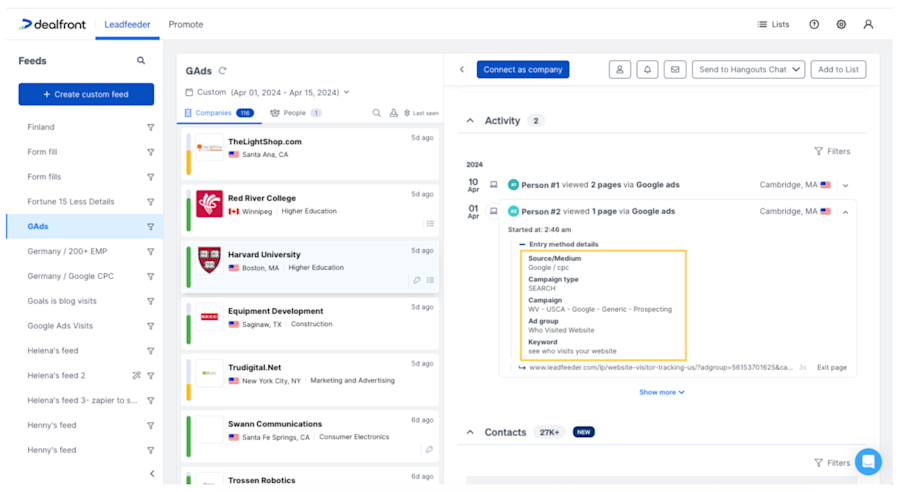
You have integrated Leadfeeder with Google Ads, now what?
Step 2: Create custom feeds to segment Google ads traffic
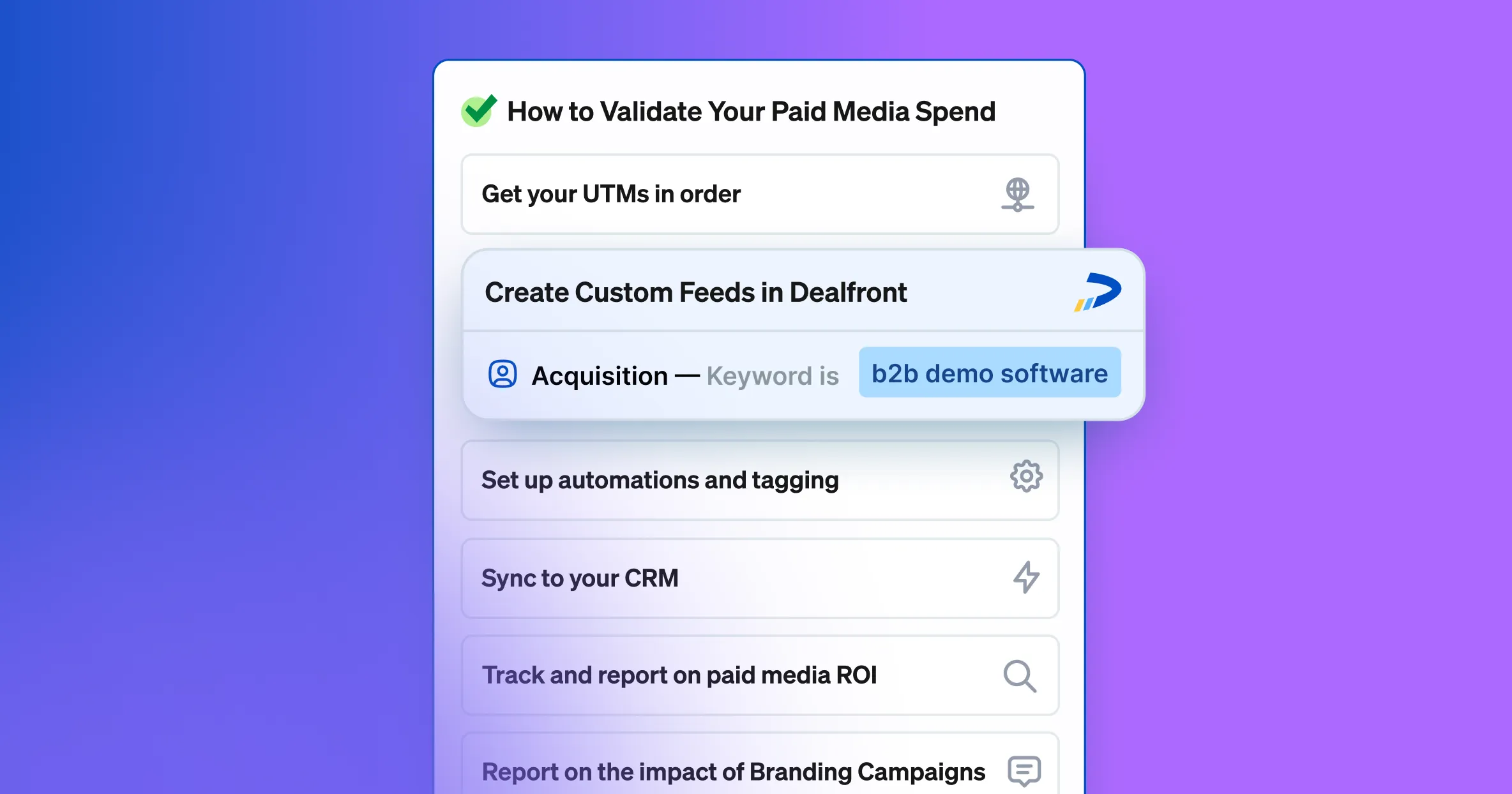
Once your data is flowing, the next step is to build custom feeds to make sense of the activity. Leadfeeder allows you to segment traffic using the ‘Acquisition’ filters.
Create feeds by:
Campaign Name – to track specific campaigns
Keyword – to identify high-intent search terms
Medium – to differentiate between Search, Display, and other channels
This reveals:
Which companies your ads are attracting
What content or pages they explore
Whether they return, convert, or drop off
Which campaigns drive high-fit traffic that actually moves down the funnel
Because this activity is tied to real companies, you can assess campaign quality with much greater precision.
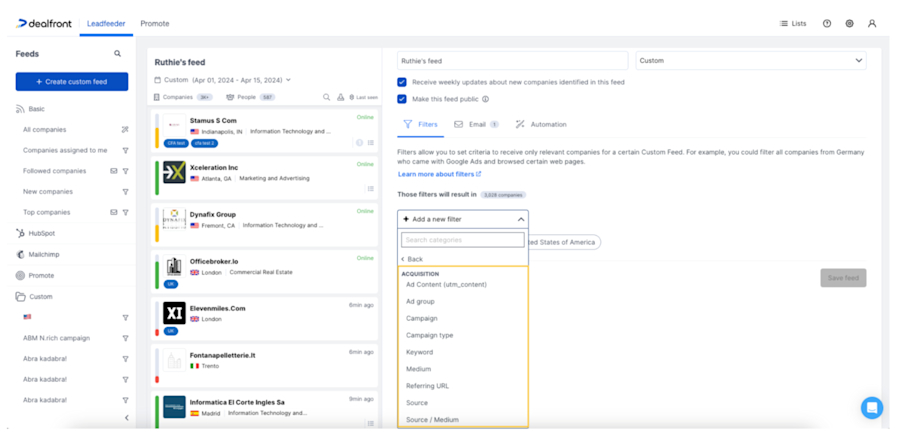
You don’t need to manually create custom feeds for every campaign. Leadfeeder will automatically generate a custom feed for each Google Ads campaign you track using the exact campaign name. This means you can instantly see which companies are engaging with specific campaigns, assess lead quality, and analyze audience fit by location, industry, and ICP segment all in one place. Access your Google Ads Campaigns folder on the left side as shown in the screenshot below.
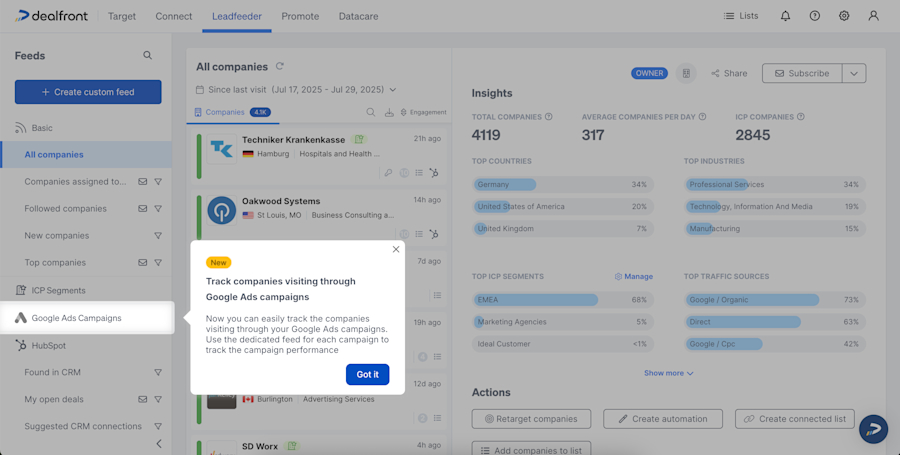
Step 3: Four common Custom Feeds to try in Leadfeeder
Step 3.1: See if campaigns are reaching the right accounts
Problem: PPC Manager currently can only see the companies that their ads are reaching when they submit a lead. They have no visibility if their ads are reaching the right accounts so they cannot optimize the campaigns so they reach more of their target audience.
Solution: Get visibility on all the companies that are clicking on your Google Ads so you can optimize your ad spend to the ad groups and keywords that are reaching your target accounts
Feed Name: All Google Ads companies
Feed filters: All companies Leadfeeder identified with any visit from Google Ads
Step 3.2: Generate additional leads from Google Ads spend
Problem: Companies spend huge amounts of money on Google Ads but the only return they get is from the ~5% of visitors that submit a lead form. They pay for the other 95% but get no value from them.
Solution: See the companies that click on your ads but don’t convert. Send them to your sales team to follow up with, generating a secondary revenue stream from your Google Ads spend. Improving ROAS (Return On Ad Spend).
Feed Name: Non converters
Feed filters: All companies with a visit from Google Ads that did not submit a form
Step 3.3: Monitor your pipeline generated by Google Ads
Problem: In most companies the PPC manager has very little visibility of what happens to a lead once they convert on their Google Ads landing page. Even though they are responsible for return from ad spend, they often can’t track how the leads are progressing through their CRM. On top of this attribution is generally done on last click so if the Google Ads campaigns assisted in the conversion they are not given any credit
Solution: Monitor all the open opportunities in your CRM that Google Ads has influenced, even if the lead is submitted by a different person in the company or on a different device.
Feed Name: Open opportunities
Feed filters: Companies with a visit from Google Ads that have an Open opportunity in CRM
Step 3.4: Identify revenue generating keywords/ad copy
Problem: PPC Managers never have the ability to track revenue generated by won deals back to the ads and keywords that attracted in that customer. This makes it very difficult to find out which ads are generating revenue and which are generating leads that don’t convert to paying customers
Solution: With Leadfeeder you can track won opportunities right back to the campaigns/ad groups and keywords that reached that account. Giving you key insights on the buyer journey that allows you to optimize your campaign to generate more revenue.
Feed Name: Won deals
Feed filters: Companies with a visit from Google Ads that have an Won opportunity in CRM
Step 4: Go beyond Google’s 90-day attribution window
In B2B, buying journeys are rarely linear, and rarely short. It can take weeks, months, or even longer for a potential customer to go from initial click to closed deal. But Google Ads has a hard limit: it only attributes conversions that occur within 90 days of the first ad click.
This is a huge blind spot for B2B marketers. If a prospect first clicks your ad, visits your website, and then comes back three months later via a direct visit or email link, they disappear from Google Ads attribution entirely.
Leadfeeder solves this. By identifying the companies behind anonymous website visits, Leadfeeder gives you visibility well beyond Google’s 90-day window. It continuously tracks returning visits from the same company, even if the user didn’t convert the first time, enabling you to:
See the full buying journey from initial ad engagement to eventual conversion
Connect multiple touchpoints across time, channels, and decision-makers
Attribute long-cycle conversions back to the original ad campaign or keyword
For example, if a company first finds you via a Google Search ad in January, comes back in March via an organic visit, and finally fills out a form in April, Leadfeeder connects the dots. You can trace that conversion all the way back to the first paid click.
This extended attribution allows you to:
Prove the value of top-of-funnel campaigns that don’t convert immediately
Allocate budget more confidently to long-term plays that influence pipeline
Report on true ROI using data Google Ads simply doesn’t provide
All the usual campaign data (campaign type, campaign name, keyword, and ad group) remains accessible and filterable via Leadfeeder's Acquisition filters. That means you’re never in the dark about what triggered a visit, even long after the standard 90-day clock has expired. This is an attribution that actually reflects how B2B buying works.
“Forget the obsession with MQLs and channel-specific reports. True B2B marketing effectiveness comes from understanding which companies are engaging, how they're moving through the funnel, and ultimately, how your paid spend translates directly into pipeline and revenue. We, as marketers, have to stop chasing volume and start owning our contribution to real business growth. That's the core of what Leadfeeder enables.” – Sam O'Brien, VP of Marketing, Leadfeeder
Step 5: Push ad engagement data to your CRM
Take your attribution further by syncing identified companies and ad touchpoints directly into your CRM. This allows you to:
Attribute pipeline and revenue to specific ads and keywords
Track influenced deals, not just direct conversions
Uncover offline or multi-touch influence from Google Ads
Alert your sales team in real-time when high-fit companies engage
Use CRM fields to tag and report on ad-driven opportunities
With these insights, marketing and sales teams can collaborate more effectively, focusing their efforts on the accounts showing clear intent.
By integrating Google Ads with Leadfeeder, you're no longer flying blind. You gain the tools to:
Uncover who’s really clicking and why
Follow complex buyer journeys across time and teams
Attribute real business outcomes to your campaigns
It's time to stop guessing and start proving the true impact of your B2B Google Ads.
What happens next: 11 ways Leadfeeder supercharges B2B Google Ads attribution
Integrating Google Ads with Leadfeeder is just the beginning. Once connected, you unlock a full suite of powerful attribution enhancements tailored specifically for the complexities of B2B marketing.
Below, we break down 11 common B2B attribution challenges and look at how Leadfeeder helps you solve each one. Consider these your Play for smarter optimization, better reporting, and more revenue-driven campaign decisions!
1. Longer Sales Cycles
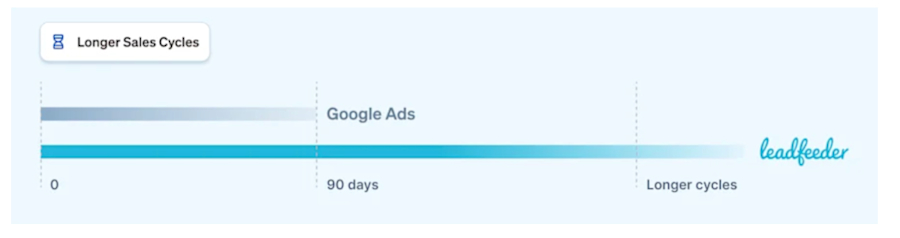
The problem: Google Ads only attributes conversions that happen within 90 days of an ad click. That’s far too short for most B2B journeys, which often span months.
How Leadfeeder helps: Leadfeeder extends attribution far beyond Google's 90-day window. If a buyer clicks an ad in January and converts in June, you can still trace that journey back to the original touchpoint, and see every visit in between.
2. Revenue from Influenced Deals
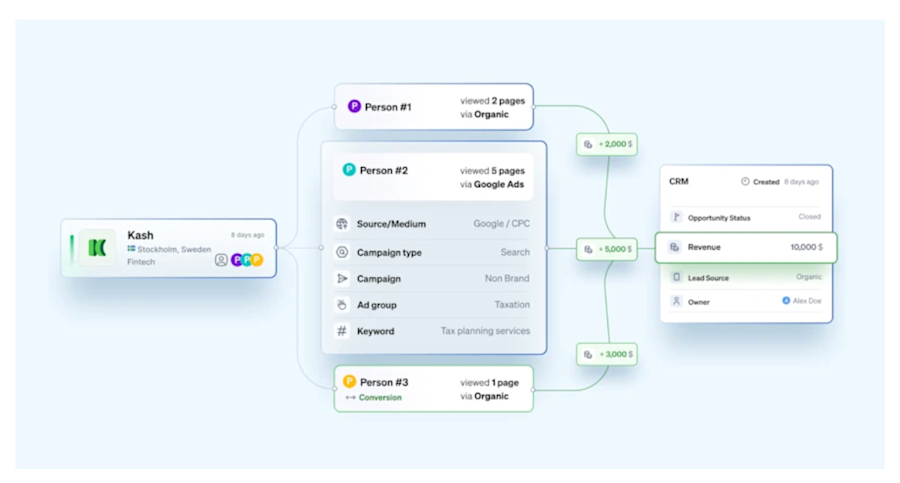
The problem: CRMs often only credit the first or last touch. If your Google Ads campaign created initial interest but wasn't the final touchpoint, it’s invisible in your attribution reporting.
How Leadfeeder helps: Leadfeeder tracks multi-touch journeys and flags ad-influenced visits. You’ll finally be able to prove the value of early-stage campaigns and how they contribute to pipeline, even if the deal closed through another channel.
3. Campaign Optimization
The problem: Google Ads data alone doesn’t tell you which campaigns are attracting the right leads, only that someone clicked.
How Leadfeeder helps: With company-level identification, you can see which keywords, campaigns, and landing pages bring in your ICP. Filter by industry, location, company size, or any firmographic data to focus only on what matters.
4. Multiple Decision-Makers
The problem: Most tracking is user-level, operating off one device, one cookie data. But B2B deals often involve entire buying committees.
How Leadfeeder helps: Leadfeeder shows all website activity from across the same company, even if different users visit from different devices or locations. You’ll get a full picture of buying interest from across the org.
5. Multiple Touchpoints
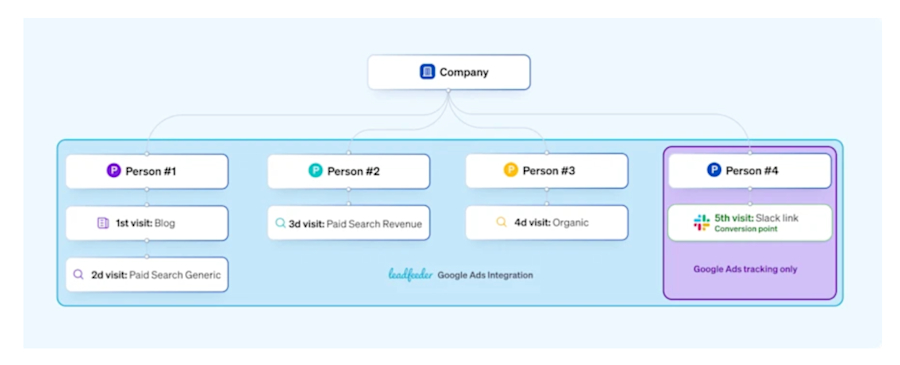
The problem: B2B buyers rarely convert on the first visit. Instead, they research across channels and over time.
How Leadfeeder helps: Leadfeeder consolidates all visits by company, capturing the entire decision journey, from first click to final conversion. Understand which touchpoints actually move deals forward.
6. Data Privacy Regulations
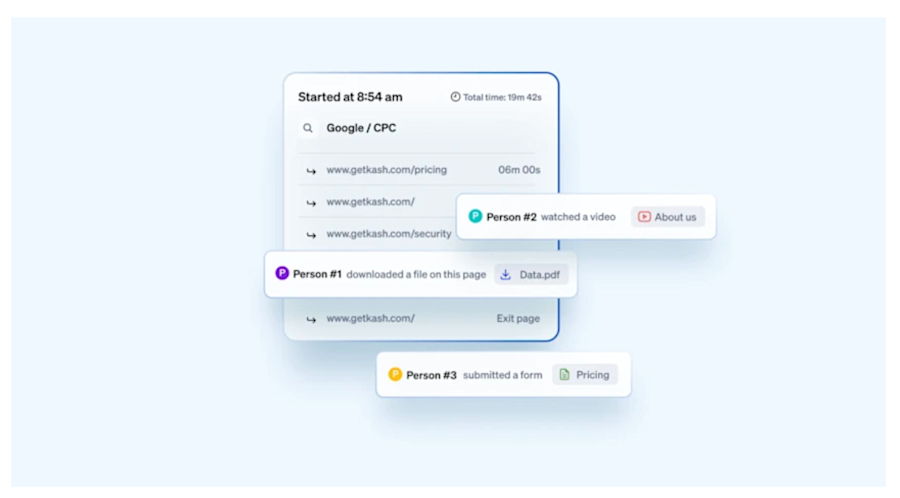
The problem: Cookie consent banners and GDPR compliance limit traditional tracking methods.
How Leadfeeder helps: Leadfeeder uses IP-based company tracking, fully GDPR-compliant and effective even without cookie consent. That means more reliable attribution, even in regulated regions.
7. Offline Conversions
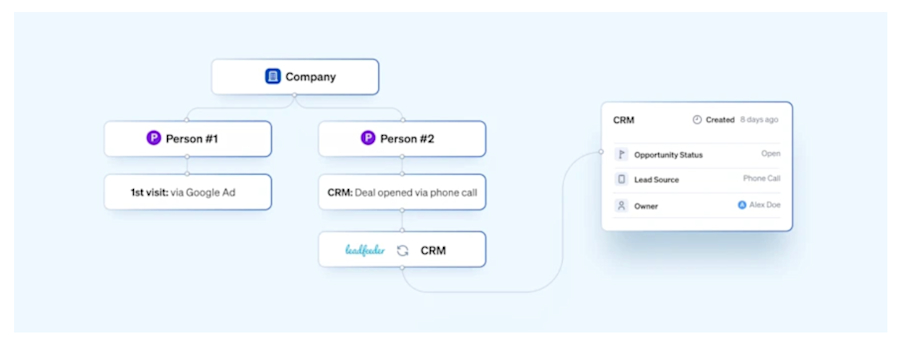
The problem: Some high-value leads don’t fill out a form. Instead they call, book a demo directly, or engage offline.
How Leadfeeder helps: Leadfeeder syncs with your CRM, matching offline deals with prior website activity, even if that activity started with a Google Ad. That way, you can still attribute revenue to the right campaign.
8. Low Quality Leads
The problem: Google counts all conversions equally, even if it’s a student, job seeker, or spam bot.
How Leadfeeder helps: Use custom feeds to filter out non-ICP traffic and focus on the companies that actually match your buyer profile. Stop wasting budget on irrelevant clicks.
9. Cross-Device Tracking
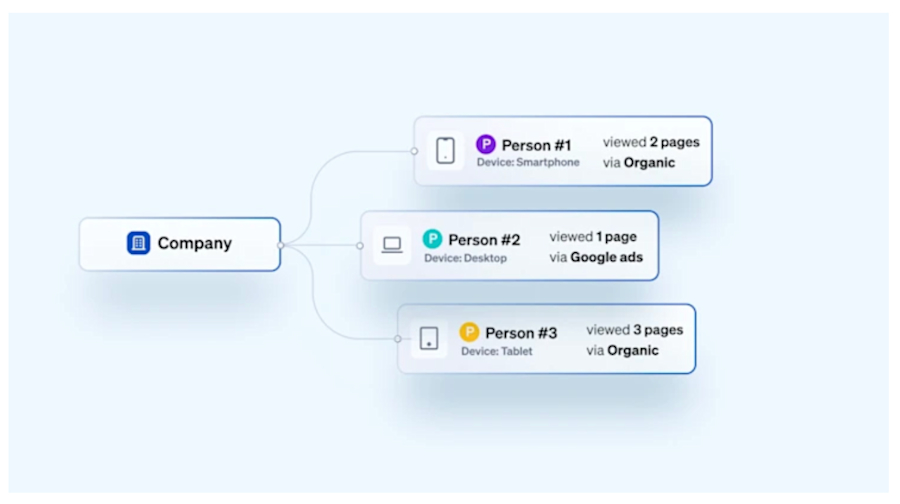
The problem: Unless a user is logged into their Google account, tracking across devices is patchy at best.
How Leadfeeder helps: Leadfeeder uses company-level IP identification, so even if a buyer starts on mobile and later returns on desktop, it’s all stitched together into one journey.
10. Awareness Campaigns
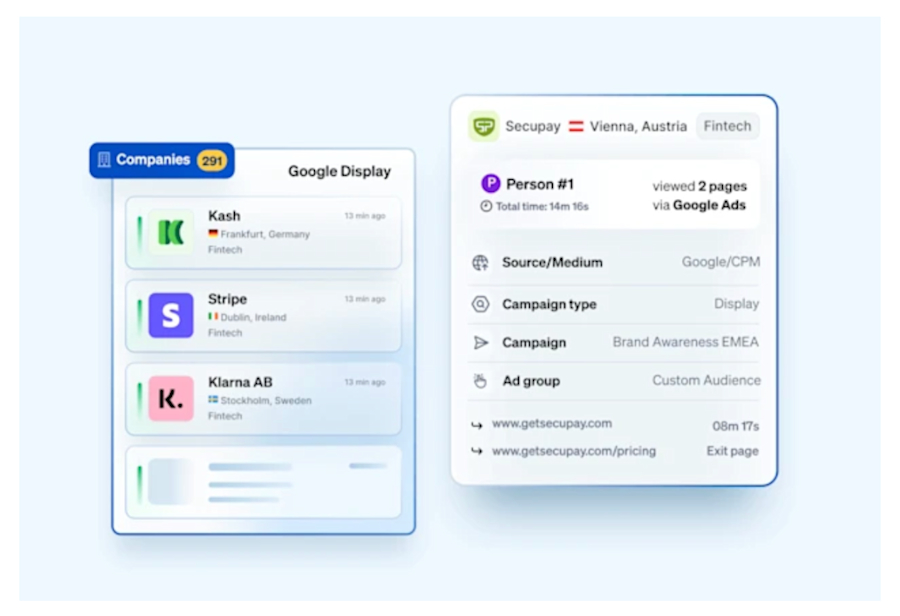
The problem: Display and YouTube ads don’t always lead to direct conversions, but they build awareness and drive future traffic.
How Leadfeeder helps: Even if someone doesn’t convert, Leadfeeder shows you which companies visited after seeing your ad, so you can measure awareness impact and retarget effectively.
11. Outbound Sales Alignment
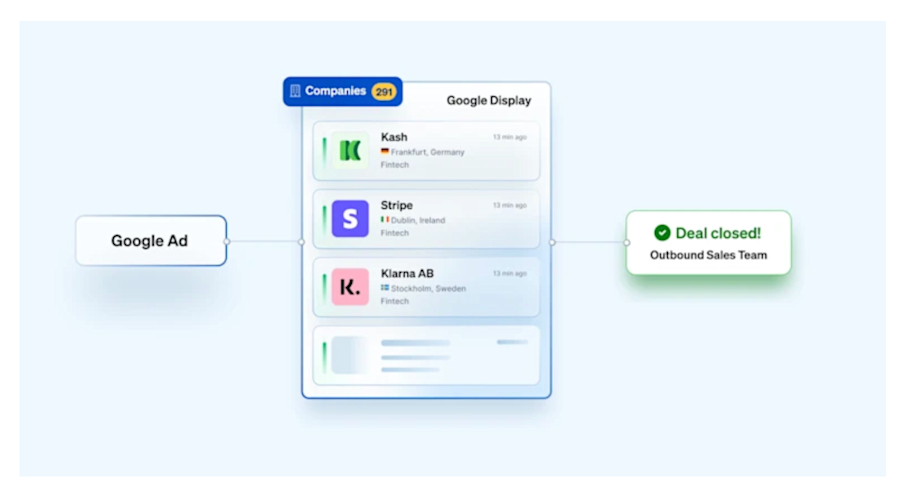
The problem: If a lead clicks your ad but doesn’t convert, your sales team stays in the dark.
How Leadfeeder helps: Surface companies that clicked on your ads but didn’t fill out a form—and send them straight to your outbound team for timely follow-up.
Steal these ready-made templates for B2B attribution
When a company engages with your Google Ads and visits key pages (like pricing or product pages), that’s a signal worth acting on, especially if they’re a match for your ICP. Use these alert templates to notify sales the moment it happens.
Real-Time email alert templates for Sales teams
Email 1: Follow-up after a high-intent visit from a Google Ad
Subject: Noticed your interest in [Your Solution] – thought this might help
Body:
Hi [First Name],
I saw that someone from [Company Name] recently clicked one of our Google Ads and spent time exploring our [product/service]—especially the [landing page or feature page].
If [challenge or opportunity] is top of mind, I’d be happy to send over a relevant case study or walk you through how others in your industry are using [Your Product].
Let me know if you’re open to a quick 15-minute chat.
Best,
[Your Name]
Email 2: Multi-visit engagement from the same company
Subject: A few visits from your team—can I help?
Body:
Hi [First Name],
Noticed some interesting activity from [Company Name] on our site recently—multiple visits over the past few days from your team via Google Ads.
It looks like there’s interest in [specific product/topic] based on the pages visited. If you’re currently evaluating options, I’d love to answer any questions or share tailored insights.
Would a quick call this week make sense?
Thanks,
[Your Name]
Email 3: Resource follow-up after specific keyword engagement
Subject: Resources on [Keyword Topic] for [Company Name]
Body:
Hi [First Name],
Saw that your team found us via a Google search for “[Keyword]” and spent some time exploring our [related landing page or feature].
If that’s a current focus area, here’s a resource that might be helpful:
→ [Insert link to a case study, guide, or demo video]
Happy to chat if you'd like a personalized walkthrough or have questions.
Best regards,
[Your Name]
Email 4: High-fit company clicked awareness campaign
Subject: Noticed [Company Name] engaging with our latest campaign
Body:
Hi [First Name],
Your team recently landed on our site from one of our Google Ads campaigns promoting [solution or theme]. Great to see interest from [Company Name]—you’re a great fit for what we offer.
Would you be open to a quick conversation about how we’ve helped [similar company] solve [specific pain point]?
Looking forward to connecting,
[Your Name]
Email 5: Light nurture after Display Ad click
Subject: Thanks for stopping by—something useful for you
Body:
Hi [First Name],
I noticed someone from [Company Name] visited our site after seeing one of our Google Ads recently. I wanted to share a quick resource that might help if you're exploring [topic]:
→ [Helpful asset link – not gated]
No pressure to connect, but if you'd like more info or want to chat, I’m here!
Warm regards,
[Your Name]
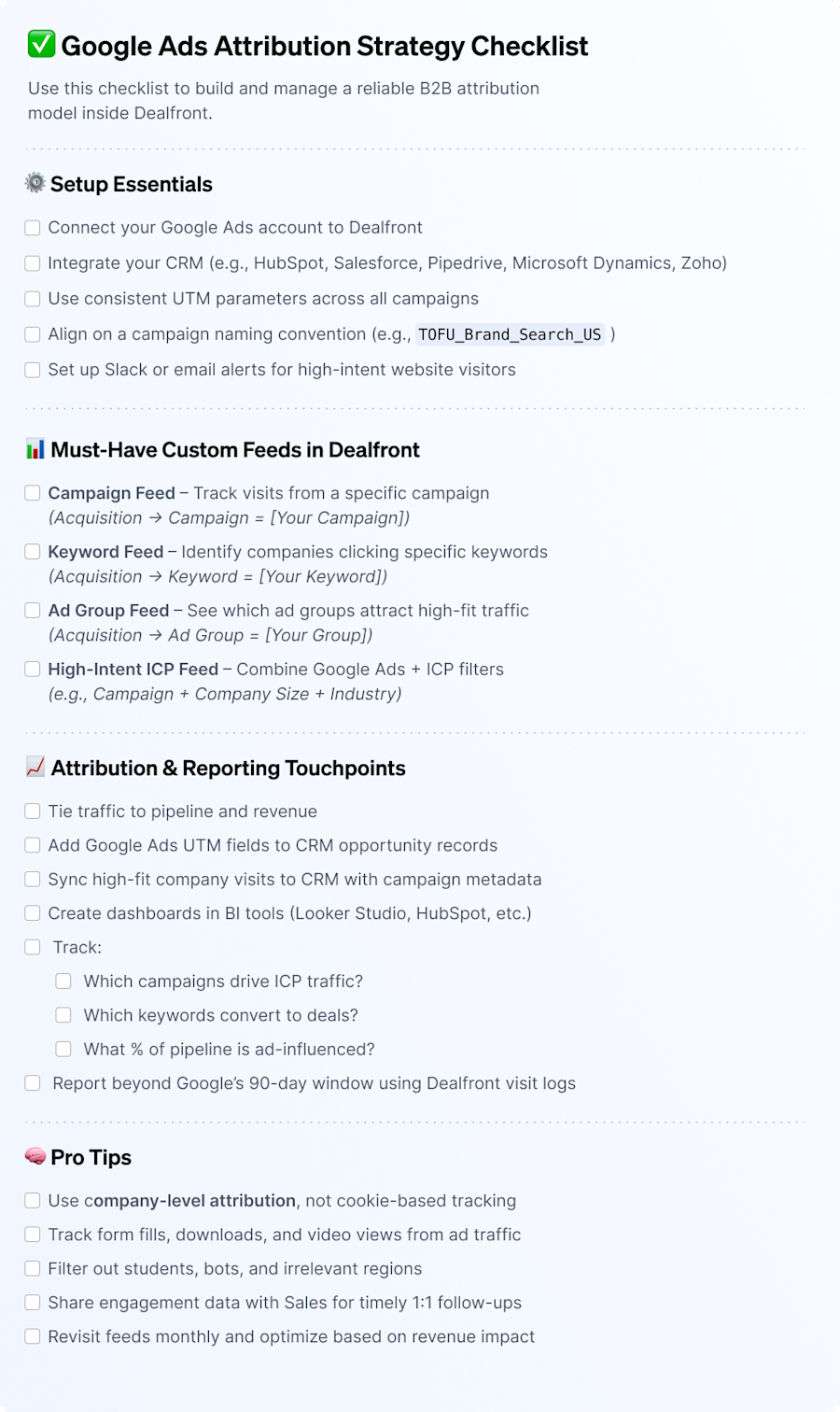
2. Google Ads attribution strategy checklist
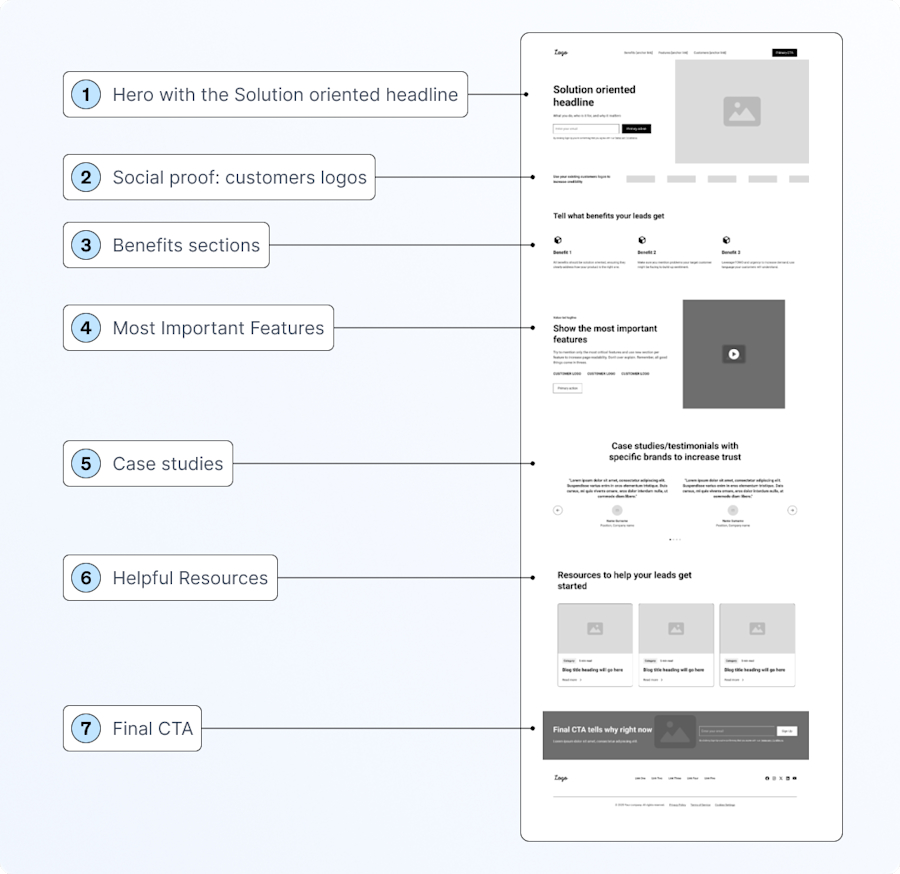
3. PPC landing page wireframe
A high-converting layout built for B2B Google Ads campaigns.
This wireframe is designed to capture qualified demand, ideal for demo requests, form fills, or hand-raisers. It follows best practices for paid search and display, balancing clarity, urgency, and trust.
Expected results
See which keywords attract your ICP
Attribute revenue to ad-influenced journeys
Justify paid budgets with campaign-level ROI
Enable sales with company-level ad insights
Eliminate low-quality leads from your paid funnel