60-Second Summary
Buying B2B lead lists often wastes budget and time because those contacts lack demonstrated intent, are frequently outdated, and can create privacy and reputation risks. Visitor identification (e.g., Leadfeeder) builds qualified lead lists from companies that actually visit your site, giving you better data, behavioral signals, and higher conversion potential.
Key takeaways: Purchased B2B lists tend to be low-quality, inaccurate, and non‑exclusive, leading to lower conversion rates, higher CPAs, longer sales cycles, and potential privacy issues; sourcing leads from site visitors yields higher-intent, up-to-date prospects.
Standout strategies & tactics: Build custom feeds to filter visitors by firmographics and intent, use behavioral page-view data to prioritize outreach, enable Slack/email notifications, and automate lead routing via CRM integrations.
Real-world lessons & frameworks: Prioritize intent-based sourcing (identify visitors → qualify with filters → act quickly). Quality over volume shortens cycles and improves ROI; accurate contact data reduces wasted outreach and spam complaints.
Quick implementation steps: Set up a custom Leadfeeder feed with your lead criteria, add automations/notifications for reps, connect your CRM to auto-send and tag leads, then iterate filters and outreach based on behavioral signals (try the 14‑day free trial to start).
*This summary was created with AI assistance, using our original content.
That means your sales team spends valuable time chasing cold prospects who are unlikely to convert. Instead of helping your business grow, bought lead lists can drain your budget, waste resources, and distract your team from higher-value opportunities.
A better approach is to build your lead list from companies that have already shown interest in your business.
In this article, we break down why purchased B2B lead lists often fall short, how visitor identification improves lead generation, and how to create a stronger, more qualified lead list that is more likely to convert.
Note: Ready to build a better lead list for your B2B sales team? Sign up and try Leadfeeder free for 14 days to see the companies that visit your website, plus behavioral details like which pages they looked at.
The Many Problems with Buying Lead Lists
Let’s talk a little more about why buying B2B leads or email lists isn’t the ideal way to get more leads. We’ll outline 4 main reasons:
The leads are of low quality.
The company and contact information are outdated and/or inaccurate.
Your competitors may already be pursuing the same leads.
Bought leads can lead to privacy issues and more spam reports.
As we mentioned briefly above, purchased leads are almost exclusively low-quality leads. That’s because they haven’t actually shown any interest in your business or what you offer—they don’t meet any behavioral or intent-based lead qualifications. In other words, they’re not all that likely to be interested in or ready to buy what you’re selling.
We also touched on something above: Purchased contact lists often include outdated or just plain inaccurate contact and company information. They may have a decision maker listed who isn’t even with the company anymore.
They might tell you the company has 1,000 employees when they actually laid off a third of their workforce and have closer to 700. They may include email addresses and formulas that no longer exist.
Not to mention, when you buy a marketing list of B2B leads, you have no guarantee of exclusivity. There’s nothing preventing the list provider from selling the exact same list to your competitors.
Finally, when you get a list of random companies and start emailing them, it raises a whole host of privacy and brand-reputation issues.
For one, people who receive random, unsolicited emails from companies are far more likely to relegate you to the spam folder—hurting your brand’s reputation. Plus, sending unsolicited emails can get you in trouble with data privacy regulations like GDPR in Europe.
These reasons, along with our experience working with tens of thousands of B2B marketing and sales teams, suggest that purchased lead lists often yield lower conversion rates, higher CPAs, and longer sales cycles.
Fortunately, there are better ways to get high-quality leads with accurate, up-to-date details without breaking your budget.
Visitor Identification Offers a Better Way to Build Your B2B Lead List
Visitor identification lets you pull more leads from companies already visiting your website. Since the average B2B company sees a 2% conversion rate on its website, there are many potential customers (the other 98%) that most sales teams never see.
By tapping into those potential leads via visitor identification software, you can get access to:
Higher quality leads who look like your ideal customer and have shown a baseline level of interest by visiting your website.
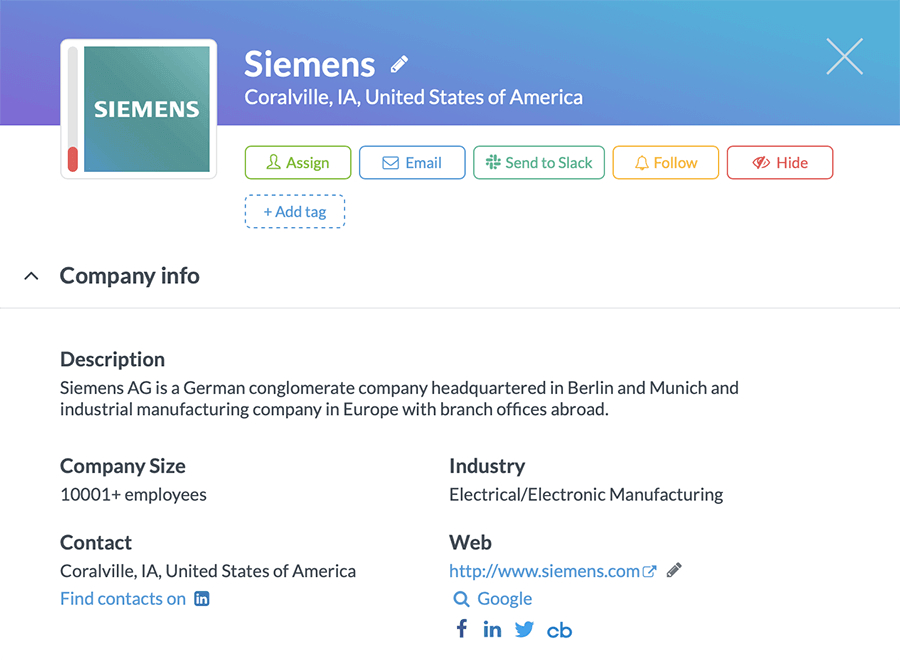
More accurate, complete, and up-to-date information about lead companies — including company name, contact information (phone numbers, social media), company size, decision maker job titles, and more.
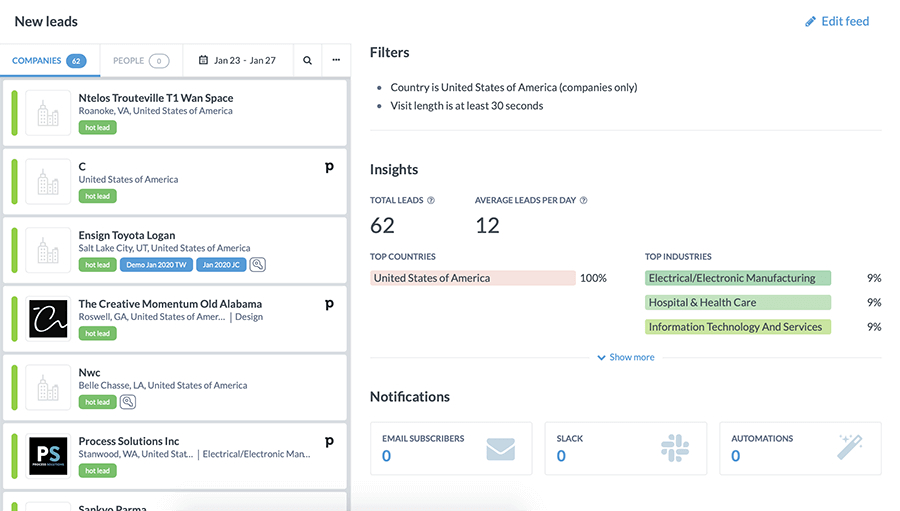
Custom, filtered feeds that make it seamless to find the best potential leads.
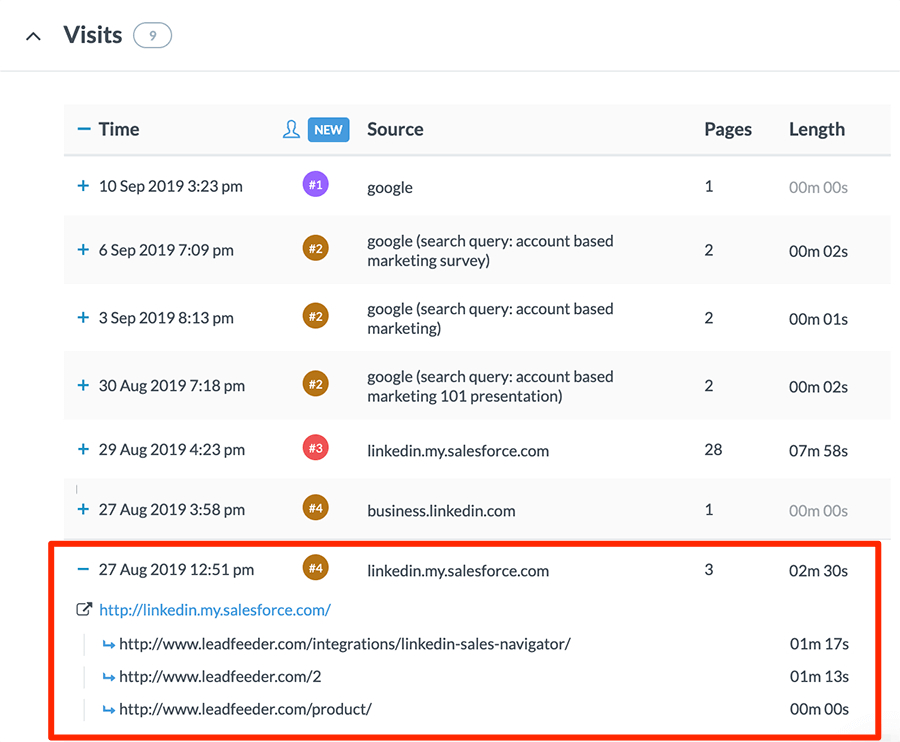
Behavioral data that enables you to learn more about potential interests and buying intent signals.
That means you’re building a B2B lead list that’s more likely to convert (in less time and at a lower cost) and gaining better, more complete information to help your sales reps get to a sale.
Note: Ready to build a better lead list for your B2B sales team? Sign up and try Leadfeeder free for 14 days to see the companies that visit your website, plus behavioral details like which pages they looked at.
How to Use Leadfeeder to Build Your B2B Lead List
It’s clear that using a website visitor identification tool to identify potential leads is a much better option than buying a B2B lead list. So let’s talk about how to use Leadfeeder to build your list of qualified leads.
Once the list is built from real intent rather than bought in, it pays to wire up a few automations that keep your funnel moving so nobody has to remember to follow up.
Once you’ve signed up for Leadfeeder and are logged into your account, there are 3 main steps to get your lead list ready to work for you and your team.
Step 1: Set Up a Custom Feed for Your Baseline Lead Qualifications
When you log in, your main Leadfeeder feed will show you the companies that have visited your website. But to build a B2B lead list, you probably want to get a little more targeted. To do that, you’ll build a Custom Feed.
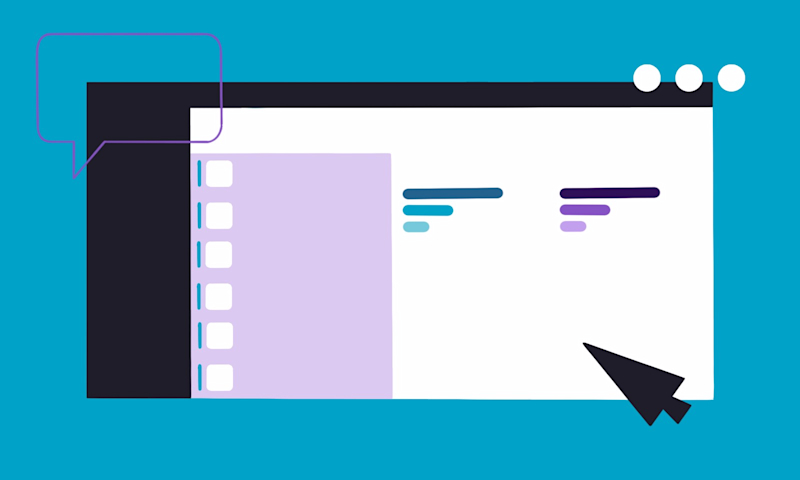
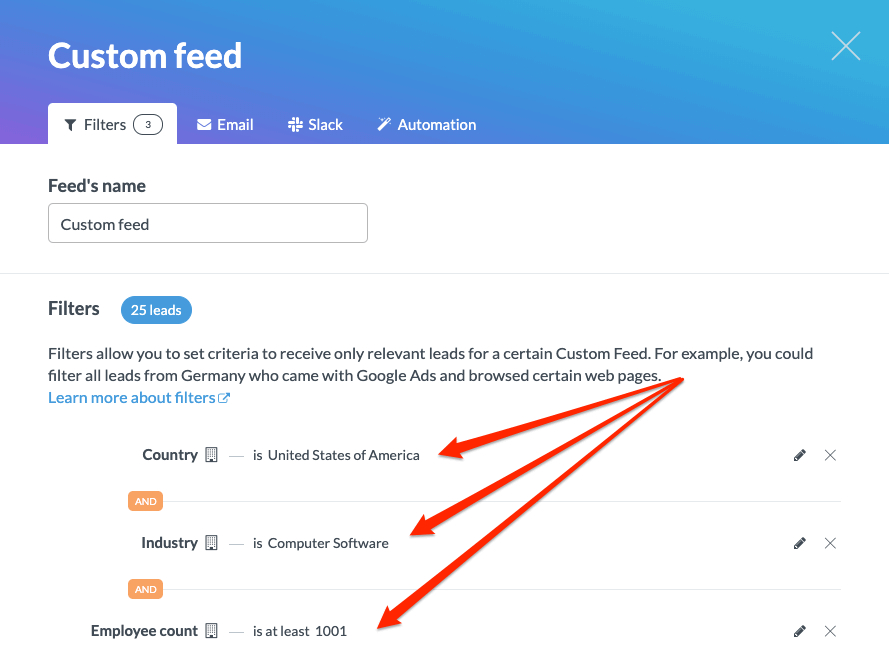
From your dashboard, click the blue ”+ Create a custom feed” button and give the new feed a name. Then, all you have to do is add any filters or qualifiers you need and then click “Save feed”.
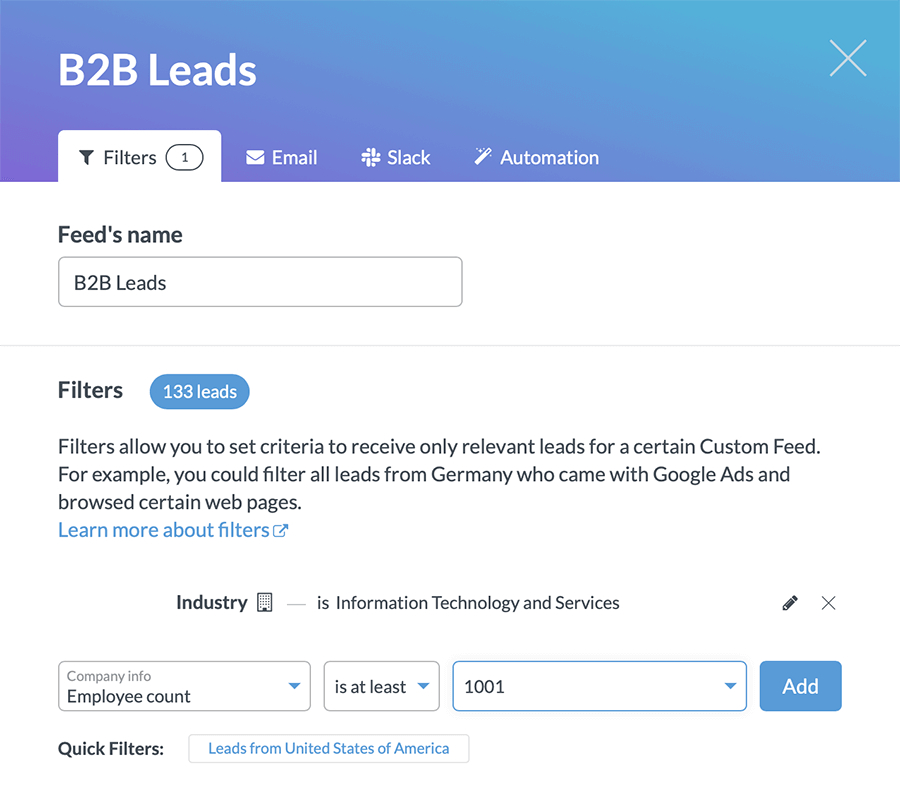
The filters can be any lead qualification criteria your team has set—industry, for example, or the number of employees (our tool has more than 30 filters to choose from).
Once your Custom Feed is running, you’ll have an up-to-date list of all the companies that visit your website and satisfy your lead criteria.
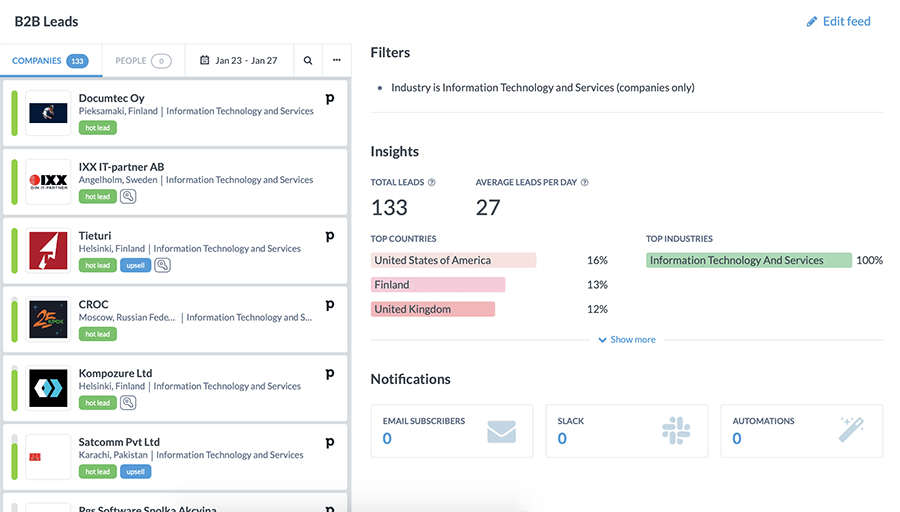
Click on any company in your B2B lead list to view more details.
Step 2: Set Up Automations and Notifications to Put Your B2B Lead List on Autopilot
In addition to viewing new leads from the Leadfeeder dashboard, you can also set up notifications and automations to put the whole thing on autopilot.
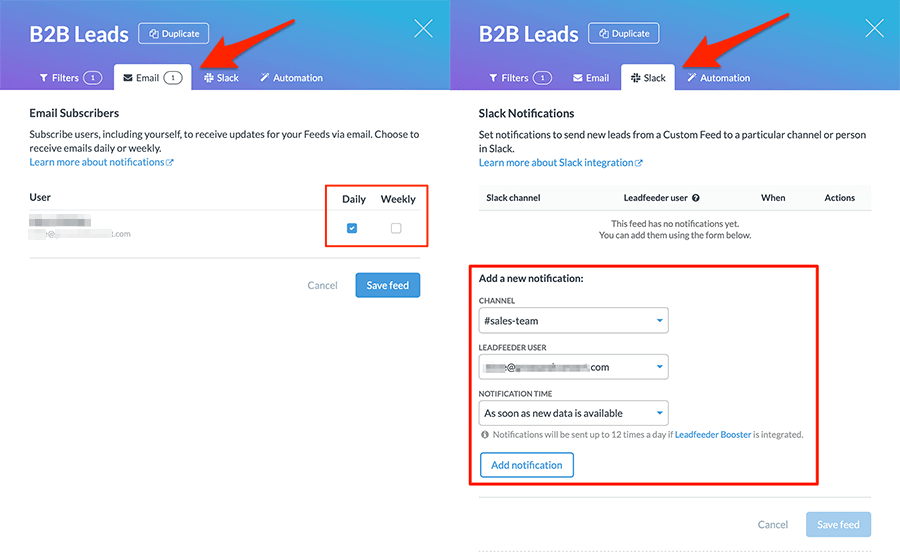
When creating or editing your feed, you can add sales reps to be notified via email or Slack and choose how often they should receive notifications (daily, weekly, or as soon as new leads come in).
Step 3: Integrate Your CRM Tool with Leadfeeder to Send New Leads to Your CRM
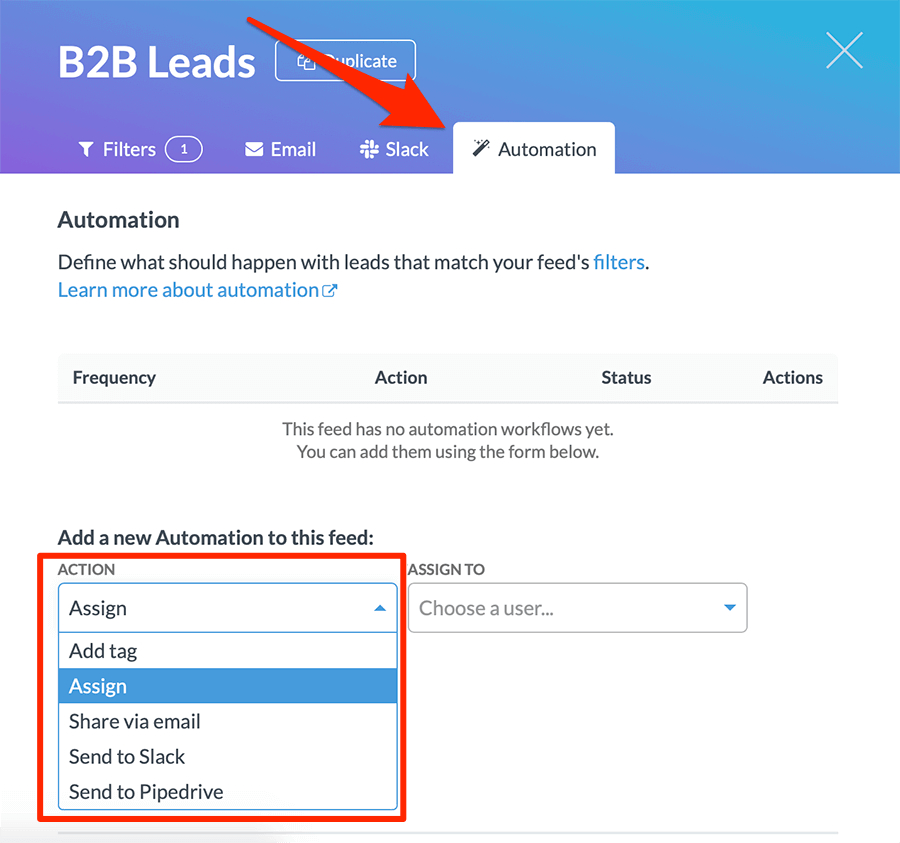
Finally, you can connect Leadfeeder to the CRM tool your team uses. Once you’ve set up the integration, you can set automations for your custom B2B lead list to automatically send new leads through to your CRM, tag leads, and/or assign new leads to a rep.
A Better B2B Lead List
When you’re in a pinch, buying a list of B2B leads can seem like a quick and easy solution. But at the end of the day, you’ll always find more success (and more sales) when you start with a B2B list that’s qualified and offers complete, accurate data. That’s how you give sales reps the best chance at turning leads into new customers.
Note: With Leadfeeder and our Custom Feeds, building that better lead list can still be quick and easy—and a whole lot more effective. Try Leadfeeder free for 14 days.