Yet many approaches to measuring lead quality are overly complicated or unfocused. Marketers often track too many metrics at once, which makes it harder to understand what is actually driving good or bad leads.
The real issue is that lead quality is often evaluated too late in the funnel. By the time a lead is scored or passed to sales, the underlying traffic problems have already happened.
To improve lead quality in a meaningful way, you need to start earlier at the traffic level. That means focusing on the right metrics and using tools like Leadfeeder to understand who is actually visiting your site and why.
This article breaks down the three most important lead quality metrics, explains why measurement alone is not enough, and outlines how to improve traffic quality to generate better leads overall.
Note: Want to improve the quality of your website traffic and the leads that it generates? Sign up and try Leadfeeder free for 14 days to get deeper insights on the companies that visit your website.
How to Measure Lead Quality (and Why Measuring, Alone, Isn’t Enough)
Let’s take a quick step back here. Before you can measure the quality of leads generated by marketing activities, you need to define what a “good lead” actually looks like. And there are a lot of ways to define a “lead”—from MQL to SQL and everything in between.
That said, the right way for your marketing team to create lead-quality benchmarks is to define what an MQL looks like in collaboration with the sales team. We’ve talked about this at length before, so we won’t belabor it here (but if you want more detail on how to define MQLs, you can find it here.)
Lead Quality Metrics to Track
Once you’ve defined what makes a quality lead and the stages of lead scoring, it all comes down to knowing which metrics you need to track to determine how effectively your marketing efforts are driving qualified leads. Despite what plenty of articles and metric round-ups may tell you, that doesn’t have to mean tracking 500 different metrics.
Instead, here are the 3 heavy hitters we recommend.
Visitors to leads: Of all the people who land on your website, how many become leads? This can be the same as your conversion rate, and it’ll give you a sense of how well your marketing activities are driving the right kind of traffic.
Leads to opportunities: For every lead your website generates, how many of them make it through further lead qualification to become sales-ready leads? This metric helps contextualize how well qualified your original leads are and ensures your definition of a “quality lead” holds up.
Time to conversion: Lead quality is about more than the likelihood of someone becoming a customer—it’s also about the time and effort it takes for a sales rep to move that lead through the sales cycle and make the conversion happen.
Why Measuring Leads, Alone, Isn’t Enough
It’s true that you can’t improve what you don’t measure, but measuring alone won’t spontaneously give you high-quality leads.
As we discussed above, one of the biggest reasons marketers struggle with low-quality leads is the low quality of their website traffic. The metrics we recommend can tell you whether your traffic is producing poor leads, but they can’t fix the problem on their own. Taking action to attract higher-quality traffic—at the expense of sheer lead volume, if necessary—is how you can boost lead quality.
And the key to improving traffic quality is understanding what’s wrong with it in the first place.
How Visitor Identification Helps You Diagnose and Improve Lead Quality Issues
Here at Leadfeeder, we’ve worked with tens of thousands of B2B marketers over the years. One of the things we’ve noticed is that, by and large, marketers really don’t know who’s winding up on their website. That’s, in part, because only about 2% of website visits become a lead, so that 2% is all that most marketers see.
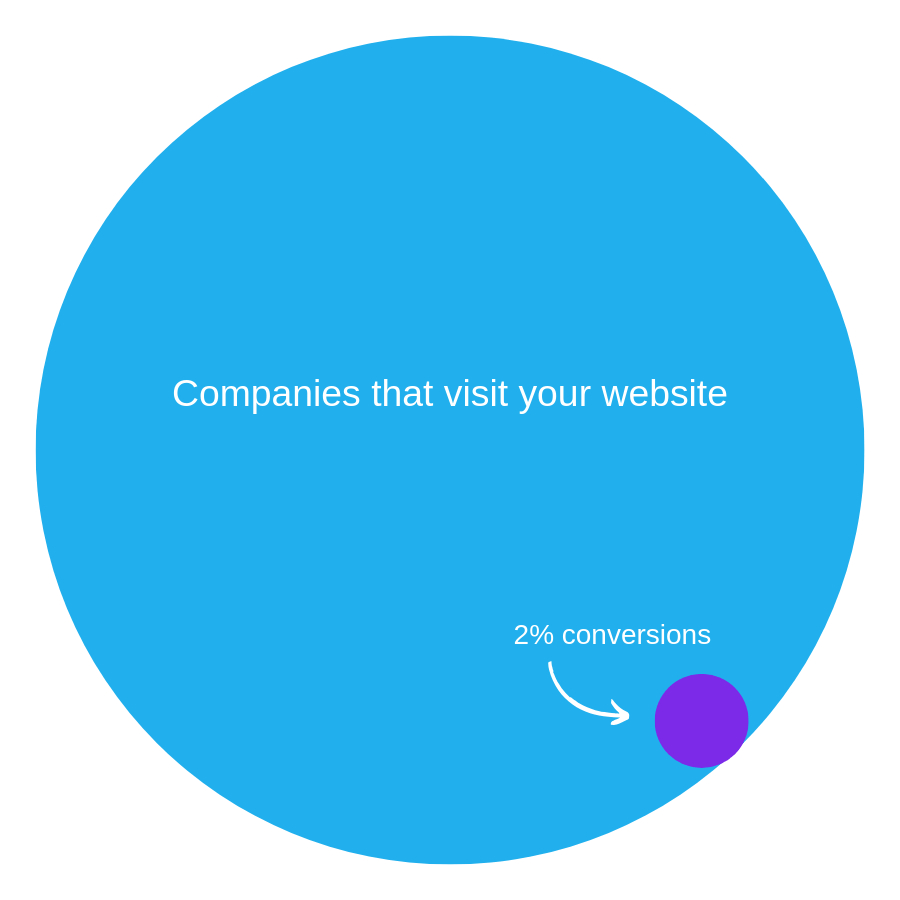
Simply put, understanding and capitalizing on the other 98% of website visits has to be a part of your sales and marketing strategy.
That’s why we built our visitor identification software to give B2B marketers more visibility and context around the other 98% of website visitors—the ones who don’t convert. That context helps marketers better gauge and improve lead quality among non-conversion visits by:
Offering account-level info on who’s visiting your website
Showcasing deeper company and behavioral data right inside the Leadfeeder app
Including campaign-level website activity data
Note: Want to unlock the other 98% of your website visits? Sign up and try Leadfeeder free for 14 days to see which companies are visiting your website, plus detailed company and behavioral data.
View Website Visits and Behavior at the Account Level
When you track website visits with a tool like Google Analytics, all you see is aggregated, anonymized data. While that might work for some companies, it doesn’t help B2B marketers figure out the quality of their web traffic.
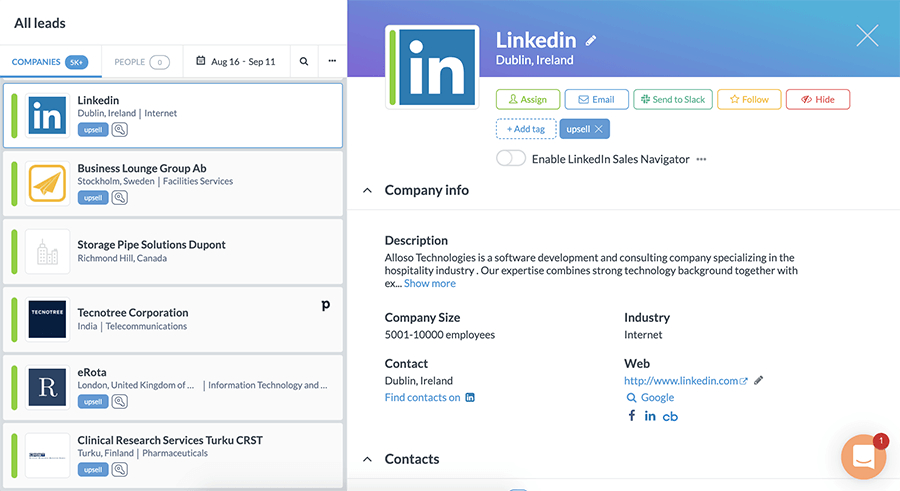
Your Leadfeeder feed shows all the companies that visit your website.
That’s why Leadfeeder identifies website visits and behavior at the account-level—giving you more visibility into the companies that visit your website. With an understanding of which companies your marketing efforts drive to your site (plus qualifying company details and filtered Custom Feeds), you can better gauge how qualified your website traffic is.
Get a Deeper Look at Who’s Visiting Your Website
Being able to view website visitor identification at the account level is a good start in measuring the quality of your traffic (particularly if you’re using account-based marketing), but the real value comes from gaining access to deeper, qualifying information on each of those companies. Do they actually fit your buyer personas? Are they an ideal customer?
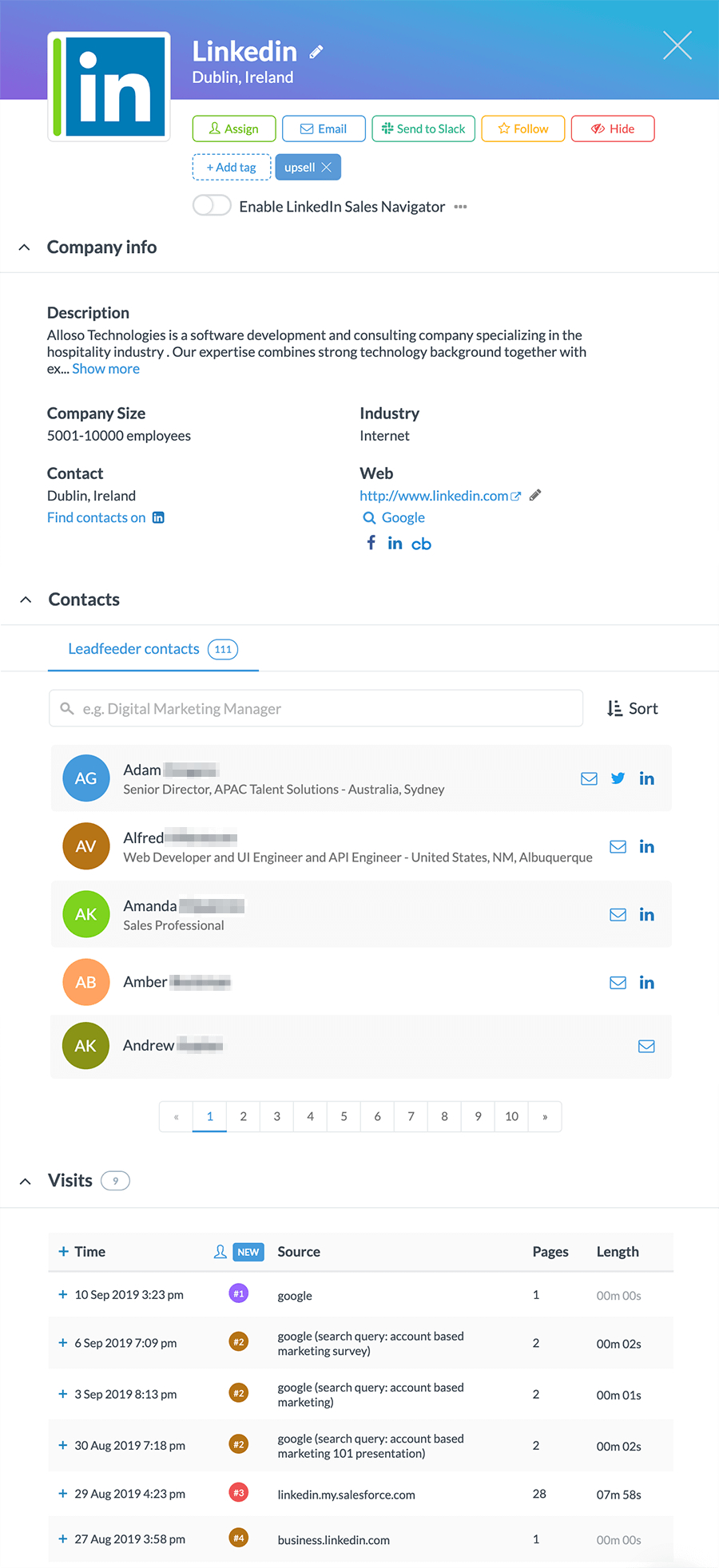
Each company listing in Leadfeeder includes a basic company description, along with details such as the number of employees, industry, location, and contact information. That means you can immediately judge whether a given company meets a certain level of lead quality and qualification.
Plus, with behavioral data on which pages they visit and how long they spend there, you can qualify further based on interest and need.
Understand Which Campaigns Drive Each Account to Your Website
Improving the quality of traffic to your website comes down to the marketing campaigns you use to drive visitors to your site. That means, in order to optimize traffic, you need visibility into the quality of leads and traffic from each of your marketing campaigns—from content marketing to email marketing to SEO.
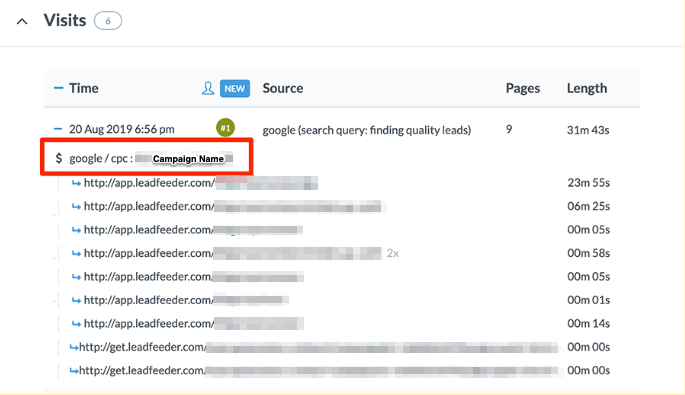
In this example, the company reached the site through a paid search campaign.

In this example, the company found its way to the site via a social media (Facebook) ad.
Our behavioral visit data identifies each website visit by the source, campaign, and keyword that led the company to your site. So you can find which campaigns and sources are driving the best-quality traffic and work to improve those that are sending decidedly lower-quality traffic.
Improve B2B Lead Quality with Visitor Identification
If you’re looking at a list of existing sales leads and lamenting the quality, it’s already too late. Ensuring your marketing team sends high-quality leads over to sales starts from the very first website visit—by boosting the quality of your website traffic.
A visitor identification tool like ours can help shed light on more of your web traffic, so you can more accurately measure and improve it.
Try Leadfeeder's visitor identification tool (for free!) for 14 days with these simple steps:
Step 1: Sign up for the free trial HERE.
Step 2: Install the Leadfeeder Tracker script on your website.
Step 3: Start seeing companies in your dashboard within minutes.
Step 4: And it's done!
Note: Want to improve the quality of your website traffic and the leads that it generates? Sign up and try Leadfeeder free for 14 days to get deeper insights on the companies that visit your website.