60-Second Summary
This guide outlines 15 actionable B2B website personalization examples—from homepage messaging and CTAs to email, sales collateral, and post-sale journeys—showing what to change, which data to use, and why it works. It stresses firmographic, behavioral, CRM, intent, and product-usage signals and recommends starting small, measuring impact, and respecting data quality and consent.
Key takeaways: Personalization across the funnel (homepage, hero, CTAs, navigation, ABM pages, email, portals) lifts engagement and pipeline when driven by reliable firmographic, behavioral, CRM and product-usage data—start with high-traffic, high-intent pages and tight segments and measure engagement, conversion, and pipeline influence.
Standout strategies & tactics: Industry- and size-based hero messaging, CTAs matched to buyer stage, navigation and search tuned by intent, inline content offers and behavior-driven resource recommendations, plus hyper-personalized ABM landing pages and account-specific sales collateral.
Real-world lessons & frameworks: Build modular content blocks, assign clear ownership across marketing/sales/ops, A/B test personalized vs standard experiences, and prioritize data hygiene and compliance to avoid irrelevant or intrusive experiences.
How to start & what to avoid: Start with one high-impact page and one segment, measure bounce/time/clicks/conversions/pipeline, avoid weak data and over-personalization, respect privacy, and use tools (e.g., Leadfeeder) to identify company-level visitors and enrich firmographic signals.
*This summary was created with AI assistance, using our original content.
This guide breaks down 15 B2B website personalization examples you can actually use. They cover website messaging, email, sales interactions, and post-sale journeys. Each one shows what to change, what data you need, and why it works.
B2B website personalization examples at a glance
Here’s a quick comparison of the best website personalization examples and where they work best.
1. Homepage messaging personalized by industry
Your homepage is one of the most impactful B2B website personalization examples available. It’s your chance to resonate with your visitors within seconds of them reaching your site. Industry-level messaging is one of the simplest ways to do that.
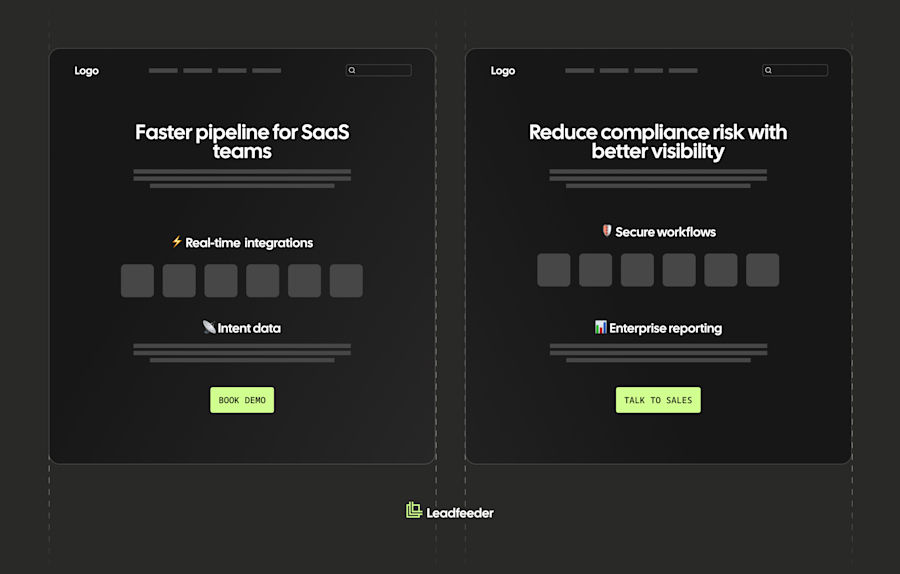
Use firmographic data to identify their industry, then adjust headlines and value props to align with real priorities. A SaaS company might show “Streamline your sales pipeline” to tech visitors, but “Reduce compliance risk” to financial services firms.
Straight away, you’re speaking directly to your visitor about a problem they’re facing, which increases engagement and makes them less likely to bounce.
Leadfeeder helps you achieve this by revealing the company and industry behind each website visit. That means you can tailor your messaging without waiting for a form fill.
2. Hero headlines tailored by company size or segment
The size of a visitor’s company shapes how they think and what they need. For example, SMBs are looking for something simple that delivers quick wins, while enterprise wants scalability and security.
Your hero headline should reflect that from the first line. This works best on homepage and campaign landing pages where clarity drives action.
Use firmographic data like company size or employee count to switch messaging by segment, such as:
“Get started in minutes” for SMB visitors
“Built for teams managing complex pipelines” for enterprise buyers
This works because it aligns with real buying priorities. Visitors recognize themselves in the message and move forward faster.
3. CTAs adapted to buyer stage
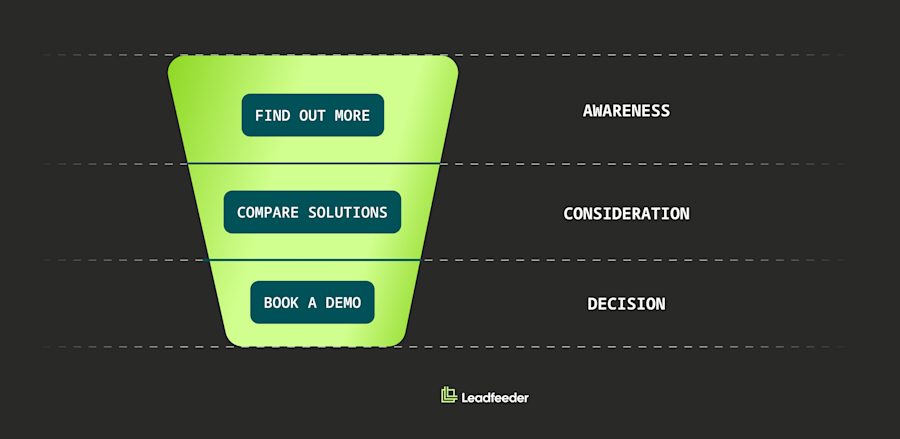
One size does not fit all, and one call to action does not fit every visitor. Match the CTA to where the buyer is in their journey. Look to use this tactic on your product, pricing, and high-intent content pages.
Use behavioral data, including visit frequency, pages viewed, and content consumed. Then adjust the CTA in real time:
First visit: “Find out more”
Repeat visits: “Compare solutions”
High intent: “Book a demo”
These CTAs remove friction. You meet the buyer where they are, instead of forcing a jump they’re not ready for. Visitors progress at their own pace, which lifts clicks and conversions.
4. Navigation personalization by intent or vertical
Navigation should guide visitors straight to what matters to them. It’s possible to alter menus and featured links based on likely priorities. Sites with a wide range of product lines would benefit most from this approach.
Use firmographic data or intent signals to reshape what appears first. Instead of showing a visitor from a healthcare company a generic menu, you could show them “Healthcare solutions” first. Focus on showing content that matches their intent early, and reducing the steps to those key pages.
When you reduce the effort required for visitors to reach the content they need, they stay engaged and move deeper into your site.
5. Industry-specific social proof and testimonials
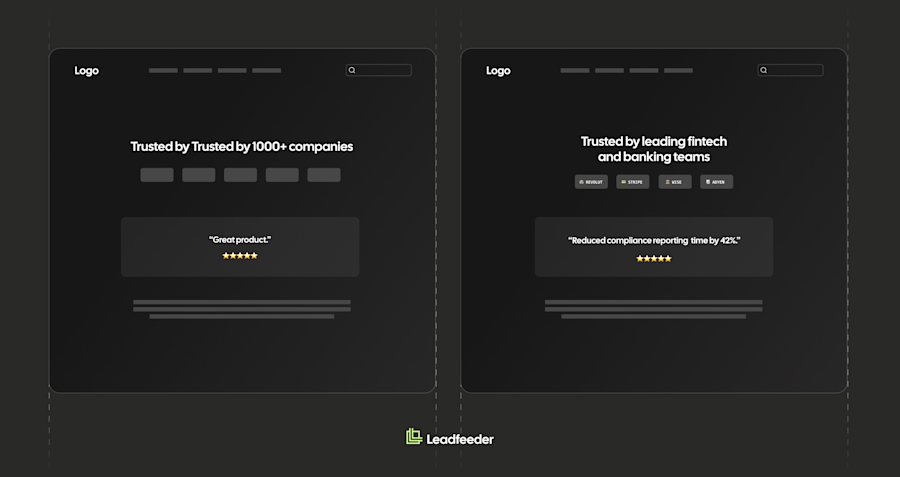
Generic proof messaging like “Trusted by 1000+ companies” lacks weight. Instead, show visitors evidence from companies like theirs. Boost that relevance across your homepage, product pages, and case study sections.
Use firmographic data to match logos, testimonials, and case studies to the visitor’s industry. A manufacturing visitor should see manufacturing brands and outcomes, not a random set of logos that mean nothing to them.
Make the social proof do the work:
Highlight industry-specific case studies with clear outcomes.
Use testimonials from companies they know.
Logos deliver fast impact
This builds trust fast. Visitors see relevance and credibility without needing to interpret it.
Of course, only use logos and testimonials where you have explicitly agreed to this use case with the relevant company.
6. Personalized imagery and visual cues
Visuals can reinforce relevance, but only if they reflect real context. Swap hero images or product screenshots based on the visitor’s industry or use case. This works well alongside tailored messaging, not on its own.
Use firmographic data to guide what you show. A logistics visitor might see workflow screenshots tied to supply chains rather than generic demo images.
However, it has to add value. Show real use cases, not abstract stock photos. Match the visuals to the problem you solve for that individual visitor. It won’t seal the deal on its own, but it will reinforce your message.
7. Content personalization examples: inline offers matched to page topic
Inline offers should match what the visitor is already reading. Embed guides, templates, or reports inside your content, such as blog posts and resource pages.
Use behavioral data from the current page to decide what to show. A visitor reading about pipeline management should see an inline offer for a pipeline template. Don’t use a generic newsletter sign-up pop-up; nobody likes those.
Make it work:
Align the offer with the exact topic on the page.
Position it at natural break points in the content.
Keep the next step clear and low effort.
You’ll find it lifts downloads and keeps visitors engaged longer.
8. Resource recommendations based on behavior
Keep your visitor on your site and away from your competition. Recommend content based on what the visitor has already done. This will make the most impact on blogs, resource hubs, and product pages.
Utilize behavioral data, such as visit history and content consumption patterns. Then suggest their next action. A visitor who reads multiple articles on a topic might see a “based on what you have read” blog post, related case study, or webinar invite.
These simple actions keep visitors moving through your funnel instead of dropping off.
9. Account-based landing pages for target accounts
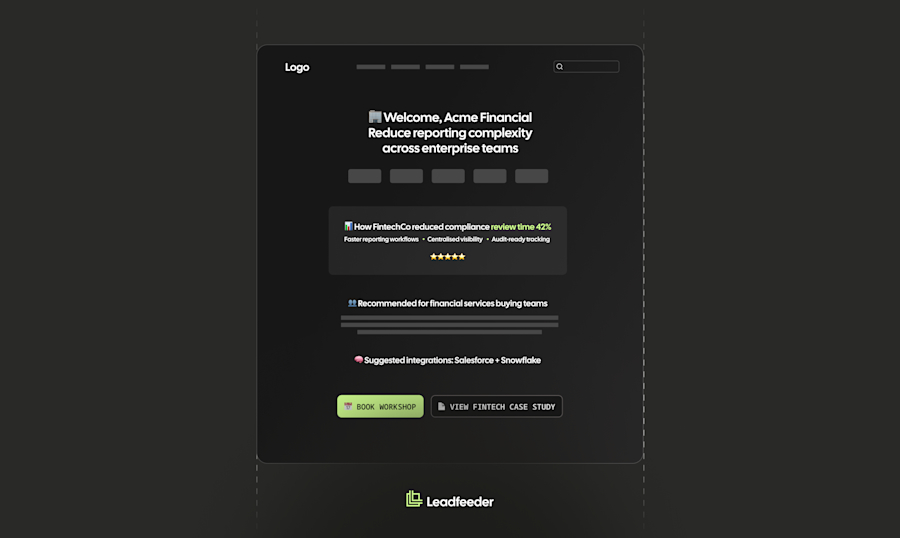
These B2B personalization examples become hyper personalization examples when you move beyond pages and into account-level targeting. Teams running ABM should create company-specific landing pages that tailor messaging, proof, and offers to that account’s context. For Tier 1 targets where the deal value justifies the effort, this should be a non-negotiable.
Use firmographic and intent data with CRM context. An example would be a logistics target seeing its challenges highlighted with relevant case studies, along with a CTA for a tailored consultation.
Get super-specific:
Refer to known priorities or pain points.
Use proof from similar accounts or use cases.
Set a CTA with a clear next step.
Leadfeeder helps identify which target accounts are visiting and what they view, so you can trigger the right page at the right time.
10. Email personalization using firmographic and behavioral data
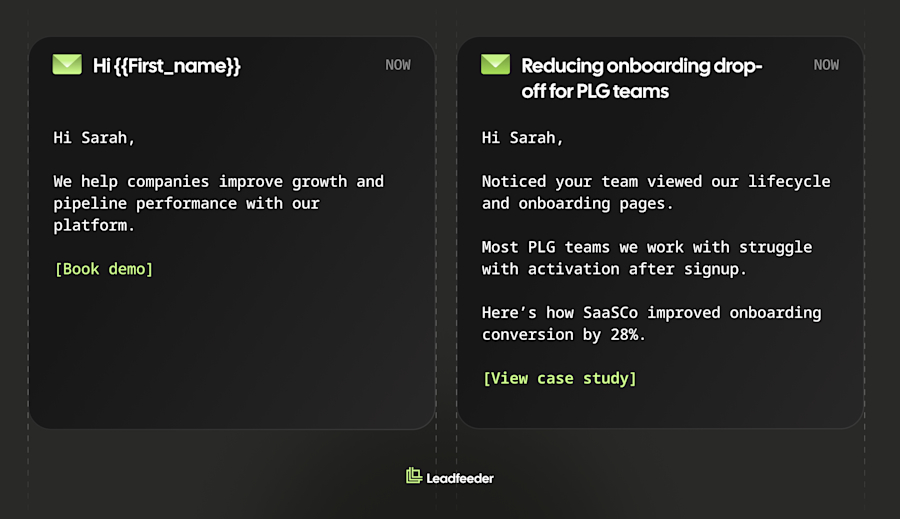
So far, we’ve only talked about website personalization, but there are opportunities to personalize in every communication you make with your prospects.
If you utilize email marketing, every email should reflect who the buyer is and what they have done. Go beyond first names. Tailor by role, industry, buying stage, and prior engagement. Use this technique across your nurture, follow-up, and outbound sequences.
Use firmographic, behavioral, and CRM data together. A mid-market demand gen Manager who downloads an ABM guide should get a relevant case study next, not a generic pitch. This is where personalization marketing examples start to show real impact. You’ll see the difference in your open and click rates.
Focus on:
Matching content to recent actions
Aligning messaging with role and priorities
Moving the buyer to a clear next step
Leadfeeder captures firmographic data for your website visitors, which feeds your email segmentation, so you can personalize nurture tracks without relying solely on forms.
11. Sales collateral personalized for account needs
Make sure your sales materials reflect the people you’re pitching to. Generic presentations will not get the results you want. Tailor decks, one-pagers, and proposals to the prospect’s industry, size, and challenges.
Use CRM and firmographic data to guide what you include. A strong deck opens with the prospect’s key challenges and backs it up with matching customer stories.
Make it specific:
Lead with the account’s industry.
Use customer stories from similar companies.
Align outcomes to their priorities and pain points.
This is where strong alignment between sales and marketing teams is valuable. Marketing creates the templates, and sales adapts them to the target client.
12. Product or solution recommendations in portals
Customer portals should guide the user’s next best action. Recommend products or features based on profile, usage, or purchase history. This gets results for platforms with multiple products or self-serve journeys.
Use product usage data and CRM context to decide what to show. A customer might see an underused feature highlighted or a complementary product surfaced based on current activity.
This drives expansion by making relevant opportunities visible at the right moment.
13. Search and discovery personalization
Your on-site search should return the most relevant results for each visitor. Personalize results and suggested pages based on behavior and firmographic context. For sites with large content libraries or complex product ranges, it’s a great way to drive engagement.
Use browsing history and industry data to prioritize what appears first. A visitor from a specific sector should see content that matches their use case, not a generic list. This reduces time-to-value and helps visitors find what they need easily, even if it takes some effort to implement.
14. Geo-based content, contacts, and events
Localize your approach by showing local contacts, regional events, and country-specific messaging based on IP or firmographic location on your homepage, pricing, and contact pages.
For example, a visitor in Germany might see EUR pricing, a Frankfurt event, and the DACH sales team. It’s not hard to do, but it can make a noticeable impact, building trust and reducing friction. It also supports localization and compliance, such as showing region-specific consent language.
15. Customer lifecycle personalization for onboarding, upsell, and retention
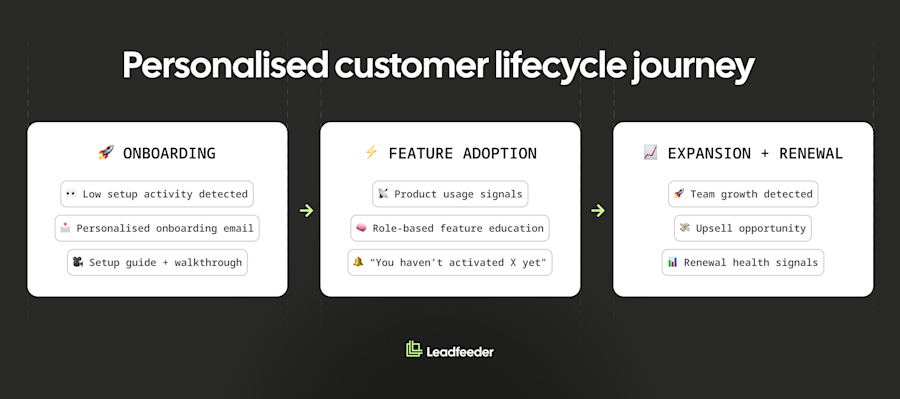
Personalization isn’t just for helping you win the deal. It can still deliver impact after the deal closes. Valuable retention and expansion revenue depends on relevant, timely communication.
Use personalization to guide onboarding, drive feature adoption, and unlock expansion opportunities. Ensure your product experiences, emails, and customer portals contain as much personalized content as possible.
Use CRM and product usage data to trigger relevant actions. For example, a customer who has not activated a key feature could receive a prompt with a short setup guide and video.
Here are some touchpoints to consider:
Onboarding prompts based on early usage gaps.
Feature education tied to behavior.
Renewals and expansion opportunities based on the customer’s growth signals.
How to get started (and what to avoid)
Now you have seen plenty of examples of web personalization that increase conversions, here’s how to get started.
Start small
Choose one high-traffic, high-intent page (e.g., home, pricing, or demo) and one audience segment.
Next, create modular content blocks you can swap by segment. This could include copy, CTAs, social proof, and visuals. Keep ownership clear across marketing, sales, and ops, because personalization often fails when the data is inconsistent or outdated.
Measure what matters
Measure impact from the start. Track:
Engagement: bounce rate, time on page, click-through on personalized elements
Conversion: form fills, demo requests, downloads, meetings booked
Pipeline: qualified accounts, opportunities created, pipeline influenced
Set a baseline, then A/B test personalized against standard experiences where possible.
Mistakes to avoid
Weak data: Poor data quality leads to irrelevant experiences and lost trust.
Personalizing too early: Build trust first to avoid coming across as intrusive.
Going overboard: Too many variants create complexity and slow execution. Keep segments tight and manageable.
Ignoring compliance: Respect privacy and compliance as well as any applicable data protection and e-Privacy legislation. Be clear on consent and data use.
Strong personalization depends on clean go-to-market data. Tools like Leadfeeder make the difference by identifying company-level visitors and enriching firmographic data, so you can tailor your prospects’ experiences without relying on form fills or guesswork.
Conclusion
B2B website personalization works when it is relevant, data-backed, and tied to clear outcomes. Start with one or two examples from this list that are relevant to how you sell. Measure engagement, conversion, and pipeline, then build on what works.
Better personalization starts with knowing who is on your site. Leadfeeder delivers the visitor identification and firmographic data that makes that possible, giving you the foundation to personalize with confidence.