60-Second Summary
This guide compares 10 IT decision‑maker email list providers across accuracy, regional depth, compliance, and real‑world performance. Use it to choose providers that match your geography, validate samples, and run campaigns without damaging sender reputation or violating privacy rules.
Key takeaways: Prioritize provider fit over raw database size, validate 50–100 sample contacts before committing, and match pricing models (credits, seats, pay‑per‑contact) to your outbound motion.
Standout strategies & tactics: Run sample exports for ICP validation, verify addresses with a third‑party service, warm up a dedicated subdomain, ramp sends slowly, and enrich lists with firmographic and technographic data for personalization.
Real‑world lessons & frameworks: Use role‑based messaging (CIO/CTO/CISO/IT Manager), multi‑touch cadences (email, phone, LinkedIn), and measure meeting rates and pipeline contribution by provider rather than contact counts.
Quick vendor‑selection checklist: Request DPA and sourcing documentation, ask for re‑verification cadence and expected bounce rates, confirm CRM integrations, and require a recent ICP‑matching sample export before signing.
*This summary was created with AI assistance, using our original content.
This comparison evaluates 10 IT decision makers mailing list providers on verified accuracy rates, regional coverage depth, compliance documentation, and real-world performance indicators. Use this guide to select providers matching your target geography, validate quality with sample tests, and implement lists without compromising sender reputation or compliance posture. Beyond provider reviews, you'll also find practical guidance on validating samples, protecting sender reputation during campaigns, and navigating GDPR and CAN-SPAM requirements.
How To Choose the Right IT Decision Makers Email List Provider
Picking the wrong provider wastes budget on bad data and puts your domain reputation at risk. The right choice depends on where you sell, who you're targeting, and how your revenue team operates day-to-day.
Start with your ICP and go-to-market motion
Your ideal provider should match your geographic focus and sales strategy, not just promise the biggest database. Use this checklist to clarify your requirements before evaluating vendors:
Target regions: Are you focused on EU markets, US enterprise, or global coverage? Providers vary dramatically in regional strength.
Target titles: Define exactly which IT roles you need. CIO and CTO contacts require different sourcing methods than IT Manager or Security Director lists.
Target firmographics: Specify employee count ranges, revenue bands, and industry verticals. Vague targeting leads to vague results.
Target technographics: If you sell to companies using specific cloud providers, security stacks, or development tools, confirm the provider can filter by installed technology.
Motion type: Outbound SDR teams need different workflows than ABM managers running account-based plays or agencies managing multiple client campaigns.
Key evaluation criteria
Compare providers on these five dimensions, and ask specific questions to verify their claims during demos.
Data quality and verification: Request expected bounce rate ranges for your target segment, typical sample sizes for testing, and how often they refresh their IT decision makers database.
Coverage and depth: Ask for a breakdown showing how many IT directors, VPs, and C-level contacts they have in your top three target verticals and regions.
Compliance and data ethics: Request their DPA template, explanation of lawful basis for each geographic market, and suppression list handling process.
Integrations: Confirm native support for your CRM, marketing automation platform, and sales engagement tools.
Pricing and contracts: Clarify whether they charge per seat, per credit, or flat file fee.
Questions to ask on a demo or sales call
These questions separate real providers from resellers and help you spot red flags early:
Can you provide a recent sample export matching my ICP for verification testing before I commit?
What percentage of your IT decision makers list records include job function, seniority level, and accurate location data?
What's your policy for inaccurate records? Do you offer credits back, replacements, or refunds?
How do you source your IT email list data, and can you document the lawful basis for processing in EU markets?
What's your average list decay rate, and how frequently do you re-verify contacts?
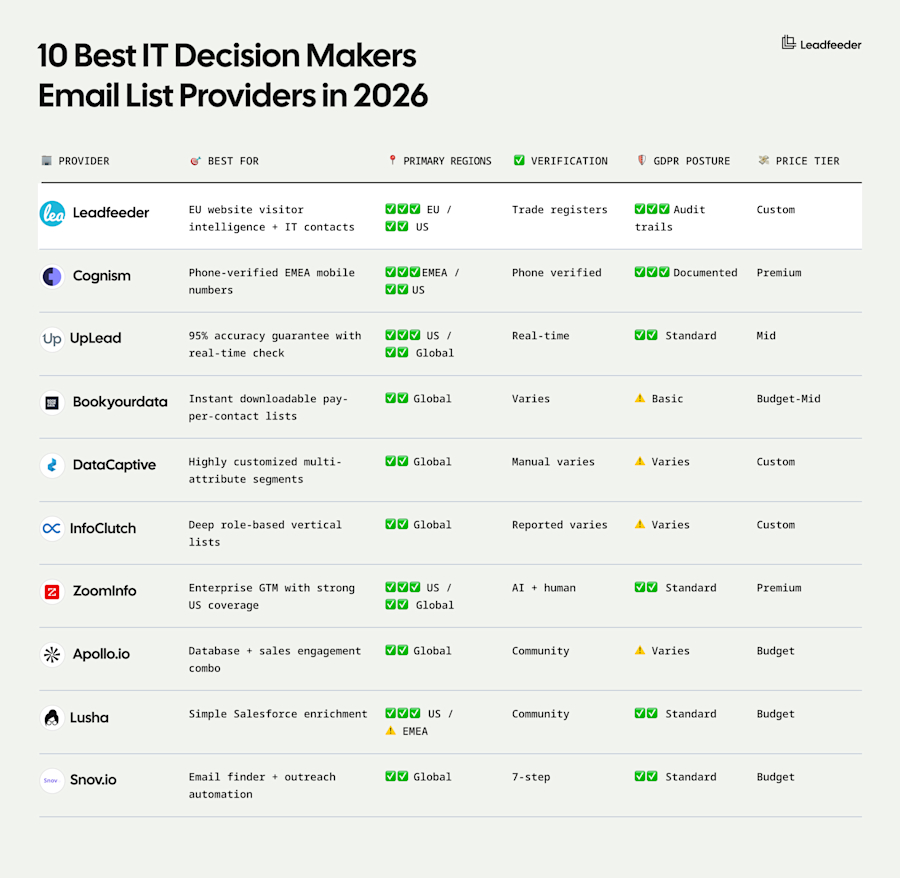
Comparisons At a Glance
Legend: ✓✓✓ Strong coverage / ✓✓ Moderate coverage / ⚠️ Limited | Price tiers: Budget <$50/user, Mid $50-150, Premium >$150 or custom enterprise
10 Best IT Decision Makers Email List Providers in 2026
The following providers represent the most reliable options for building targeted IT contact lists in 2026, ranked by regional strength, verification standards, and workflow integration capabilities. Each provider has been evaluated on data accuracy, compliance posture, and fit for specific go-to-market motions.
1. Leadfeeder: Best for GDPR-first IT decision-maker data in Europe
Leadfeeder combines website visitor identification with European B2B intelligence to help teams identify which companies are visiting your website, then enriches those accounts with IT decision-maker contacts across European markets.
Best for: European-focused B2B teams needing GDPR-compliant website visitor tracking plus contact data for IT executives in Germany, Austria, Switzerland, and the wider EU region.
Pros
✅ Real-time website visitor identification reveals which companies browse your site, with IP-to-company resolution that surfaces firmographic details, page-level intent signals, and ICP filtering to prioritize high-fit IT accounts showing buying behavior
✅ EU-native data infrastructure with GDPR-first compliance built into core operations, including transparent sourcing from official trade registers, audit trails, in-region storage, and multilingual accuracy across German, French, and Nordic markets
✅ Leadfeeder enriches visitor accounts with IT decision maker contacts filtered by job title (CIO, CTO, IT Director, Head of Architecture), company size, technology stack, and firmographics, then syncs to Salesforce, HubSpot, Pipedrive, and other CRMs
Cons
❌ Database of 60 million-plus companies and 400 million-plus contacts skews heavily European
Who should avoid this: Teams targeting primarily EMEA or APAC, or those needing built-in sales engagement sequences without third-party integrations.
Pricing
Contact sales for a custom quote
2. Cognism: Best all-round B2B intelligence for IT decision makers
Cognism is a B2B sales intelligence platform providing verified email addresses, firmographic and technographic data, and intent signals for VP-level and above IT decision makers.
Best for: Mid-market and enterprise teams targeting European IT executives who need verified email lists with rich context data.
Pros
✅ Continuously refreshed and enriched decision-maker database with GDPR-compliant sourcing
✅ AI-powered Sales Companion delivers recommended contact suggestions and intelligent signals
Cons
❌ No native email sequencing or campaign automation
❌ Seat-based pricing model can become expensive for larger teams
Who should avoid this: Teams focused exclusively on North American markets or those needing built-in email sequencing without additional tools.
Pricing
Offers two plans but no public pricing
3. UpLead: Best for SMBs needing on-demand, verified IT contacts
UpLead is a B2B contact database providing real-time email verification with a credit-based model designed for self-serve list building.
Best for: Small to mid-market teams who need verified IT decision maker emails on demand, and want flexible pay-per-contact pricing without annual enterprise contracts.
Pros
✅ Real-time email verification validates every contact before export
✅ Over 50 search filters including technographics and intent data help build targeted IT contact lists
Cons
❌ No native email sequencing or outreach automation tools
❌ Smaller database and variable coverage compared to enterprise platforms
Who should avoid this: Enterprise teams needing deep European coverage or those preferring unlimited seat-based models over credit consumption.
Pricing
Free: (5 credits)
Essentials: $99/mo (170 credits)
Plus: $199/mo (400 credits)
Professional: Custom
4. BookYourData: Best for instant, downloadable IT email lists
BookYourData provides pre-built and custom IT decision-maker email lists as instant CSV or Excel downloads with real-time email verification.
Best for: Teams needing one-off IT contact lists for immediate campaign launches, offline enrichment projects, or niche geographic targeting.
Pros
✅ Instant download with built-in real-time email verification ensures every exported contact is validated before delivery
✅ Pay-as-you-go pricing with credits that never expire eliminates subscription pressure and recurring fees
Cons
❌ Static lists decay immediately after download with no automatic refresh mechanism
❌ Requires separate email platforms and manual upload processes to execute multi-touch campaigns
Who should avoid this: Teams running continuous outbound motions on reputation-sensitive domains or organizations needing dynamic list updates.
Pricing
10 credits: Free
250 credits: $99
1,000 credits: $299
2.5M credits: $24,999
5. DataCaptive: Best for highly customized, multi-attribute IT segmentation
DataCaptive provides custom-built IT decision-maker contact lists with over 70 data selections and dual verification processes, delivered as ready-to-use CSV files.
Best for: Account-based marketing campaigns requiring hyper-segmented IT lists with multi-attribute filtering by job title, technology stack, firmographics, and precise geographic targeting.
Pros
✅ Exceptional customization depth with 70+ data selections and 40+ attribute options
✅ Dual verification process with human and AI validation
Cons
❌ No self-serve platform or instant download capability
❌ Static CSV delivery with no dynamic refresh or platform-based updates
Who should avoid this: Teams needing instant access or self-serve platforms, or those running continuous outbound programs requiring dynamic list updates.
Pricing
Essentials: Custom (5,000 credits)
Plus: Custom (12,000 credits)
Professional: Custom (30,000 credits)
6. InfoClutch: Best for deep role-based IT lists across verticals
InfoClutch provides custom-built IT decision maker email databases with over 70 data selection options and deep role-based segmentation across 2 million IT executives globally.
Best for: Teams needing deeply segmented IT contact lists by specific role responsibilities, technology stack users, and industry verticals requiring custom-built lists with extensive attribute filtering.
Pros
✅ Exceptional role depth with granular segmentation by IT specialization and filtering across technology platforms, NAICS/SIC codes, and vertical-specific attributes
✅ Uses comprehensive filters to build precisely targeted lists
Cons
❌ Custom build process requires quote requests and coordination calls
❌ Delivers in static file formats (CSV, XLS, TXT) without platform-based refresh
Who should avoid this: Teams needing instant list access or those preferring self-serve platforms over custom procurement processes.
Pricing
No public pricing
7. ZoomInfo: Best enterprise-grade GTM platform with strong US IT coverage
ZoomInfo is an enterprise go-to-market intelligence platform combining a database of 500 million verified contacts with firmographic, technographic, and AI-powered buyer intent signals across 12,000 topics.
Best for: Enterprise revenue teams needing a US IT decision makers mailing database with integrated intent monitoring, organizational charts, and workflow automation for scaled North American outbound programs.
Pros
✅ Comprehensive GTM platform combining contact data with organizational charts, technographic insights, and over 1 billion monthly buyer intent signals
✅ Native integrations with Salesforce, HubSpot, Marketo, and sales engagement tools
Cons
❌ European IT coverage requires additional Data Passport add-on
❌ Multiple modules and add-ons create pricing complexity
Who should avoid this: Small teams with limited budgets or those primarily targeting European IT decision makers.
Pricing
Offers multiple plans but no public pricing
8. Apollo.io: Best blended data and sales engagement for IT outbound
Apollo.io uniquely combines a B2B contact database of 275+ million verified profiles with built-in email sequencing and multi-channel outreach automation.
Best for: SMB to mid-market teams needing IT decision maker emails plus integrated outreach automation in one platform.
Pros
✅ Unified workflow eliminates tool-switching by merging contact discovery with email sequences, task automation, and dialer
✅ Offers firmographic and technographic filtering
Cons
❌ Data accuracy and freshness vary by segment
❌ Community-sourced data model means compliance and sourcing documentation may be less accurate
Who should avoid this: Teams requiring premium data verification standards or those needing extensive GDPR documentation for European IT outreach.
Pricing
Free: 900 credits/year
Basic: $49/user/mo
Professional: $79/user/mo
Organization: $119/user/mo
9. Lusha: Best for simple ICP-based IT lists with Salesforce enrichment
Lusha streamlines IT contact discovery through a Chrome extension that reveals verified emails and phone numbers directly on LinkedIn profiles and company websites.
Best for: Sales teams using Salesforce who want fast, browser-based IT contact enrichment without complex setup or switching between prospecting and CRM tools.
Pros
✅ Chrome extension delivers instant prospecting by surfacing contact data on LinkedIn, Sales Navigator, and company sites
✅ Automated Salesforce enrichment and CSV bulk processing fill missing fields
Cons
❌ Coverage and accuracy drop significantly outside North America
❌ Phone number completeness varies and advanced features require custom Scale plan pricing
Who should avoid this: Teams targeting primarily European or APAC IT decision makers, or those needing advanced segmentation out of the box.
Pricing
Free: 40 credits/mo
Starter: $49.90/mo (400 credits)
Pro: $69.90/mo (600 credits)
Premium: $399.90 (3,400 credits)
Scale: Custom
10. Snov.io: Best for combining email finding with outreach automation
Snov.io merges email discovery with cold outreach automation, providing bulk email finder, real-time verification, AI sequence generation, and mailbox warm-up in one affordable platform.
Best for: Small teams sending fewer than 3,000 emails monthly who need basic email finding and outreach automation.
Pros
✅ Domain search and Chrome extension uncover IT decision maker emails from LinkedIn and company websites
✅ Unlimited email campaigns with AI-generated sequences, mailbox rotation, and free native CRM
Cons
❌ Restrictive credit pool covers finding, verification, and enrichment with no rollover
❌ Database lacks phone numbers, firmographics, technographics, and intent signals, with no enterprise governance features
Who should avoid this: Teams needing comprehensive IT contact databases with phone numbers, advanced enrichment data, or enterprise-grade compliance and governance tools.
Pricing
Starter: $39/mo (1,000 credits)
Pro: $99/mo (5,000 credits)
Custom Ultra: Custom
How To Use an IT Decision Makers Email List Without Burning Your Domain
Even the cleanest IT decision makers database won't deliver results if you skip technical setup, verification, and strategic campaign design. Here's how to protect your sender reputation while maximizing performance.
Warm-up and infrastructure
Your technical foundation determines whether emails reach inboxes. Set up these essentials before your first send:
SPF, DKIM, and DMARC records: Configure all three authentication protocols to prove you're a legitimate sender
Dedicated outbound domain: Use a subdomain for cold outbound to protect your primary domain reputation
Gradual ramp-up: Start with 50 to 100 emails per day and increase slowly over two to four weeks
Daily monitoring: Track bounce rates, spam complaints, and inbox placement during ramp-up
IT decision makers email database cleaning and enrichment
Never send to a new IT email database without verification first.
Always verify before first send. Use a third-party email verification service to remove invalid addresses, catch-alls, and spam traps. Remove risky addresses by stripping out role-based emails and suspicious patterns.
Plus, enrich for personalization. Add firmographics, technographics, and LinkedIn URLs to enable relevant outreach.
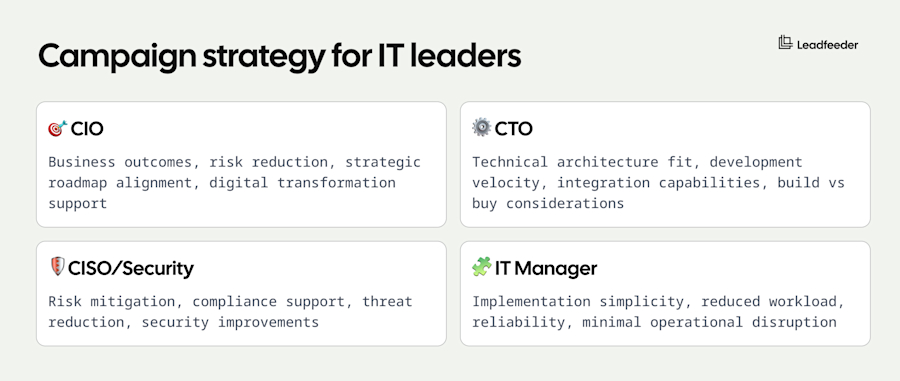
Campaign strategy for IT leaders
IT decision makers respond to different value propositions based on their role. Tailor your messaging using this framework.
Use a multi-touch approach combining email, phone, and LinkedIn outreach. A typical five-touch cadence over two weeks (email, phone, LinkedIn, email, phone) performs better than single-touch campaigns.
Compliance and Privacy: Safely Emailing IT Decision Makers
Using an IT executives email database without understanding compliance requirements puts your company at legal and reputational risk. Here's what you need to know to stay on the right side of regulations.
Understanding the legal landscape
Different regions have different rules for B2B cold outreach. GDPR applies across the EU and UK, requiring lawful basis for processing contact data. CCPA and CPRA govern California contacts with specific disclosure requirements. CAN-SPAM covers US email regulations, mandating identification and opt-out mechanisms. PECR adds restrictions in the UK for electronic marketing.
The lawful basis you rely on matters. Legitimate interest works in some EU jurisdictions for B2B outreach, but consent may be required in others. This isn't legal advice. Work with your legal counsel to determine the right compliance approach for your target markets.
Best practices to stay compliant
Here’s a practical checklist for compliant outreach:
Identify yourself and your company clearly
Provide an easy opt-out
Keep outreach relevant to the recipient's role
Maintain suppression lists
Store and document data sources
Working with IT decision makers mailing list providers
Request these documents from any IT decision makers mailing list provider before signing:
DPA and subprocessor list: Confirm they'll sign a Data Processing Agreement
Sourcing documentation: Ask how they collect data and their refresh cadence
Data subject rights process: Understand procedures for access, correction, and deletion requests
Legitimate interest documentation: Request assessment templates for EU outreach if applicable
Final Thoughts
Choose provider fit over database size claims. A smaller IT executives email database with 90% accuracy in your target market outperforms global coverage with weak regional performance.
Key takeaways:
Validate before committing: Test 50-100 sample contacts matching your ICP before signing annual contracts or large purchases.
Prioritize compliance for EU outreach: Verify your IT decision makers mailing list provider documents sourcing, maintains audit trails, and offers Data Processing Agreements to avoid GDPR violations.
Match pricing to your motion: Credit-based models suit occasional campaigns, seat-based pricing fits continuous prospecting, pay-per-contact works for one-off needs.
Build infrastructure first: Configure SPF, DKIM, and DMARC, warm up sending domains, and implement verification workflows before scaling volume.
Measure business outcomes: Track meeting rates and pipeline contribution by provider, not database size or feature counts.
Here are some quick recommendations by scenario.
EU SaaS scale-up: Start with Leadfeeder for GDPR-first website visitor identification plus verified IT contacts in DACH and Nordic markets. Add Cognism for phone-verified mobile numbers or Apollo.io when expanding to North America.
US SMB team: Self-serve tools like UpLead ($99/month) or Apollo.io ($49/user/month) provide sufficient IT email list coverage for early-stage prospecting. Upgrade to ZoomInfo only when targeting Fortune 500 IT executives.
Global enterprise: Implement multi-provider strategy with regional specialists (Leadfeeder for EU, ZoomInfo for US) rather than forcing one global vendor. Enterprise platforms deliver the compliance documentation and audit trails that legal teams require.
FAQs
What fields should a good IT contact record include?
A quality email list of IT decision makers should include verified work email, direct phone number, full name, exact job title, company name, company size, industry, and geographic location. Advanced providers add technographic data (cloud platform, security tools, CRM system), firmographic details (revenue, employee count, funding status), LinkedIn URLs, and job change indicators to enable precise targeting and personalization.
Can I use an IT decision makers email list for cold emailing legally?
Yes, but compliance requirements vary by region and you must follow GDPR in Europe, CAN-SPAM in the US, and CASL in Canada when using an IT executives email list for cold outreach. Always verify your IT email list provider documents their data sourcing and offers Data Processing Agreements before running campaigns in regulated markets.
How often should I update my IT email database?
IT decision makers change jobs frequently, meaning you should refresh your IT decision makers database at minimum quarterly and ideally monthly for active campaigns. Static downloaded lists decay immediately after export, while platform-based providers like ZoomInfo and Cognism offer real-time enrichment to catch job changes automatically.
What's the best IT decision makers email list for targeting European companies?
Leadfeeder leads for GDPR-first European IT outreach by identifying which companies visit your website, verifying contacts across DACH and Nordic markets, and transparent audit trails backed by official trade register sourcing. Cognism offers the strongest phone-verified mobile coverage for EMEA IT executives email lists with Diamond Data delivering 87% connect rates, while providers focused on North America like ZoomInfo or UpLead require expensive global data add-ons that still underperform regional specialists in European accuracy and compliance documentation.