Around 80% of marketing automation users reported that automation has increased the number of leads their businesses generate, demonstrating that automation continues to drive measurable lead growth.
But, even with great software at your fingertips, there are several other things to consider when discussing how to generate leads using automation.
Let’s take a deeper dive into the what, how, and why of automated lead generation so that when you implement automation, you’ll generate high-quality leads that stick around.
Note: Ready to start generating higher-quality leads for your sales team? See your leads now when you sign up for our free 14-day trial.
What is automated lead generation?
Before you start to think about why and how to use automated lead generation, it’s important that you have a clear understanding of what exactly it means.
Lead generation is the bread and butter of marketing and sales: it’s the process of finding potential customers and clients for a business. Automated lead generation makes this process as simple as possible by leveraging digital tools to handle many of the time-consuming tasks.
Automating lead generation includes a range of different strategies and techniques. For instance, you might create a selection of email templates to automatically send to prospective clients when an event is triggered. This combines email marketing automation and lead generation into a single tool.
To get a clear understanding of what automated lead generation would look like for your business, take a step back and consider all the parts of your lead generation process. This will help you identify where you can introduce automation to make lead generation as easy, quick, and hassle-free as possible.
What are the benefits of lead generation and marketing automation?
So, now you know some of the basics of automated lead generation. But why should you bother integrating lead generation and marketing automation into your tech stack? Here are the biggest benefits that you’ll experience when you start using automated lead generation software in your company:
Better productivity. Consider the time you spend manually searching for leads and running marketing campaigns. Once you add that up over a year, it becomes a pretty significant amount of time. Lead generation automation can complete many of these basic tasks, freeing up members of your sales and marketing team for more complex tasks.
Enhanced brand awareness. Lead automation uses technology specifically designed to make your brand stand out and target leads who are right for your company. This means your brand will appear to your target audience at the right time, helping build brand awareness with the people who matter most.
Accurate data analysis. Automated lead generation is a useful tool for collecting and analyzing data on leads identified and contacted. This data can be analyzed automatically, enabling you to make data-driven decisions about your marketing strategy and the effectiveness of your lead generation approach.
Higher-quality leads. Marketing automation for lead generation automatically filters out leads that aren’t a good fit for your company. Not only will this save time, but it will also reduce the chances of human error and, therefore, help you identify better-quality leads.
More costs and resource savings: Lead generation automation is ultimately about taking time-consuming tasks out of the hands of highly skilled employees, freeing them to use their abilities elsewhere. This will save costs over the long term, as you can make the most of the resources you already have.
How to implement an automated lead generation system
Despite all these amazing benefits, transitioning to new technology can be difficult. Worry not: here are seven comprehensive steps to implement an automated lead generation system in your organization.
1. Identify your target audience
Before you do anything else, you need to be as clear as possible about the sort of leads that you want to attract. This means identifying and describing your target audience in detail.
A great place to start is by using a buyer persona. This is a fictional character that is representative of your ideal customer. Think about what your audience will be interested in and why they’re looking to make a purchase with your company.
When identifying your target audience, you’ll also want to use demographic data. This includes information such as your intended audience's location, age, and gender. All of this data is crucial for ensuring your lead generation automation tools find the right matches for your business.
2. Gather and segment contact data for your leads
The next step is using lead segmentation to make your lead generation automation tools as effective as possible. Once you’ve collected the right contact data (remember to check that it’s up-to-date and accurate), you’ll need to put it to good use.
This starts by dividing the data into different segments. You can segment your leads in a range of ways, for example, by demographic segments or based on a certain activity, such as having a group of leads that are sales-qualified.
Once this data is segmented effectively, you can target your marketing efforts to individual segments. This means that when you use automated marketing tools, each lead will still receive a personalized experience tailored to their needs.
3. Choose the right lead generation automation tools
It’s vital that you choose the right lead generation automation tools for your organization's needs. That’s why we’ve included a dedicated section about this issue later on. Keep on reading to find out the best tools for lead automation!
4. Integrate your chosen platforms
Once you have your lead-generation tools in place, you’ll need to integrate them into your workflow. You’re probably already using a CRM, for instance, so it’s important that you’re able to integrate your new automation tool with your existing tech stack. This will save you time and ensure that your leads are quickly incorporated into your overall sales process.
5. Start generating and sharing content
With your technological tools all set up, it’s time to start generating and sharing content, for example, through an automated ad campaign. In this case, you would develop the ad copy and design before letting the automation tool run the campaign across as many channels as you need—all it will require is a few clicks.
Automated content marketing isn’t just about ad campaigns, of course. Depending on your organization's and your target audience's priorities, you can set up automated email marketing and social media marketing simultaneously to improve your overall lead generation strategy.
6. Nurture your leads
Identifying a high-quality lead is not enough to keep hold of them. It’s vital that you nurture your leads once you’ve reached out to them.
This involves staying in regular contact with them and providing only relevant information. Fortunately, this too can be automated! Many lead generation automation tools include AI chatbots that you can use to nurture your leads without diverting attention or resources from other tasks.
7. Convert leads into paying customers
The final step is the most important: convert your leads into paying customers! This can mean having effective landing pages when they are directed to your website and ensuring they are supported throughout the buying process, reducing the risk of cart abandonment.
How to add automation to four lead generation techniques
I’ve ransacked the depths of the internet to unearth these four enticing automated lead generation tactics.
1. Automate cold email campaigns
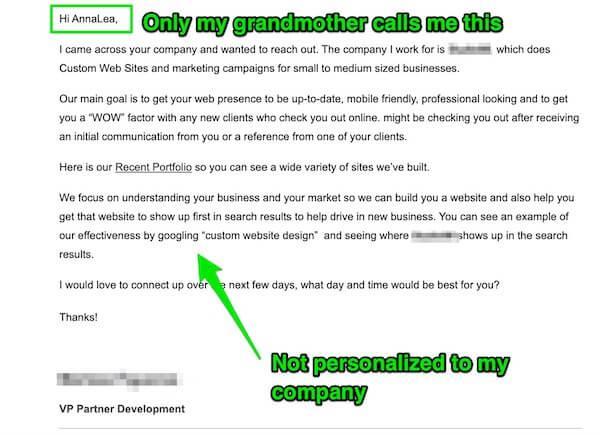
Have you ever felt like this after receiving a poorly designed automated email?
Yep. 🙌🏽 That’s exactly how I felt after reading this email:
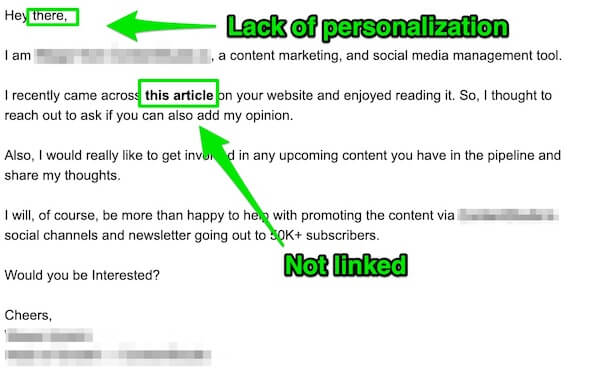
And, this email:
According to the Content Marketing Institute, 73% of marketers use email as a top content distribution channel, and 71% use email engagement to measure the effectiveness of content in generating sales.
But what does this mean? Simply, an advanced, automated email system can improve your bottom line.
Don’t believe me?
Tools like Mailshake can help you scale your lead generation through automated email marketing.
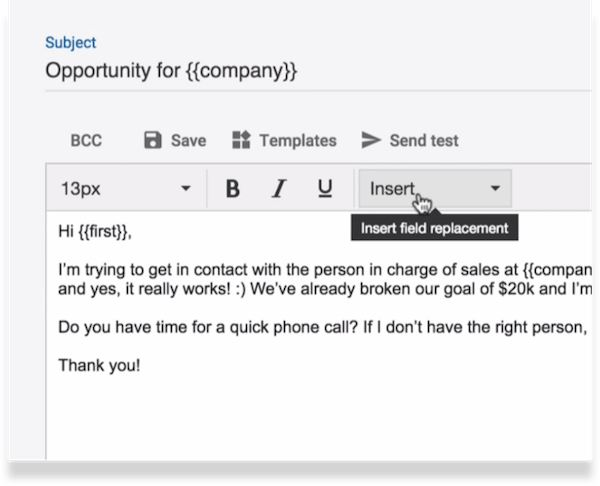
Growthscore generated 500 leads in 72 hours using automated email campaigns.
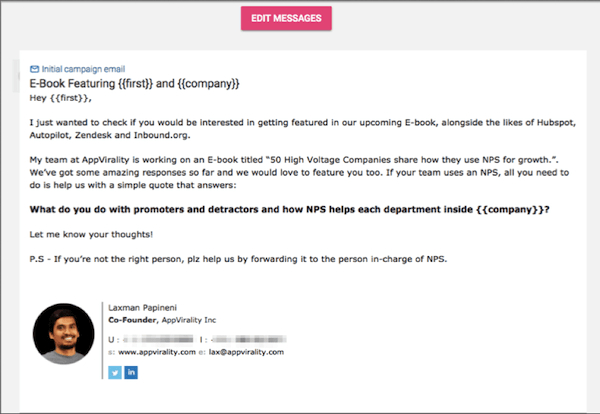
According to Salesforce, automated emails can increase click-through rates by up to 199% while reducing marketing spend by up to 80%.
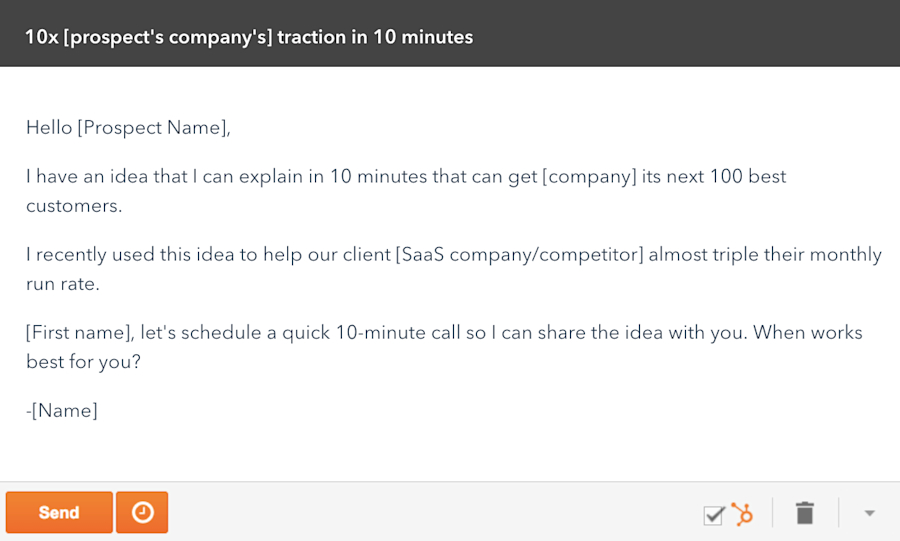
However, automated emails still require personalization.
Aaron Ross, CEO of Predictable Revenue, gained 16 new customers simply by personalizing his automated email template.
B2B companies worldwide dream of automating their email processes.
Harnessing the power of email automation isn’t easy, though.
Ask yourself. How will your company succeed in this era of elevated customer expectations?
2. Create personalized website experiences
One misconception about B2B personalization is that it is vastly different from B2C.
The common denominator?
There’s still a human behind the product or service that you’re targeting.
Brian Solis, head of global innovation at ServiceNow, explains it like this.
Business buyers don’t go to work and forget what they do as humans. There’s a new normal that blurs the line between B2B and B2C. They just want things personalized.
And there are countless examples of how well website personalization works.
When Philips used past behavioral data and user preferences to add contextual product recommendations to its mobile web app, it saw a 40.1% increase in conversion rate.
Dynamic Yield gained a 111% increase in demo requests after personalizing elements across its site.
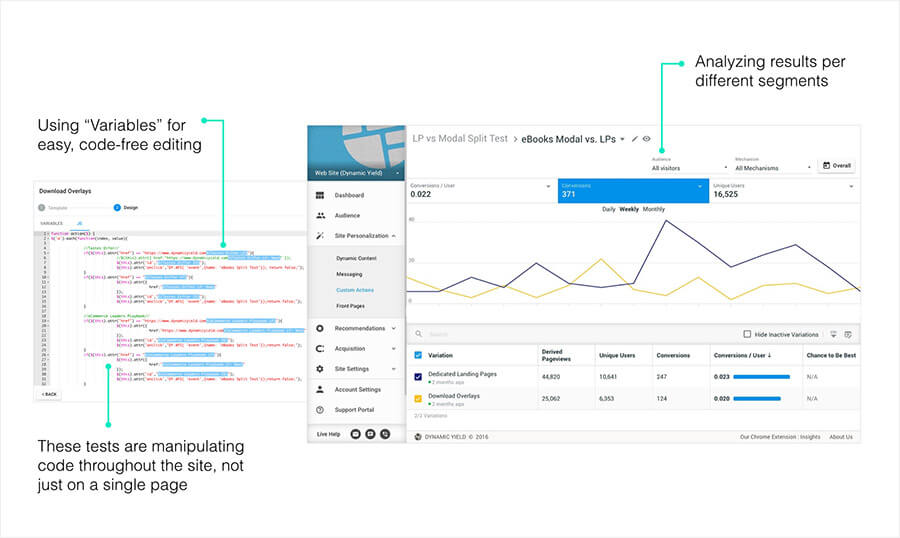
Personalized leads can be created from customer behaviors. When analyzing customer behavior, you should segment customers by marketing personas.
For example, tailoring your homepage for new vs. returning visitors like Gusto.
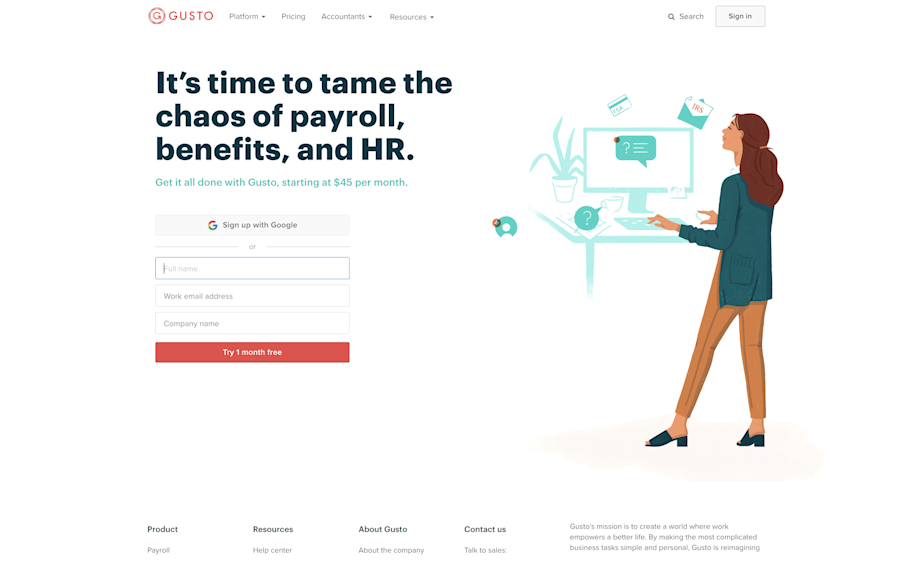
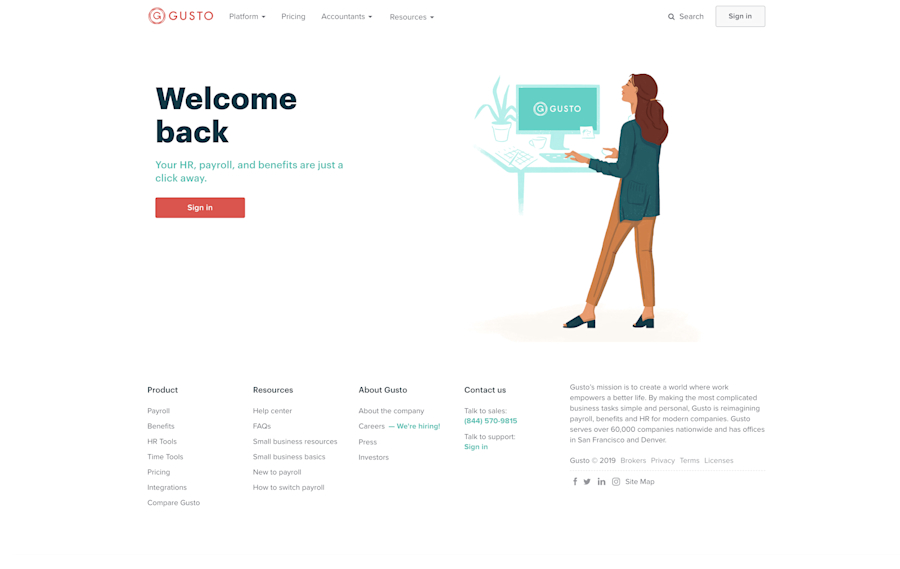
You can also use behavior-based data to identify how customers navigate your website and group them by their actions. toward paying attention to how customers navigate your website, then dividing them into groups based on their actions.
Founded in 2018, RightMessage allows users to create a welcome bar that changes its messaging based on who is seeing it.
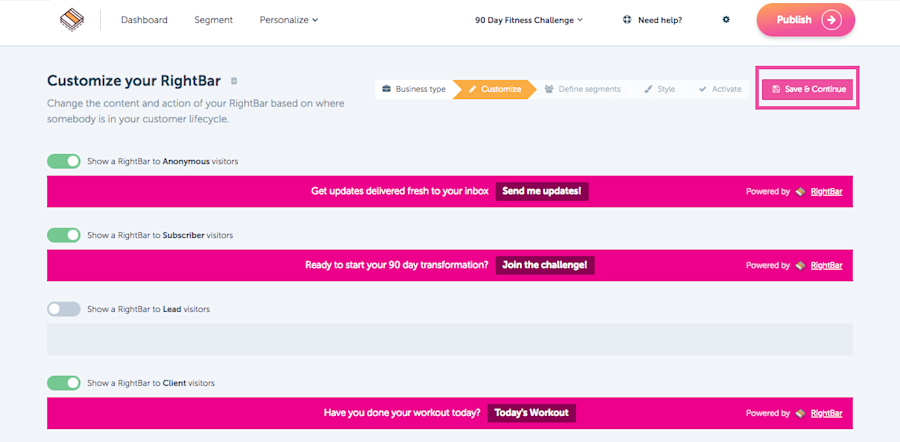
No matter which customer behavior categories you choose, you will need to manually select, create content, and set triggers to adapt your data for personalization.
Thankfully, there are plenty of useful automation tools out there to finish the job for you.
3. Use a chatbot
According to HubSpot, marketers are increasingly turning to social media platforms like Facebook, LinkedIn, Instagram, and Pinterest to generate high-quality leads, with 89% of B2B marketers specifically using LinkedIn for lead generation.
However, social media can be so much more than a way for businesses to generate leads. These platforms have also become customer service channels, through which people expect immediate responses—no matter what time zone they’re in.
For instance, at Leadfeeder, we have our own Facebook Group for Leadfeeder users.
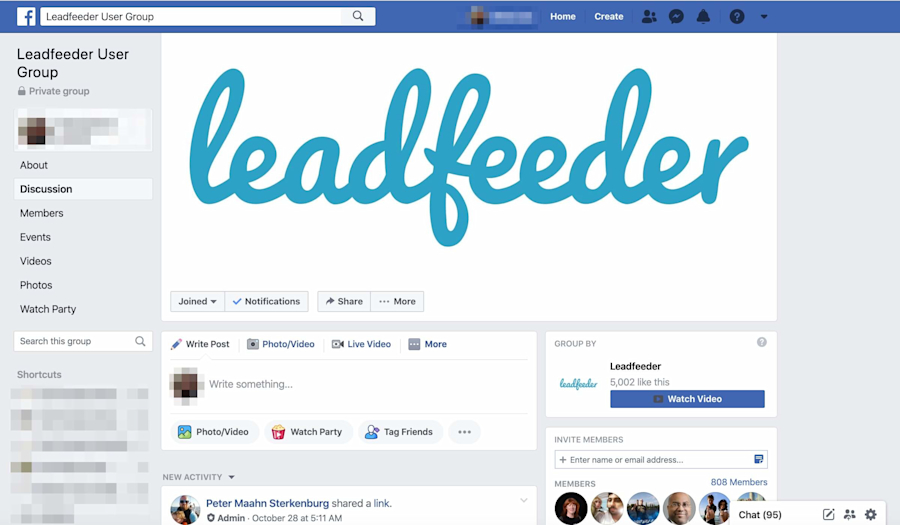
Here is yet another way automation technology comes to the rescue. With massive leaps in artificial intelligence enabled by machine learning, chatbots can manage the complexities of language.
In a 2022 study by Tidio, 62% of respondents said they would rather use a chatbot than wait for a customer service representative, and 69% said they were satisfied with the quality of their last chatbot conversation.
But chatbots can be used for much more than customer service. For example, Drift helps its customers use chatbots to generate leads.
SalesRabbit saw a 40% lift in the conversion rate of requests to meetings held and a 50% increase in qualified leads after using Drift to schedule product demos.
Larry Kim, founder of MobileMonkey, reduced their cost per lead acquisition to 97%.
And, at Leadfeeder, we use Intercom’s answer bot to help out our Customer Success team when we’re out of the office.
Of course, a chatbot can’t do everything for you when it comes to communicating with customers.
However, the top expectation from respondents to the Tidio study was that chatbots were available to help 24/7.
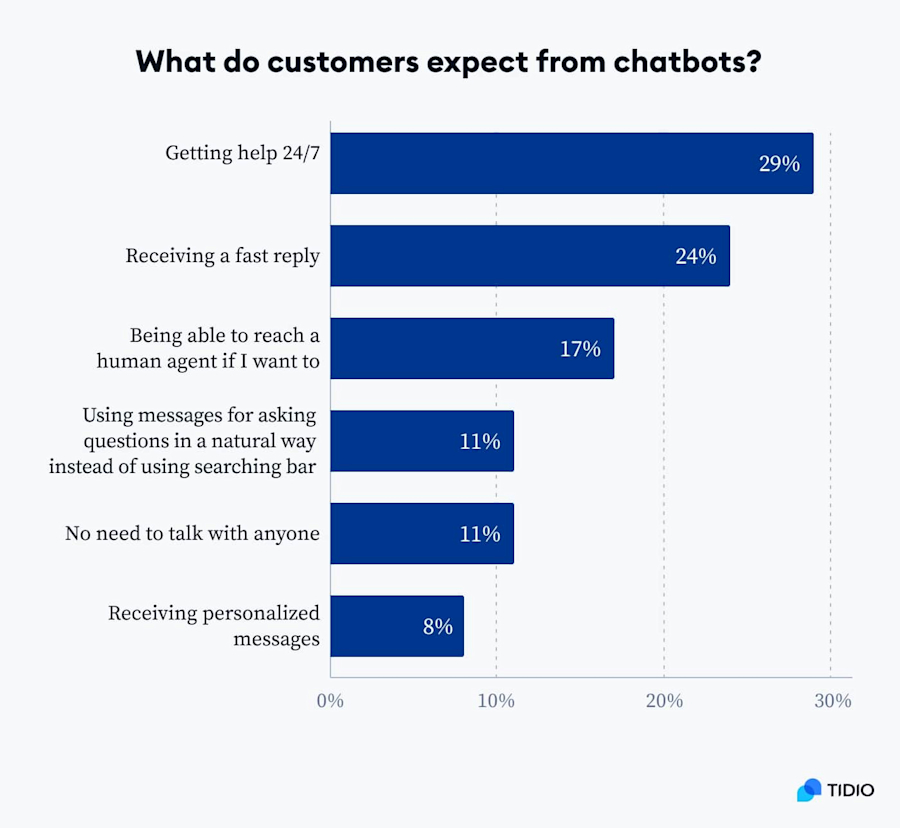
So, unless you’ve got endless resources to pay employees to provide 24/7 customer service, using chatbots has become essential.
Even if you can’t answer right away, you can still gather enough information to generate a lead.
4. Use your website data
In addition to chatbots, pop-ups, lead generation pages, and email software, there are automation tools that generate leads based on who visits your website. This is part of the service that Leadfeeder provides.
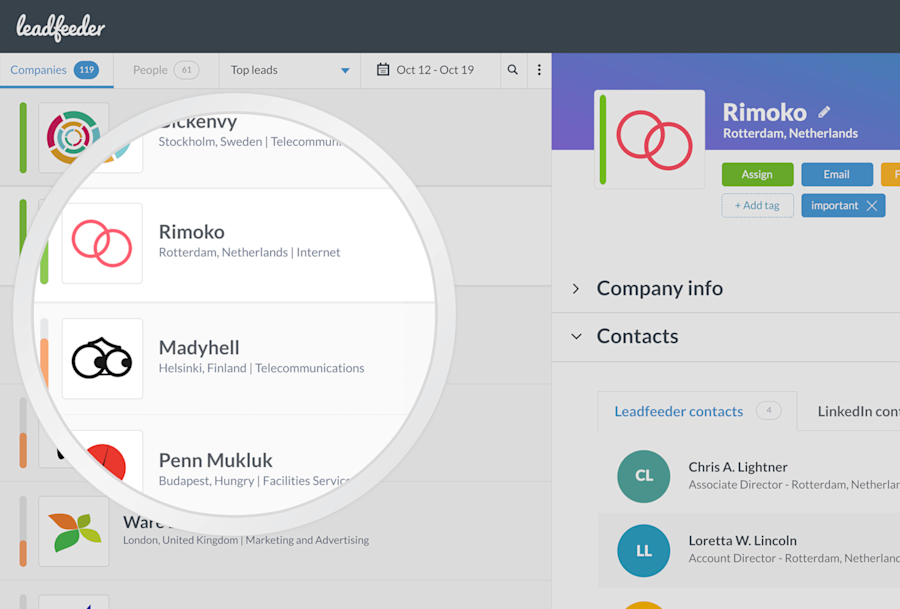
Tactikmedia gained 600 accounts using Leadfeeder, while AlertOps increased demo rates by 700%.
However, what Leadfeeder offers is a little bit different from other lead generation tools.
Leadfeeder automatically identifies companies visiting your website, helping you determine which visitors to contact directly.
You can set up Slack alerts for specific companies visiting your site, and connect to other tools, such as your CRM, to create a centralized database of information that will support following up on all leads—regardless of how you initially connected with them.
For more information on how Leadfeeder automates lead generation, keep reading!
Best lead generation automation tools
Effectively automating your lead generation requires working with the right tools. Here are the best lead generation automation platforms.
1. Leadfeeder
Leadfeeder has long been seen as one of the best automated lead generation and marketing tools. It uses website visitor data to generate leads for you, in addition to identifying leads through social media.
Leadfeeder reveals the identities of companies that visit your website and integrates this information into your CRM, making it a brilliant tool for any B2B organization looking to automate its lead generation. Its positives include true GDPR compliance, transparency, and a broad range of filters that let you zero in on the best leads for your business.
2. Sprout Social
If you’re looking for a tool that focuses on generating leads through automated social media marketing, Sprout Social might be the one. It automatically manages, monitors, and analyzes multiple social media accounts over different channels.
It’s got an easy-to-use interface and a great range of reporting tools for analytics. However, it’s very focused on social media marketing and has limited integrations with tools unrelated to social media.
3. Mailchimp
Mailchimp has a range of tools for automatically producing leads and running email marketing campaigns. It is built around email campaigns, but it can also be used for a variety of lead-generation purposes. Its features include analytics, A/B testing, and a drag-and-drop interface, which increases ease of use for beginners.
Although its free plan is very limited, Mailchimp’s benefits include a range of pricing options and many integrations with other automation and lead-generation tools.
4. Marketo
Marketo is a comprehensive lead-generation tool that automates a range of processes related to lead generation. It can be used to manage existing leads, produce automated email marketing campaigns, and analyze data from your lead generation efforts. It is specifically designed for B2B companies, but many other businesses also use it.
Its benefits include powerful, in-depth automated lead generation, intelligent customer targeting, and personalization tools. It also offers easy integrations for a variety of sales tools. However, it is more expensive than other automated lead generation tools on this list.
5. HubSpot
Many businesses have heard of HubSpot, as it is a widely used marketing automation tool. With HubSpot, you can access tools for marketing automation, lead generation, and customer relationship management. This means businesses can generate leads and create personalized marketing campaigns within a single suite.
Its key benefits include being a comprehensive, all-in-one solution for marketing and sales automation, with integrations for many other tools. However, this can make it difficult for beginners to access. Furthermore, it can be pretty expensive, especially for companies looking to scale up.
Generate high-quality leads using automated lead generation with Leadfeeder
Automated lead generation eliminates low-value and repetitive tasks from the workday of sales and marketing teams.
With Leadfeeder, you can turn page views into a lead generation pipeline and enhance your company profiles with truly compliant data stored on EU servers.
With more than 50 filters, powerful contact insights, automatic lead scoring, and automated notifications, Leadfeeder delivers better results for both sales and marketing teams.
Note: Ready to start generating higher-quality leads for your sales team? See your leads now when you sign up for our free 14-day trial.
Automated lead generation FAQs
How do you automate lead generation?
Companies can automate lead generation using a lead-generation or marketing-automation tool, which will generate leads for them. There are many tools available to automate all or part of the lead generation process. Some of these include chatbots, email automation, website personalization, and lead identification.
What is AI lead generation?
AI lead generation is a method of identifying the best leads for your organization by using software solutions that are enhanced with artificial intelligence. This can increase the efficiency and productivity of your sales team.
Which tool is best for lead generation?
There are many tools for lead generation, and the right platform will depend on your organization's requirements. Leadfeeder is an industry-leading, go-to-market software that generates leads from companies that are already visiting your website, creating a list of high-quality leads with product interest or buying intent.

Director of Content Marketing @ Leadfeeder
Jamie Pagan is Director of Demand at Leadfeeder, where he leads demand generation and pipeline growth initiatives. His work focuses on connecting marketing activity with revenue by combining intent signals, campaign performance data, and audience insights.
With experience building scalable demand engines and launching growth-focused campaigns, Jamie brings a practical perspective on how marketing teams generate and capture demand. His experience working with intent data and marketing analytics informs his approach to identifying high-intent buyers and converting interest into qualified opportunities.