


B2B decision–makers are constantly getting hit with messaging from every direction. Cutting through the noise has become a huge challenge for sales professionals, who must battle not just to be seen, but also to be seen as relevant with every outreach effort.
While there’s no shortage of advice on creative outreach strategies - from using GIFs in emails to attending customer events - this article takes a different approach. We’re going to look at the step before the outreach and dive into how to creatively identify the most promising prospects to target.
Keep reading for our top tips on how to work smarter, not harder, in finding the right prospects to reach out to!
Find the Right Prospects, Close More Deals
Where better a place to start than with our very own go-to-market platform! At Leadfeeder, we understand the challenges sales and marketing teams face. That’s why we’ve developed a comprehensive platform that provides the data, applications, and insights necessary not only to find new prospects but also to win them over. Streamline your sales prospecting process, save valuable time, and increase your chances of closing more deals with Leadfeeder.
Leadfeeder is a suite of five integrated SaaS products, packaged into two solutions:
Let’s find out more about each of the Leadfeeder products and the creative ways you can use them to find the right prospects to reach out to.
Find Prospects with Target and Connect
Target and Connect are complementary Leadfeeder products. Target is a B2B sales prospecting tool with unique filters that help you create company and lead lists, and find the contact details of key decision-makers. Connect provides you with in-depth B2B data on over 40 million companies, from trade registries, company websites, news, and social media.
Both products are included in Leadfeeder’s Sales Intelligence (SI) Solution, enabling you to generate high-quality leads and reach more sales-ready contacts with GDPR compliant B2B data. Datacare, the third product in the SI Solution, helps you review, cleanse, enrich, and optimize your imported data records.
Good data is essential, but it can become overwhelming. As a salesperson, you want to be out there building new relationships and strengthening existing ones. You need to narrow the millions of available data records into a manageable, actionable set.
We’ve got some suggestions for how to get creative in finding the right prospects using the products in the Sales Intelligence Solution:
1. Dive deeper into specific industries
You’ve probably noticed that finding the exact industry to target is a struggle. Generic industry categories, such as those on LinkedIn, are often too broad, as not every company neatly fits into a few predefined boxes.
For example, if you’re looking for companies that only deal with the financial side of pensions, but you can only search by a catch-all financial phrase, e.g., ‘Banking’, you’re going to see a lot of companies that aren’t relevant to you.
Leadfeeder’s Target has three different industry assignment layers you can peel back to get the correct classification every time. These filters are: Leadfeeder Industries, NACE codes, and WZ codes.
The first is your standard Industry search of two levels: first, an overarching area, such as ‘Education’, followed by a refinement to ‘Higher Education’, ‘Preschool’, or ‘School System’, for a total of 3 options.
Secondly, NACE codes are an overarching classification established by the European Community as a standard for companies. They are based on the United Nations International Classification of Economic Activities (ISIC). Taking the ‘Education’ example, instead of only 3 sub-options, we now have 11, grouped into fields such as ‘General secondary education’ and ‘Sports and recreation education’.
Thirdly, WZ codes derive from NACE codes and are designated by the German Federal Office of Statistics. They are commonly used in the DACH area. WZ codes offer a third level of refinement. So instead of just ‘General secondary education’, you can also search for ‘Technical and vocational secondary education’ and other segmented options.
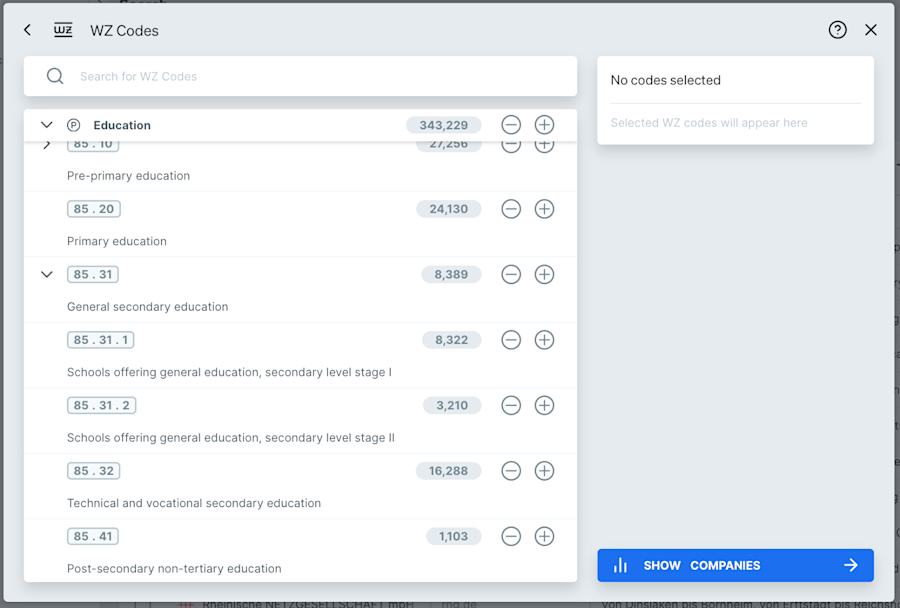
By being able to search for companies in very specific industries, you’re not only saving yourself vast amounts of time but also ensuring your outreach is super relevant and, hopefully, a positive experience for your prospects.
2. Find the technologies that matter
Some products and services rely on other products or services to function. And some simply work even better with complementary products or services. Take Leadfeeder, for example. It’s great as a standalone tool, but if you integrate it with your CRM, it’s even more valuable.
If you sell something that is enhanced by or reliant on another technology, you could be spending so much time outreaching to companies that don’t possess this, severely reducing your conversion chances.
Sticking with the Leadfeeder example, HubSpot is one of our CRM integrations. If our sales team knows that a prospect uses HubSpot, they can tailor their pitch to highlight the additional benefits of a HubSpot integration at no extra cost.
Target’s Website Search lets you look for particular keywords on a company’s website.
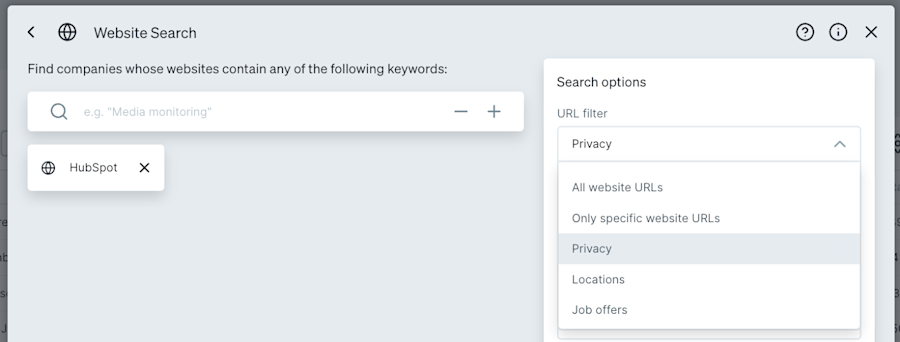
In many cases, when a technology is integrated into a website, it must be declared in writing in the website's Privacy section. Target includes an additional filter for this.
You can then apply additional filters to narrow demographics and firmographics to match your ICP. The list you’re left with is incredibly direct. It’s up to you to get creative about how you reach them!
3. Search by e-commerce or shop
Technographics, in terms of e-commerce usage, can be a great way to narrow down who your prospects are. This way, if your product relies on a specific platform, you’re only reaching out to those companies that use it.
The E-commerce and shop systems filter in Target can help you search for many different types of platforms, including Shopify, WooCommerce, and Magento.

If your product or solution solves a problem for companies without any of these major platforms, you can also use the option ‘unknown shop system’.
4. Discover contacts at the right level
Building a contact list of HR professionals is great, but how do you know they’re the right contacts for you to sell to?
Your sales strategy could be based on several factors. You might have a product that you know sells best when it gets into the hands (or onto the screens) of regular-grade employees. If you can give them a free trial and know they’ll love it, then they become your advocates and can help you take the conversation higher.
Or you might have a product that can only be sold to senior management, perhaps its underlying benefit is that it helps reduce headcount. This isn’t as likely to be adopted and embraced by employees whose jobs could be put at risk.
Target’s Hierarchy level options in the Department & Hierarchy filter can help you reach who you really want.

Have the right conversation faster by only finding contacts who are suited to what you want to speak to them about.
5. Look for teams of the right size
Lots of companies hire agencies or external support to take the burden off the internal team. Instead of having an in-house marketing team of 10, there may only be 2 internal employees coordinating with a hired marketing agency. Similarly, for the accountancy function, payroll might be handled entirely externally, as there simply isn’t the in-house expertise or appetite to handle it.
In these examples, if your product or service solves a pain point for these departments, you might be barking up the wrong tree. These companies may never want to buy from you, or it might take you a disproportionate amount of time to explain why they should. Then you have to weigh up the opportunity cost.
What you really need is internal departments with greater than X employees in each - Target has a filter for that!
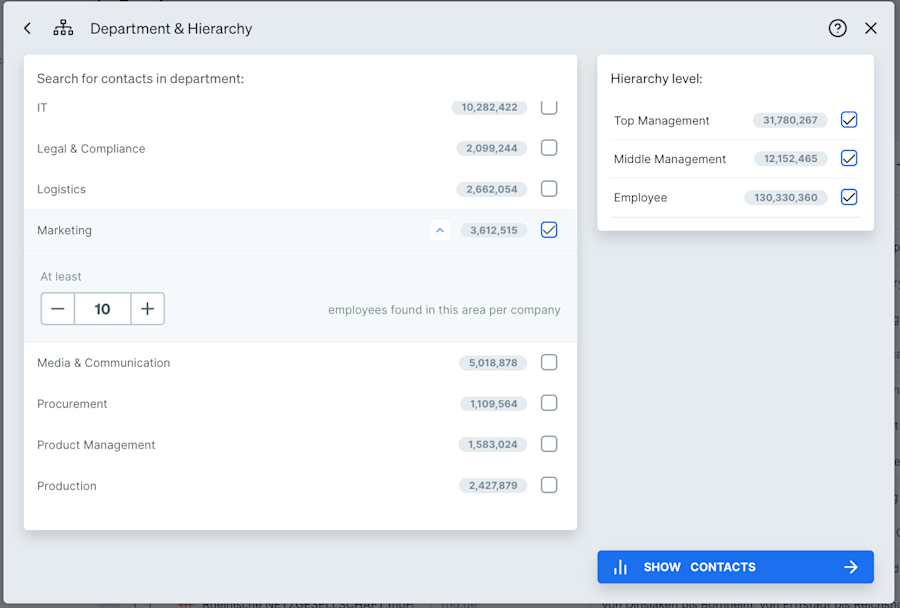
Within the Department & Hierarchy filter, there is an option to only show companies with at least X employees found in this area per company. Now you’ll be able to create a list that matches your ICP, consisting only of companies that are realistically positioned to purchase your product. You’ll know straight away which pain points you could take away, without any guesswork needed.
6. Identify positive business indicators
Aside from knowing who to reach out to, knowing when to reach out is essential for any good salesperson. Enthusiastically contacting a company that is going through a round of redundancies may not be the best time. But contacting a new hire who is eager to prove their value in a role and may have a fresh budget could be a winning move.
In Target, you can filter by Trigger Events. These are changes that have occurred in companies and, on the positive side, range from winning awards to expansion abroad, job listings to contract wins. On the negative side, you can filter by staff cuts, financial losses, or product recalls, for example.

If you sell a software ideal for companies handling the tax implications of operating abroad, a new international expansion could be exactly when they want to hear from you.
Combining the right Trigger Events with filters such as industry, company size, location, etc., to match your ICP will really refine your list. You’ll be left with a list of companies and contacts ideally suited to hearing from you at this point in time.
Instead of searching for Trigger Events, you can get alerted when they happen by using Connect signals. Alerts can only be set up on a company list, so you first need to save a list of companies of interest, either from Target or by uploading your own company list. Once you have a list of key companies, you can set up an alert to receive an email when chosen positive signals occur at these companies, enabling you to react in near real-time.
Please note: Trigger Events are not yet available in every region.
Trigger Events are not yet available in every region.
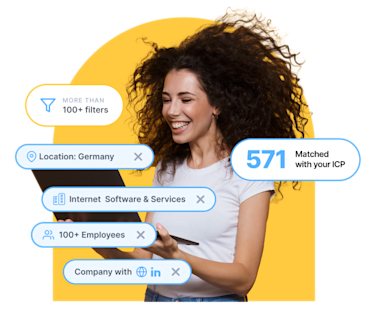
Identify and land your dream customers
Find the right prospects, accelerate your sales pipeline, and land your ideal customers even faster.
Start Sales ProspectingFind Prospects with Leadfeeder
Leadfeeder identifies the otherwise anonymous companies visiting your website, enabling you to discover exactly what they’re looking for and engage with the right leads at the right time. Leadfeeder is part of a Web Visitors Identification (WVI) Solution.
However, as with any data, website visitor data is only as good as what you do with it. Leadfeeder offers a set of simple-to-use core features, including powerful filtering with custom feeds, real-time alerts, and CRM integration - all designed to help you make the most of knowing who is visiting your website.
Here are some of the top ways to find prospects fast using Leadfeeder:
7. Re-engage with lost deals
You can keep track of which of your lost deals are still visiting your website. Why might that company be back on your website? Maybe things aren’t going so well with the solution they went with instead, or maybe you sell something else they’re interested in… Just because a deal was lost doesn’t mean a new one can’t be won!
Create a custom feed for each of your salespeople, filtering by both their name as the deal owner and the deal status of ‘lost’.

This feed shows you every lost deal that visits your website, for each salesperson. You can also set up an alert so the associated salesperson receives an email notification whenever a new company (i.e., a new lost deal) appears in this feed. Alerts can also be set to daily or weekly.
Note: CRM integration is required to use this method. Leadfeeder integrates with 5 leading CRM solutions: Salesforce, Microsoft Dynamics, HubSpot, Pipedrive, and Zoho. Integration is quick to set up and enables seamless integration with your tech stack.
Pro Tip: Custom feeds
If you don’t have a CRM you can integrate with, you can create a list of lost deals in CSV format and upload this into Leadfeeder. Then, when creating the custom feed mentioned, add ‘Company List’ as an additional filter. You could even add a Tag to each of these companies so they’re easily identifiable as lost deals. You can learn more about how tagging works here.
8. Discover new industries
If you know your ideal customer profile (ICP), you’ll know which industries you typically look for prospects within. But what if your website is actually getting visits from companies outside of these industries? This could open up a whole new market, or markets, you hadn’t even considered reaching.
If you spot unexpected industries visiting your website, set up a custom feed for each new industry (or combine a couple) with an automated alert to get notified when new companies check you out.
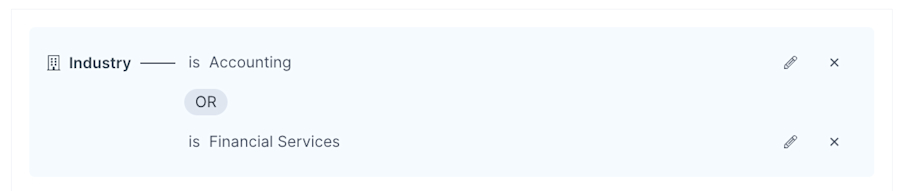
As well as helping expand into new markets, this is also useful research for your marketing team. They can use the information to inform the design and structure of your website, tailor landing pages for new industries, and reallocate advertising budgets.
9. Spot upselling and cross-selling opportunities
If you sell more than one product or solution, you’ll likely want to sell multiple products to each customer. Leadfeeder can help you find upsell or cross-sell opportunities. What we’re looking for here is known customers viewing specific product/solution pages on your website.
Let’s say you sell 3 solution sets, and most of your customers purchase one or two of them. However, all the solutions work together, so each customer could buy all 3 - that’s the goal!
Create a custom feed for each product page, using the URL filter and filtering for won deals (so existing customers).
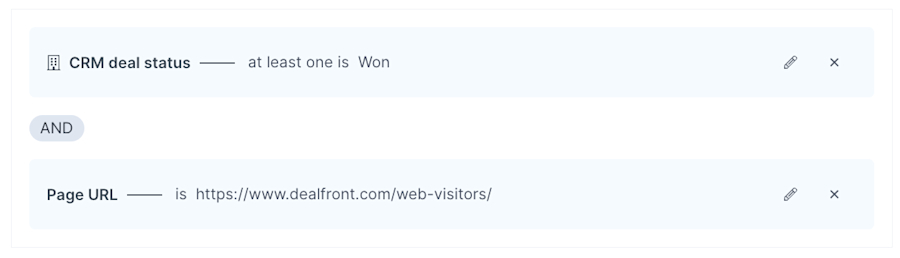
If you spot (or get alerted to) existing customers visiting pages of solutions they don’t have, there’s your perfect opportunity to try for a cross or upsell!
Note: CRM integration required
CRM integration is required to use this method. Alternatively you could import an existing customer list as mentioned in Tip 1.
Note: CRM integration is required to use this method. Alternatively, you could import an existing customer list as mentioned in Tip 1.
10. Uncover the opportunities in your blog
If your website's SEO is strong, your blog articles likely have a very wide reach and serve as one of your inbound channels. It could be very insightful to see which types of companies are attracted to your blog. Additionally, it gives you a further outreach tactic.
If you have articles on your blog which are highly targeted at certain job roles, for example, Senior HR Managers, you could search for Senior HR Manager contact details at each of the companies visiting a specific blog or blogs. Your intro might then look like: “I was speaking to another Senior HR Manager about [insert topic] and thought you might also be interested in this blog [insert blog link].”
Create a custom feed using the URL filter and filtering for key blog articles.

11. Gain deeper insights from your email marketing campaigns
If you send email marketing campaigns, you already have insight into which links your subscribers are clicking. Leadfeeder integrates with Mailchimp and ActiveCampaign to show you who the user visiting your website is - not just the company name. Make sure you integrate these functions in accordance with GDPR and ePrivacy laws, for example, by collecting the appropriate cookie consents!
By integrating your email marketing system (EMS), you’ll be able to see what users do after clicking your emails. This can be a great upsell or cross-sell tactic for existing customers; something on your website, other than what you sent them, may spark their interest - you’ll be able to see what that was.
Similarly, when emailing prospects, you might target a specific focus, but once they reach your website or landing page, they actually look at alternative topics. Your next outreach step is super simple: you know exactly who the user was, and exactly what they’ve shown interest in!
If you have an EMS integration, you’ll automatically see a folder in your account containing default feeds that show visitors from your campaigns. You can, however, set up your own custom feeds to filter by a specific campaign and any other characteristics of interest.

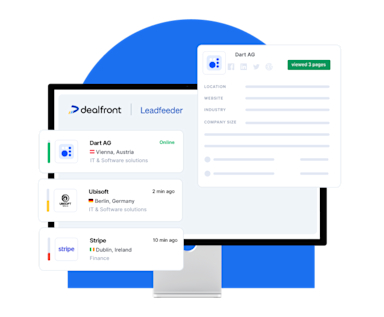
Turn anonymous website traffic into leads
Reveal which companies are already looking at your website and identify accounts that need your solution.
Start Discovering NowFind and Reach Prospects with Promote
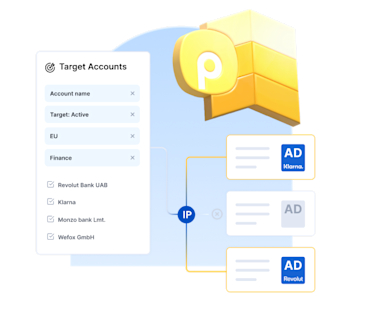
Promote is the custom-built B2B display advertising tool from Leadfeeder, available with both solutions. It enables you to target specific companies’ IP addresses with programmatic display ads so their employees see your ads even when working remotely.
Display advertising generally falls at the top of the funnel, as an excellent way to build brand awareness. It's used to attract users who may not have specifically searched for your business, but a well-designed, well-thought-out ad can pull them to your website.
Most display ad platforms are built for the B2C market, and much of the available data is not relevant to B2B advertisers. What if instead of consumers, you could target the exact companies you want to reach, with ads that appear only to them, without wasting money on low-value impressions?
Gone are the days of having to set an ad live and hope, with Promote you can be much more creative in finding and reaching the right prospects:
12. Reach a wider set of decision makers
Buying committees can be large, and reaching each one individually can be incredibly time-consuming. By targeting company IPs with display advertising, you can reach a much wider set of employees at a single company in one hit.
You may even reach employees you didn’t realize had any influence over buying decisions. By seeing your ads, they get time to self-educate themselves on your offering, before you’ve even reached out personally.
To do this with Promote, you first need a list of companies to outreach to - this could be built in Target, or created by some other means (e.g., imported from your CRM, or taken from Leadfeeder). You can find out more about the ins and outs of creating campaigns in our Help Center.
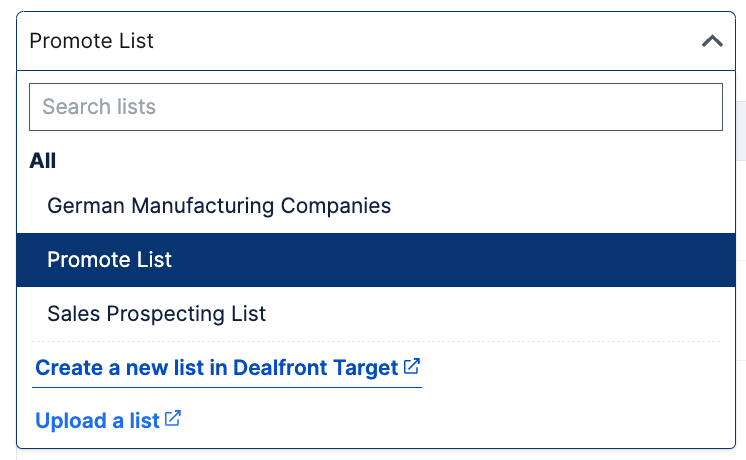
The companies on your list should match your ideal customer profile for the offering you’re going to push in your ad campaign. If you have multiple ICPs, make sure the ads and landing page align with each group.
13. Retarget your website visitors
Retargeting is a powerful way to bring visitors back to your site to complete a desired action or push them further down the funnel. Leadfeeder and Promote work hand in hand to ensure you retarget only the right visitors for your campaign.
Custom feeds in Leadfeeder are used to segment your visitors into manageable groups. This could be done using any combination of the 50+ filters available.
A key group of web visitors for your business could be companies in the automotive industry from North America who viewed a certain page on your website. The next action you want these visitors to take is to watch an interactive demo on your Promote campaign landing page.
First, set up a custom feed in Leadfeeder for the audience of interest. Next, save the companies coming into this custom feed to a Leadfeeder list. Ideally, you’d pick visits between a set of recent dates, rather than all time.
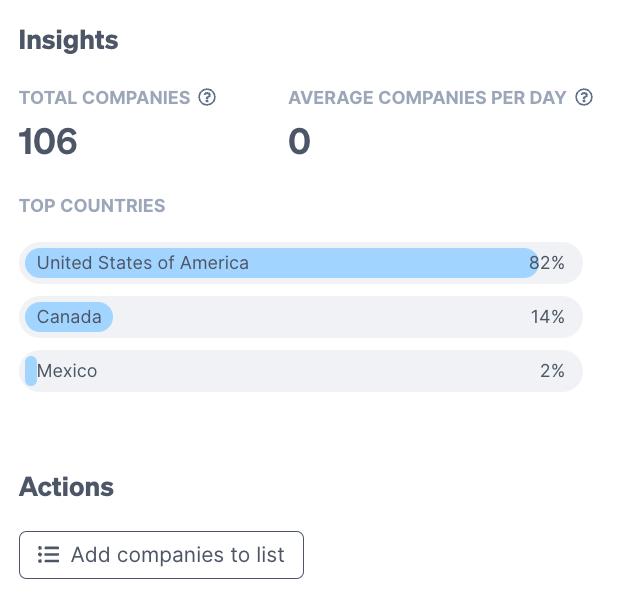
Then target this list in Promote, and build your campaign with relevant ads.
You already know these companies have visited your website. Now, you’re trying to draw them back in with an enhanced offering.
14. Account-Based Marketing Strategies
While you can use display advertising to widen your net, sometimes you also want to be specific with it. Account-based marketing (ABM) is a very popular marketing method of putting lots of energy into a few key prospective companies.
Or, perhaps you are going after subsidiaries of a large company you already work with, using the parent name as a foot in the door. Either way, you’re being very niche in your approach.
You can use Promote to do this either with an imported list, a built list in Target, or from a list of existing website visitors who meet your criteria.
15. Target CRM Open Opportunities
As we’ve established that display advertising doesn’t have to be limited to the top of your funnel, why not use it to help push your open opportunities further towards that sale?
With Leadfeeder integrated with your CRM, you can retarget Open Opportunities. This isn’t specific to one salesperson, so if you want to run campaigns for each individual salesperson’s open opportunities, you should do this with a custom feed.
For a wider reach campaign, a few clicks are all you need to get set up in Promote.
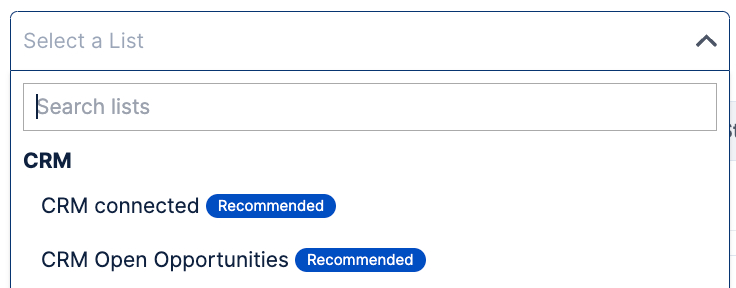
Your creative and messaging are important here in solidifying your brand recognition and inspiring your target accounts to want to continue the conversation when you next reach out personally.
Reach your ideal customers with B2B display ads
Prepare your ad creatives, set up your campaign, and streamline your B2B marketing to always reach the right audience.
Discover PromoteFind and Reach Prospects Beyond Leadfeeder
So far, we’ve shown you how to find and reach prospects using only the products in the Leadfeeder platform. But we know creative outreach isn’t all about our products, so here are some other helpful ideas!
16. Start social listening
Social listening is simply monitoring social media channels for terms relevant to you. This could be mentions of your brand, or your competitors’ brands, or any related keywords.
As well as social media channels, look out for social forums, and yes, we consider LinkedIn a social channel here.
Read what people are talking about and see where you can add value with a response. Can you answer any key questions or share content of interest to help?
Also, find strong influencers (this mainly applies to LinkedIn, so think business influencers, not travel), and engage with their content. Ask your own questions to strike up conversations with participants on their posts.
If you start having a meaningful conversation, find a way to take it off the social channel or forum, or if on LinkedIn, into a private message.
It takes a little work, but you’ll be right there in the heart of the conversation every time.
17. Uncover Buyer Intent Through Review Sites
Review sites can not only capture and share the opinions of your current customers about your product, but some can also help you source prospects through buyer intent data.
G2, for example, captures enriched data on buyers researching your product on its site. Buying intent signals are triggered by several actions, such as viewing your product profile, viewing a category page where your product appears, or viewing a sponsored ad or a licensed report.
The buyer’s stage in the process is then evaluated using all these factors and more. This provides valuable data to identify where that company is in its buying journey. Armed with this knowledge, achieving positive reviews has an even greater purpose!
18. Seek out startups
Who needs many products and solutions? A new business, of course! There are various platforms to help you find new startups and information on their success, but we won’t go into that here. We’re looking more at the concept of why you’d add startups to your prospect list.
Startups grow, and good ones grow fast. What might have started out as a single-user license could be 10 or 20 times that before you know it. The opportunities are in some ways endless.
Also, startups don’t always immediately register in companies' databases. When all your competitors are going after the established businesses, why not go after the ones they haven’t even heard of?
19. Look for struggling competitors
We all know the phrase ‘keep your friends close and your enemies closer,’ and this comes into play here. Not that we want to encourage you to think of your competitors as enemies!
Keep an eye on what’s going on publicly in your competitors' worlds. By this, we mean: are their customers happy? Are they continually getting rave reviews? Do they seem to have advocates left, right, and center, or is it a different story? Unhappy customers can be scooped up and introduced to a better option - if you’re first on the scene, you could be their savior, the one who can help make everything better.
Sometimes the fault isn’t with the competitors, so be mindful of this and consider whether a customer is just disgruntled or if there’s a deeper problem you could solve for them.
Get More Creative in Building Your Winning Pipeline with Leadfeeder
In this article, you’ve discovered 19 creative ways to find the right prospects to reach out to, and some other helpful tips along the way!
Save time searching for hot new prospects to add to your pipeline and build more innovative and original lists with Leadfeeder. Stop fighting against the competition and think a little smarter, step around them, and enter a league of your own.
Discover more about our Sales Intelligence solution in a no-obligation demo with our sales team. They’ll happily walk you through how it all works and might even have some other creative ideas of their own!
If you’re full of ideas on how to incorporate Leadfeeder into your outreach plans, sign up for a free 14-day trial in minutes. You’ll find everything you need to know about getting started with Leadfeeder in our dedicated Help Center Collection.
Get more creative in finding the right prospects to reach out to with Leadfeeder today, enhancing your ability to buy leads intelligently.
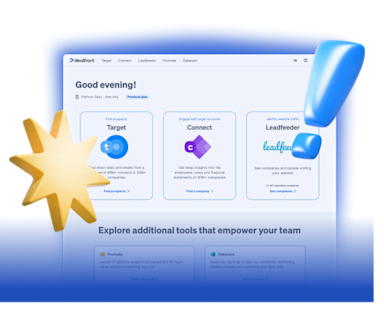
Our platform, your revenue engine
Leadfeeder combines the tools and stages of the sales and marketing process into one single platform.
Discover our Platform
CMO
Jillian Als is Chief Marketing Officer at Leadfeeder and a B2B SaaS marketing executive with nearly two decades of experience leading global go-to-market teams. She specializes in revenue-driven marketing strategy, demand generation, and aligning marketing and sales organizations.
Throughout her career, Jillian has helped SaaS companies scale marketing-sourced revenue and build high-performing marketing teams across international markets. Her leadership experience shapes her perspective on marketing strategy, attribution, and the systems modern revenue teams use to drive sustainable growth.