If you aren't qualifying leads well, sales might waste weeks nurturing and converting a lead that had no intention of converting.
If only there was a better way…
Luckily, there is.
Leadfeeder identifies what companies visit your website, even if they don't fill out a form. Try us for free for two weeks.
Can a website get your email address just by visiting?
Not directly. A website can’t automatically see someone’s personal email address just because they land on a page. What it can see is behavioral and technical data, like IP address, location, pages viewed, and time spent on site.
You already know the easiest way to collect email addresses is to create a form and ask users to sign up. In most cases, offering discounts or exclusive access to high-quality content can help you build a list.
Most of the time. Then you have to sort through those leads, build a nurturing campaign, and slowly turn those contacts into leads.
Actually, gating content might not be the answer to growing your leads. With so many businesses vying for users' emails, gated content needs to be exceptional. Plus, as scams increase, people are growing unwilling to share their email addresses. Other users are simply tired of spam.
So how do you capture email addresses without gating content?
There's no (legal) way to capture emails without asking permission. However, there are several strategies to access website visitor emails without landing in CAN-SPAM jail.
Start by using a web-tracking tool like Leadfeeder. We use IP tracking to see which companies visit your website. Then use our IP enrichment data or an email-finding tool like Hunter.io to identify the best email addresses and reach out to those companies.
No form builders required.
4 Email Capture Tools (That Aren't Form Builders)
If you're a growth marketer ready to look beyond the form builder to find (non-creepy) ways to capture email addresses, we've got you covered. Here are our four favorite tools to help you turn anonymous site visitors into leads.
A few, like Leadfeeder and Hunter.io, can be used together to get killer results.
1. Leadfeeder
Leadfeeder is a website tracking tool that uses IP data to track which companies visit your website.
IP addresses are publicly available, so you're still CAN-SPAM and GDPR-compliant. Once you know the names of companies that visit (and what pages they read ), you can either look them up on LinkedIn, check out their website, or use an email finder tool.
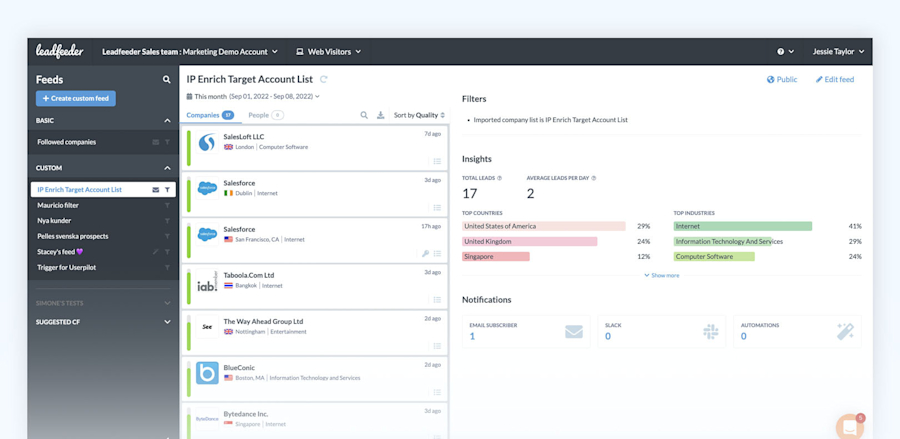
When possible, we'll give you the email address and social profiles of the contacts most likely to fit your ICP. This data is located under Contacts for each company.
2. Hunter.io
Once you know which companies visited your website, it's time to put on your detective hat. Or in this case, find a tool that does the grunt work for you.
Hunter.io is an email finding tool that locates professional email addresses in minutes.
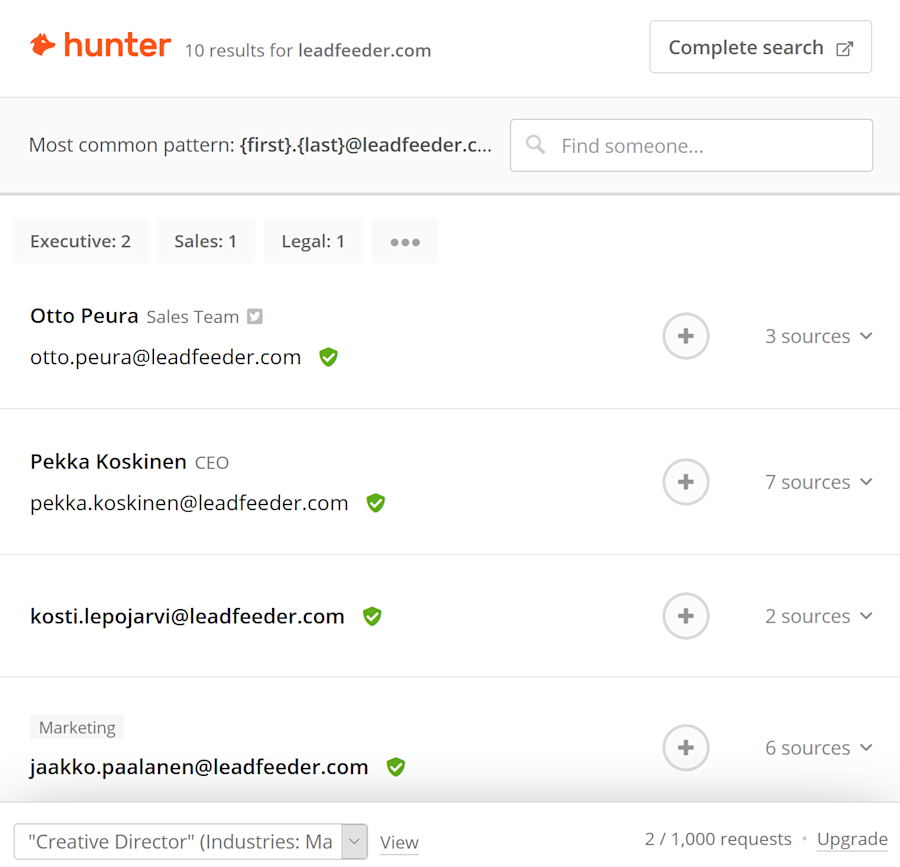
Here's how it works: Once you see a company visit your site in Leadfeeder, plug the URL into Hunter. Hunter provides the company's most common email address format for free, or you can register to get actual addresses. For example, they may tell you that the company uses <first name, last initial@company.com format.> Using this info, you can 'guess' the email of contacts.
Currently, free Hunter account holders get 25 searches a month, while paid users get access to unlimited searches, CSV downloads, search filters, and more.
3. GrowMeOrganic
GrowMeOrganic is another tool for contacting site visitors after you've identified which companies are on your site via Leadfeeder. Unlike Hunter.io, this tool doesn't provide just email addresses.
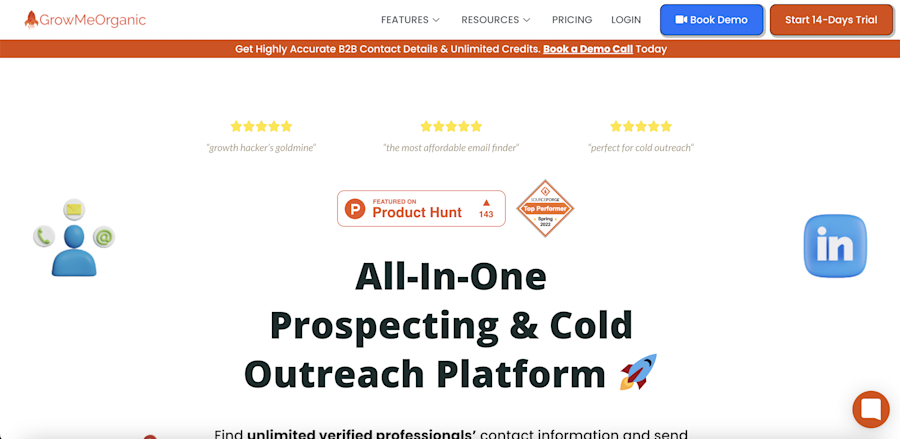
Start by finding the companies visiting your site in Leadfeeder, then look in Contacts for the best contact for your business.
Search for that contact in GrowMeOrganic, which pulls prospecting information from LinkedIn Sales Navigator. They'll deliver the name, phone number, email, and even a company profile so you can build an insanely personalized pitch.
The platform also pulls local businesses from GMB, and offers a database of 15 million B2B businesses to help you find leads even if they haven't visited your website.
4. Social Connect
Another alternative, if users don't want to hand over their email address, is social sign-in.
Rather than providing their email address, visitors can use their Twitter or LinkedIn details to access your site via an app like Social Connect. This gives you access to their account details, including (in many cases) their email address.
Why would someone be willing to log in if they won't even offer their email?
There are several user benefits to social sign-ins. First, social platforms offer more security, sometimes even two-factor authentication, so users feel more secure. Social sign-ins are also more convenient for mobile users.
Social sign-ins do tend to be more popular with B2C, but there are B2B use cases, especially for free trials and access to demos or documentation.
Comparison Summary
Tool | What It Does | Best For | How It Helps Capture Emails |
Leadfeeder | Identifies companies visiting your site via IP tracking | B2B visitor identification | Reveals companies so you can find relevant contacts |
Hunter.io | Finds professional email formats and addresses | Email discovery | Helps locate decision-maker email addresses |
GrowMeOrganic | Enriches prospect data from LinkedIn and databases | Contact enrichment | Adds phone numbers, profiles, and company insights |
Social Connect | Enables social sign-in authentication | Reducing form friction | Allows access to verified account details |
Want more leads? Capturing email addresses from site visitors is the first step.
The easiest (but arguably least effective) way to gather email addresses is to create a form, offer an ebook or white paper, and then nurture those leads.
That's the way it's always been done, but it's not the only way.
Gated content still works sometimes. But it's not the most effective way to build a list of well-qualified leads. Especially in B2B, where companies buy by committee, understanding what companies visit your site is crucial.
Using Leadfeeder, you can see precisely which companies visit your site, how often they return, and even how long they spend on a specific blog. When possible, we'll share the best contacts based on your target audience.
See how Leadfeeder works—for free. Sign up for Leadfeeder and start your 14-day free trial.

Content Marketing Manager @ Leadfeeder
Sanjana Murali is a Product Marketing Manager at Leadfeeder with more than a decade of experience in B2B SaaS product marketing and content strategy. She specializes in translating complex product capabilities into clear messaging that resonates with marketing and sales teams.
Sanjana has led product launches, developed messaging frameworks, and built content strategies that help companies understand and act on buyer intent. Her work bridging product, marketing, and customer insights informs her perspective on how businesses can identify website visitors and turn anonymous traffic into actionable sales opportunities.