60-Second Summary
Publishing great content alone rarely turns visitors into leads — most users leave without converting. To close the content loop, attract the right traffic, identify who visits, tailor offers to their needs, and keep testing.
Key takeaways: Great content is necessary but not sufficient—focus on attracting the right visitors, use analytics to find which pages drive qualified traffic, and convert with targeted offers rather than hoping traffic will self-convert.
Standout strategies & tactics: Build buyer personas from your best clients, analyze referral sources and site search via Google Analytics, identify anonymous company visitors with Leadfeeder, and deploy targeted, timed offers (top bars, exit-intent takeovers, tailored CTAs) while A/B testing with tools like Optimizely.
Real-world lessons & frameworks: Work backward from your business goal (trial signups, demos, booked services), map the intermediate steps required to reach that goal, create mid-funnel offers that match decision-makers and channels, and continuously test because what converts changes over time.
*This summary was created with AI assistance, using our original content.
When it comes to content, a lot of folks use what I like to call "The Field of Dreams Approach."
"If I just publish really great content, traffic will magically find my site and sign up for my service/buy my product!"
If it were that easy, I'd be rich.
Hell, we'd all be rich.
Unlike Ray's baseball field in the movie, however, publishing a bunch of great content isn't enough to generate a ton of leads— or, more importantly, turn that website traffic into leads.
Here's the deal — the vast majority of your visitors will leave your website without doing anything at all.
That means you've wasted time, money, and energy getting users to your website — only for them to say "Thanks, but no thanks."
That's a ton of money down the drain.
So, how do you make it right?
The key to closing the content loop and turning visitors into leads is actually pretty simple.
Find the right traffic and then figure out what they need.
Watch the full webinar here:
Note: Identify anonymous website traffic by using Leadfeeder to see companies already visiting your website. Sign up for Leadfeeder’s free 14-day free trial.
Step 1: Attract the right traffic
Let's say you have a SaaS website with an average conversion rate of around five percent.
That means for every 100 people you attract to your website, just five of them actually sign up for a free trial (which is what we're counting as a conversion in this example.)
Now, most site owners would focus on conversion optimization methods to tempt the other 95 percent of visitors to convert.
But maybe the issue isn't your conversion tactics, but rather the type of users you are attracting.
Instead of focusing on conversions first, focus on attracting the right type of traffic.
Here's how.
Look at your current client list
Start by looking at your current client list — not just anyone who buys from you, but your gold star clients. The ones that convert easily and are willing to invest heavily in what you have to offer.
Then, break that list into segments:
Who is most likely to do an initial search on your website? Keep in mind, it might not be the decision-maker — or they might not be the main decision-maker. At Leadfeeder, for example, we find it takes between three and five decision-makers at every company before a conversion happens.
Who is the decision-maker? For example, if the initial site visitor might be someone from HR, but the actual decision-maker might be at the executive level — and those two people will need different types of content and CTAs.
What channels did they find you through? Social, a partner site, organic search, paid ads? The most effective content will vary by channel.
Now, what do you do with this information?
Start by using this info to create more detailed buyer personas — which will help you create content better aligned to your traffic's needs.
Dig into Google Analytics
When it comes to understanding who your traffic is and what they do, GA is your BFF.
This is going to give you all the information you need to know about what people do once they get to your website.
Do they visit one page and leave? Do users convert more often when they read a specific blog post?
Google Analytics has your back here.
Take a look at:
Referral traffic: (Acquisition> All Traffic > Referrals) to see where the vast majority of your referral traffic comes from. Pay special attention to which pages have the highest Goal Conversion rates — those are the pages that are driving actions. (You'll have to set up goals to see this info.)
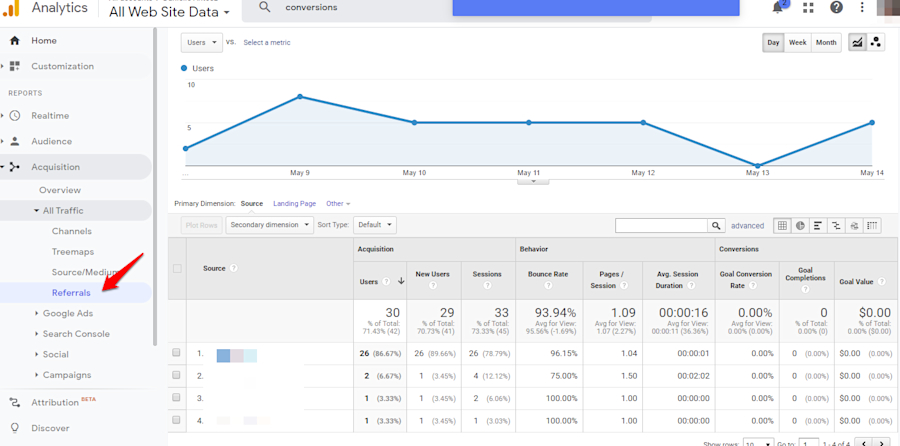
What content earns the most traffic: (Behavior > Site Content > All Pages) Keep in mind that traffic alone isn't going to tell you everything, but it is a good place to start. You'll at least know what content is attracting traffic.
What content do people search for on your site? (Behavior > Behavior Flow> Site Search > Search Terms) This will tell you what content users are actually interested in — so you can create more of that content or optimize those pages.
Next, use this info to see what content actually attracts users that are likely to use your software or buy your product. Then, create (and promote!) more of that type of content.
Step 2: Use a visitor identification tool
What happens when someone leaves your website without converting? Do you know how to reach them again?
If you are like most sites, you probably have no idea how to recapture those potential leads.
A website visitor identification software, like Leadfeeder, allows you to dig a little deeper and see which companies and industries are visiting your site.
This is information you won't find in Google Analytics, and it can be incredibly valuable.
For example, if someone visits your site, do you know what company they work for? Or how to reach them?
Leadfeeder will even narrow it down to the office location. You can see what pages appeal most to those visitors and better understand what actions they took your site.
Once you know who these prospects are, you can establish your website's goal and create a tailored offer that captures their specific interests -- and convinces them to sign up for a trial or give their email address.
Leadfeeder also makes it easier to retarget those visitors on other sites, like LinkedIn.
Step 3: Look for ways to improve traffic conversion rates
Attracting the right type of traffic is the first step — but now you need to make sure when the right traffic comes to your site, they are actually filling out a form, leaving their email address, or signing up for a trial.
Here are four questions to ask when trying to improve conversion rates:
Where is your traffic coming from?
Who is your ideal client?
What are they seeking? Why are they coming to your site?
What steps do you need to take to make sure they are actually taking the next step in the buyer journey?
Don't just think about the ultimate goal for your website; think about the ultimate goal for your business.
At the end of the day, when someone visits your website, what action do you want them to take?
Depending on your business, you might be looking to have users:
Book your services
Sign up for a free trial
Create an account
Sign up for a demo
Once you understand the action you want them to take, map the buyer's journey backward from the goal.
Ask yourself:
What do site visitors need to do or see before hiring me,
purchasing from me, or buying my product?
Here's what I mean:
Say you're an agency or a consultant with an average contract cost of around 10K. The final action you want a site visitor to take is to actually book your services, right? That is your goal.
Once you have your goal, you want to start filling in the middle part of that customer journey.
Unless your traffic is ridiculously warm, they're not going to buy a 10 or 20 grand consultation package from your website content alone.
So what do they need to do or see before they're actually going to hire you as an agency or as a consultant?
I'm gonna guess if they're hiring you for agency services, coaching, or consulting, they probably wanna hop on a call with you, right?
What information or content do they need to make that decision?
Now, if you are a SaaS company, the main goal might be a free trial.
Hellobar, for example, uses a freemium product — it is free to start, and users can upgrade within the product. Free demos or freemium trials really give people a chance to see what you can do and move them through the buyer cycle.
So now that you know what your main goal is, what's the next step? Do you show them the cool stuff your software does? Do you need to educate them about why the problem you solve is such a big deal?
This part will vary by company and industry, but working backward helps ensure that every action, every piece of content stays laser-focused on your end goal — whatever that goal is.
Step 4: Test and try again.
Once you have set your goal and you have your offer — whether that is a free trial or a webinar or what have you — you'll want to implement it and then start testing.
This is something you're going to do over and over again, so look for ways to streamline the testing process. Trust me, it's going to make your life way easier.
For example, you can use Leadfeeder to understand when you should be displaying your offers. By showing more targeted offers, you can increase conversion rates much faster.
Or, use an automated testing tool like Optimizely, which will provide data about which versions of content or landing pages perform best.
Here are a few areas to test:
A top bar with yes/no options: They integrate into the site experience seamlessly and aren't as intrusive as popups.l
Take over pages: They annoy some people, but timing is important. Hello Bar, for example, uses an exit-intent takeover, which shows when people are trying to leave the site. They've been able to collect an additional 900 emails a month with just that one change.
Different CTAs: For example, test one that pushes for an email sign up, another that suggests a white paper download, etc.
Content headlines and formats: Do question headlines drive more traffic? What about listicles, videos, etc.
Do you need to test forever?
Yeap.
Even if you find something that works really well, it might not work next month or next year.
Final thoughts
The reality is good content is not enough to turn traffic into leads — at least not on its own.
If you really want to close the loop and turn site visitors into leads, you need to pay attention to the data.
Start by figuring out who, exactly, you need to target. Then look for ways to smooth the conversion path and make it easy for users to convert by offering content customized to their specific needs.
Finally, test. Keep testing.
I am constantly surprised by what we learn about our customers and our leads by testing strategies — even ones we didn't think would be particularly effective.
Note: Identify anonymous website traffic by using Leadfeeder to see companies already visiting your website. Sign up for Leadfeeder’s free 14-day free trial.