60-Second Summary
We built a serverless data warehouse on AWS—using Glue, Lambda, Batch, Step Functions, and Redshift—and use Tableau Online for reporting. This approach speeds development and reduces infrastructure costs, but introduces testing, long-running job, and cross-stack challenges.
Key takeaways: Serverless eliminates most server ops, lowers costs via pay-for-use, and accelerates deployments, but requires new approaches for testing, debugging, and long-running workloads.
Standout strategies & tactics: Use Glue (managed Spark) with the Data Catalog and crawlers for schema centralization; leverage Lambda for language-flexible, small-batch processing (chained invocations) and AWS Batch for heavy, long-running aggregations; orchestrate with Step Functions; use Redshift + Spectrum for warehousing and query-offload; integrate Tableau via the API and enforce governance with queues and resource limits.
Real-world lessons & frameworks: Chunk large extractions to protect source systems, chain Lambdas or switch to Batch for time limits, rely on Glue Dev endpoints and local virtualenvs plus a Postgres Docker for testing, and treat the Data Catalog as the single source of schema truth to make jobs data-source-agnostic.
Pros & cons: Pros — no server management, cost savings, fast deployments, built-in scaling; Cons — hard to replicate/test locally, Lambda time limits, and added complexity when integrating non-AWS components.
*This summary was created with AI assistance, using our original content.
Within our AWS infrastructure, we've developed a Data Warehouse solution and adopted the serverless paradigm to support analytics.
It enables us to save on infrastructure costs and develop, maintain, and evolve our pipelines more efficiently.
To fulfill reporting requirements, we use Tableau Online, a cloud-based Business Intelligence solution.
So, what does "serverless" mean?
Per AWS:
"Serverless is a way to describe the services, practices, and strategies that enable you to build more agile applications so you can innovate and respond to change faster. With serverless computing, infrastructure management tasks like capacity provisioning and patching are handled by AWS, so you can focus on only writing code that serves your customers. Serverless services like AWS Lambda come with automatic scaling, built-in high availability, and a pay-for-value billing model. Lambda is an event-driven compute service that enables you to run code in response to events from over 150 natively-integrated AWS and SaaS sources - all without managing any servers."
Sounds pretty good, no? No more infrastructure management to focus on what matters — process and analyze data to steer the business and product development.
In practice, it’s not all that simple. We have a large data volume, mostly from our product data, and handling it poses several challenges.
Our serverless pipelines
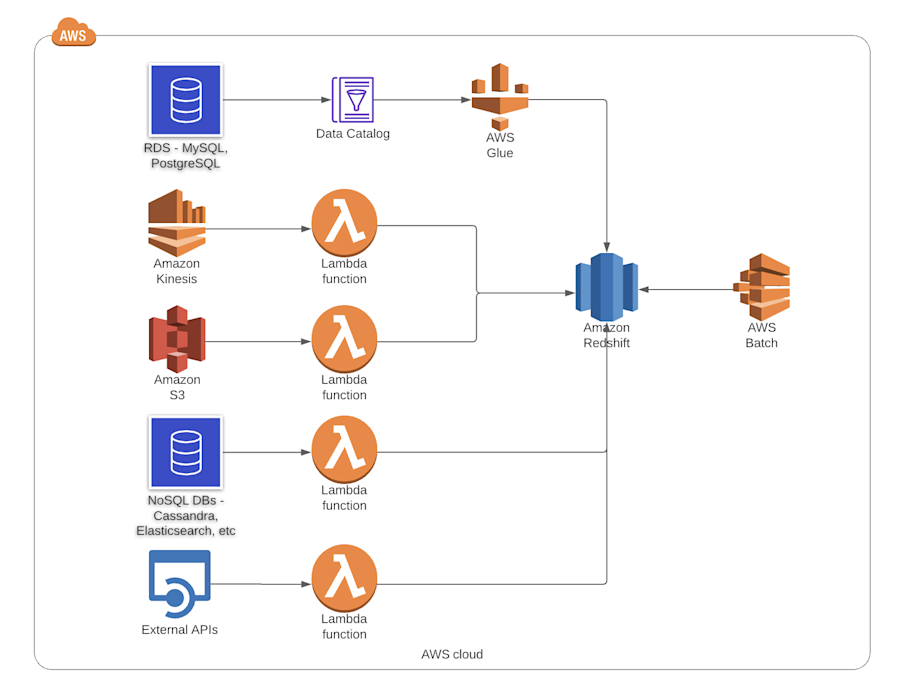
As shown in the diagram above, the main components we use for data processing are AWS Glue and AWS Lambda.
Glue is essentially a managed service for Spark, while Lambda provides serverless compute. Both of them allow us to develop and deploy code quickly.
For example, with Glue, there's no need to manage a cluster, which is a huge advantage.
Managing a Spark cluster can be overwhelming, eventually leading a team to focus on monitoring, maintaining nodes up, and ensuring jobs are submitted correctly.
Glue allows us to write a job, specify the capacity, and a few additional configuration parameters, and run it.
Of course, there are a few caveats to all this. AWS automatically provisions a cluster when a job is executed, and the cluster may take some time to become available. This is painfully true for the initial versions of Glue, but AWS has somehow mitigated this in the latest version (2.0 at the time of writing).
We do lose the fine-grained control that traditional Spark job submission provides. However, that seems more of an advantage, given the complexity of keeping all job submission parameters in line with the cluster's capabilities and availability.
An additional interesting feature of AWS Glue is the Data Catalog. This metadata repository, which we can easily parallel to the Hive Metastore, can store schemas and connection information for data sources from different systems, including AWS S3.
To update this repository, Glue includes a Crawler that can automatically maintain the schemas by scanning the source systems.
To use these data sources in our jobs, we can easily just reference the catalog.
data = glueContext.create_dynamic_frame.from_catalog(
database="mydb",
table_name="mytable")
This makes the code in our Glue jobs data-source-agnostic. Plus, as the Data Catalog can collect schemas from different systems, it provides a single unified location where all our data can be described.
We also make heavy use of Lambda to support multiple programming languages.
For analytics, we use Python, but other departments use different programming languages. Lambda provides great flexibility as you can choose whichever programming language suits best for a given problem without installing anything on any server or instance. Just create the Lambda function and start coding!
In our case, we need to read data from Elasticsearch and Cassandra, undertake some processing on that data, and load it into our Data Warehouse.
When reading data from these systems, we need to be very careful to keep their load low to avoid affecting how they serve our customers.
But at the same time, the amount of data these systems possess is huge and naturally a tremendous source of value for our product analytics.
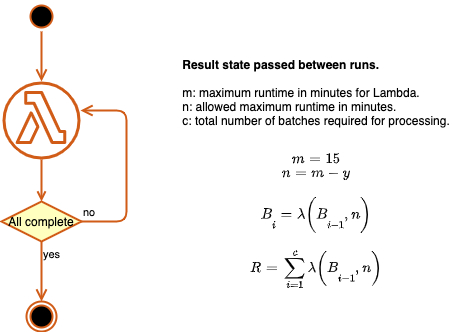
To extract data while keeping the load low, we process many small batches. Lambda has a 15-minute execution time limit, so we cannot extract all data from each source in a single function execution. To get around this, we chain Lambda executions.
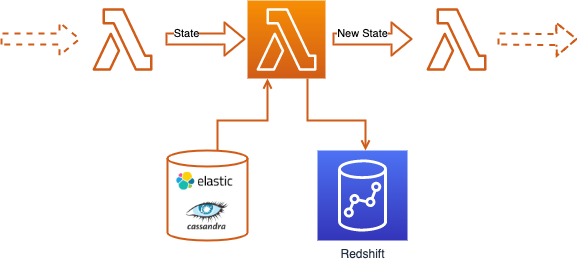
By passing a state object between function runs and updating it in each run, we can maintain a pointer indicating where processing should start and load a small batch of data in each run.
Each function instance invokes the next until the data has been processed.
This isn't ideal, so we started looking for alternatives that let us avoid worrying about time limits.
AWS provides Batch service which is designed for engineers and scientists to run large compute batch jobs. You create a compute environment, associate it with a job queue, and then define job definitions that specify which container images to run.
Compared to Lambdas, it requires a bit more setup, but on the other hand, you don’t need to worry about time limits anymore. We are currently using it to run heavy aggregations in our DWH task, which was hard to do with just lambdas.
Even though Glue, Lambda, and Batch enable fast code development and deployment, QA can be troublesome.
As more critical and complex pipelines are developed, ensuring the proper tests are run is becoming more difficult. It is impossible to replicate the serverless environment locally for unit testing.
Setting up a dedicated serverless test environment with sufficient meaningful data and metadata is quite a challenge, not to mention the associated costs.
To mitigate this, we create Glue Development endpoints whenever necessary to test code artifacts before promoting them to production.
For Lambda, since we use Python, we create local virtual environments to run unit tests and package our applications.
Also, we use a PostgreSQL Docker image to simulate Redshift, which is not ideal because there are sometimes significant differences between the two databases.
AWS Step Functions orchestrate our pipelines
To orchestrate our pipelines, we use AWS Step Functions. Step Functions a fully managed service, meaning you do not need to configure any instances.
Step functions rely on state machines and can be implemented as JSON documents. Among many other features, they allow running jobs synchronously and asynchronously, handling dependencies, parallel execution, etc.
And of course, Glue, Lambda, and Batch are fully integrated with Step Functions. Arguably, a tool supporting DAG (Direct Acyclic Graph) could be more suitable for intricate batch pipelines, until recently, no such tool was available in AWS as a managed service.
AWS now provides Apache Airflow as a managed, serverless service. For sure, we will be evaluating this in the future, but the truth is, Step functions have served us well. They are easy to implement and maintain, and provide all the features we require.
Our cloud Data Warehouse
As we rely on AWS, Redshift is the natural choice for our Data Warehouse. It has many advantages and a few shortcomings, which I will not go into detail about.
Redshift fits our serverless approach because there is no server management, and scaling vertically and horizontally is relatively simple.
Also, production-grade features such as workload management and automated snapshots are available, making it a great solution within AWS for supporting our analytics function.
Also, query performance is satisfactory and meets our reporting requirements. Recently, we also began adding AWS Spectrum to our stack.
Spectrum allows querying external data, such as data stored in S3, so you don’t need to import it into the database.
Reports, report!
Our reporting is done with Tableau Online, a cloud-based analytics service. It is the only analytics component outside of our AWS infrastructure..
On Tableau Online we can build and share reports, schedule extracts, create ad-hoc analysis, all in a very pleasant user interface — the stuff of dreams for analysts (right?!).
Without going into much detail, it provides what we need without managing any servers and scales seamlessly.
As expected, Tableau also presents its challenges. Mainly because it has a direct connection to the database, and analysts can publish reports with arbitrary SQL code and schedule them to run.
To address this issue, we have implemented several data governance measures, including separate Redshift queues for Tableau users and resource limitations.
We also started a process of moving the extract schedule to instead become part of ETL (vs using Tableau UI). This way, we'll control which queries run and when, for reporting purposes; this is mostly done via the Tableau API.
The end goal here is to integrate Tableau into our data infrastructure and manage it as any other component.
Our serverless approach accelerates our analytics & what this means for future work
Our serverless approach has enabled and accelerated the availability of analytics to our business.
This does not come without its own challenges and limitations, but it does allow significant cost savings while delivering consistent quality and facilitating agile change management.
As more serverless tools become available, careful consideration should be given to choosing the most appropriate tools, evaluating their costs and benefits.
From our experience, the pros and cons of serverless analytics are:
Pros:
No server management. No need to manually manage server instances. All the computing resources can be easily configured.
Reduced cost, only pay for infrastructure when used.
Fast deployments.
Cons:
Testing and debugging are quite challenging. Difficult to replicate the environment locally.
Not very good for long-running processes, due to Lambda limits.
Quite complicated to add components outside of the AWS stack.
Stay tuned. More on this to come soon!