60-Second Summary
B2B marketers often can’t trust standard Google Ads reporting because it’s built for B2C patterns. Leadfeeder’s Google Ads integration surfaces company-level visibility, extends attribution windows, and ties online ad engagement to CRM outcomes for clearer campaign ROI.
Key takeaways: Leadfeeder turns anonymous clicks into company-level insights, extends tracking beyond Google’s 90-day window, captures multi-user and cross-device journeys, and connects visits to CRM data so you can measure true Google Ads influence on revenue.
Standout strategies & tactics: Combine Leadfeeder’s IP+cookie company attribution with Google Ads and CRM integrations, filter by ICP and campaign fields, export keyword and landing page data to Looker Studio, and surface high-value visiting companies to outbound and sales teams.
Real-world lessons & frameworks: Move from single-touch to company-level multi-touch attribution, attribute influenced revenue across channels, account for offline conversions via CRM syncs, and prioritize campaign optimization based on company engagement quality rather than raw conversion counts.
Quick implementation steps: Add Leadfeeder script, enable the Google Ads integration, connect your CRM, set ICP and ad-data filters, and push identified accounts to sales or reporting to start attributing and optimizing ads for revenue.
*This summary was created with AI assistance, using our original content.
Most of the platform’s targeting, tracking, and reporting are designed for B2C use cases. As a result, whether you are running Google Ads for B2B SaaS or Google Ads for B2B tech, marketers struggle to understand which campaigns actually drive qualified leads and revenue. The data often lacks context, making it difficult to connect ad performance to real business outcomes or optimize campaigns effectively.
This is where the Leadfeeder and Google Ads integration makes a difference. It gives B2B marketers visibility into the companies behind clicks, helping them track performance more accurately and turn ad data into actionable insights.
What is Leadfeeder and How Does Its Google Ads Integration Work?
Leadfeeder is a sales and marketing tool that identifies companies visiting your website. By placing a small bit of code on your website, you can track and filter identified companies based on a range of criteria, including their location, industry, what pages they visit, their source, or even company size.
That data becomes even more valuable when connected to your existing tools. Leadfeeder integrates seamlessly with CRMs and marketing platforms such as Salesforce, Pipedrive, Zoho, HubSpot, MailChimp, ActiveCampaign, and Zapier, making it easier to align marketing insights with sales action.
To take this a step further, Leadfeeder’s Google Ads integration connects your advertising data with real company-level insights. Instead of relying only on clicks and conversions, you can see which businesses are actually engaging with your campaigns and how they move through your site.
With this integration, you can:
Identify all companies engaging with your campaigns
Discover the exact keywords attracting target accounts
Track the entire customer journey from your campaigns
Monitor the behavior of multiple decision makers
Extend your tracking beyond Google's 90-day limit
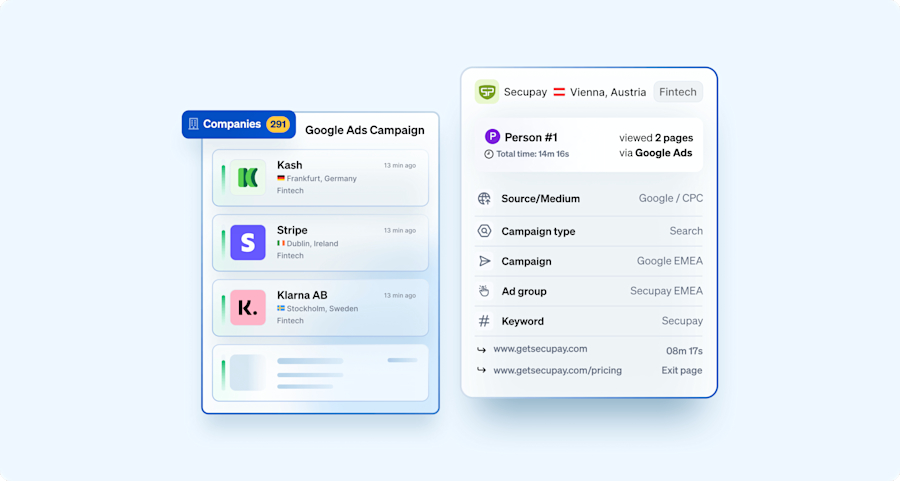
Together, these capabilities give B2B marketers a clearer, more complete view of campaign performance and help turn ad data into actionable revenue insights.
Interested in learning how to apply this in practice? Keep reading for strategies to get the most out of Leadfeeder’s Google Ads integration
How to Redefine Your B2B Google Ads Strategy and Tracking with Leadfeeder
Measuring the impact of B2B Google Ads can be challenging. But integrating Leadfeeder with Google Ads can address many, if not all, of the challenges associated with tracking the impact of B2B Google Ads campaigns. Let’s see how.
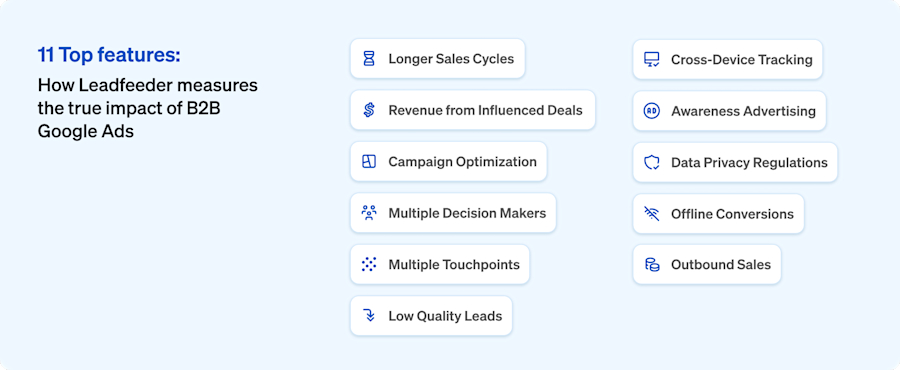
1. Longer Sales Cycles
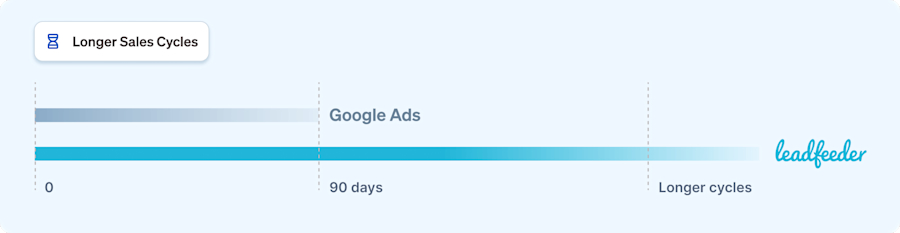
B2B transactions often have longer sales cycles than B2C transactions. It can take weeks, months, or even years from the initial contact to closing a deal. Google Ads can only track conversions that happen 90 days from the initial ad click. This makes it difficult to attribute a conversion back to the first ad click.
How can Leadfeeder help:
Leadfeeder extends the tracking window beyond Google Ads' 90-day limit by identifying website visitors, including those who didn't convert immediately but may return later to complete a purchase. By capturing this extended data, Leadfeeder helps attribute conversions back to the initial ad click, even if they occur outside the standard tracking window.
This allows you to attribute value to touchpoints along the way, even if they don't directly result in a conversion, and gain a more accurate understanding of your campaign's true impact.
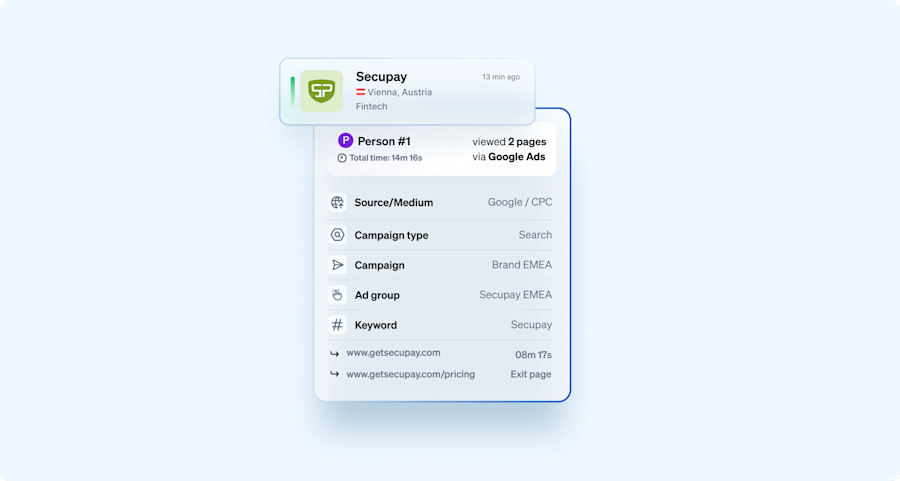
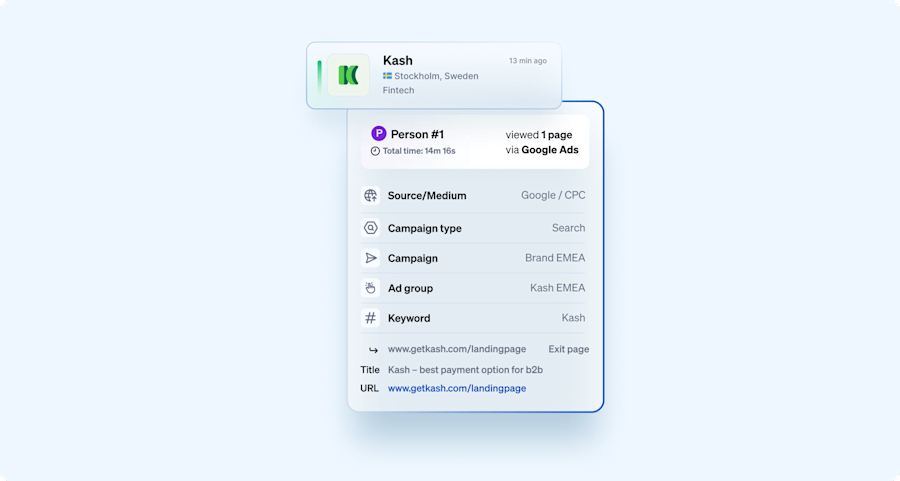
We show you data such as Campaign type, Campaign, Keyword, and Ad group that tell you which specific ad brought the company to the website. The Keyword provides context for the search term they used on Google that triggered the specific ad.
2. Revenue from Influenced Deals
But that only works if the click tells the whole story. Sam O'Brien, VP of Marketing at Leadfeeder, puts it bluntly: "We can track that Google click and say 'Google generated this much revenue' - and that's amazing, right? But factually, it's incorrect. For somebody to even search the term on Google, they've already become aware. Maybe they're searching our brand terms, or maybe they're just aware of our solution."
That’s the gap single-touch attribution misses. CRMs and other revenue tracking software typically rely on these models to determine the source of leads and revenue, assuming that only the first or last touch point before conversion should be given credit for the conversion.
However, when a customer's journey involves multiple touchpoints across multiple channels, these models struggle to accurately assign revenue to Google Ads. If a lead interacts with Google Ads at some point but converts through a different channel or later, the CRM will not credit Google Ads.
How can Leadfeeder help:
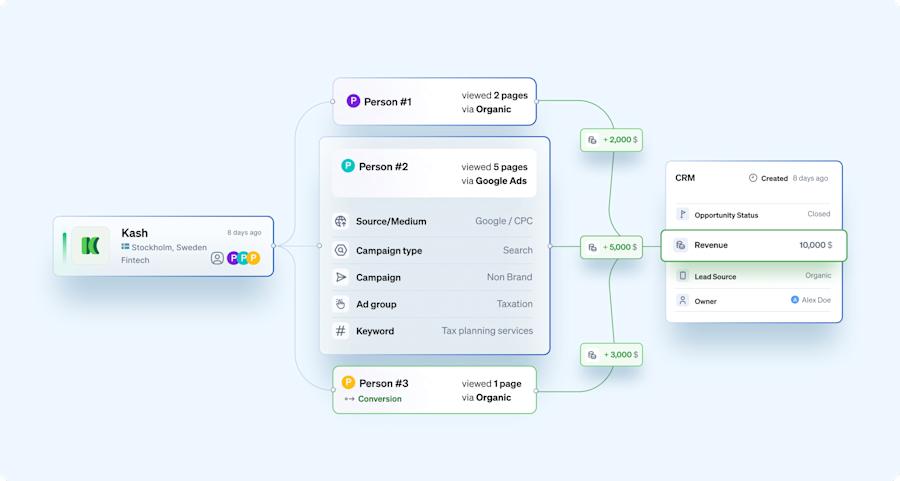
Leadfeeder's integration with Google Ads and CRMs provides a more comprehensive view of the customer journey, helping address this issue. Unlike traditional single-touch attribution models, Leadfeeder tracks the entire customer journey across multiple users and channels.
This means that even if a lead interacts with Google Ads but converts through a different channel or at a later time, Leadfeeder can still attribute revenue to Google Ads based on its contribution to the overall customer journey. This comprehensive view enables businesses to understand the true impact of their Google Ads campaigns on revenue, facilitating more informed decision-making and optimization.
3. Campaign Optimization
B2B companies often struggle to optimize their ad campaigns effectively. Identifying which keywords and ad copy generate the most valuable website traffic remains a daunting challenge. Without clear insights into which paid ad campaigns and landing pages attract high-value companies, marketers struggle to refine ad targeting, adjust bidding strategies, and allocate budgets more effectively for maximum ROI.
How can Leadfeeder help:
Understanding the search terms that drive conversions is vital to optimizing your Google Ads strategy. With Leadfeeder, you can pinpoint the exact keywords, landing pages, or campaigns driving traffic from your most valuable accounts, enabling you to prioritize and focus your efforts effectively. Moreover, you can also pull this data into a Looker Studio report with our Looker Studio integration.
4. Multiple Decision Makers in Google Ads B2B Lead Generation
B2B purchases usually involve multiple decision-makers and stakeholders within an organization. Each decision-maker may interact with different touch points along the sales funnel. Google Ads can’t connect visits from multiple employees, so only conversions from stakeholders who submitted a lead are measured, leaving much of the impact from your campaigns unaccounted for.
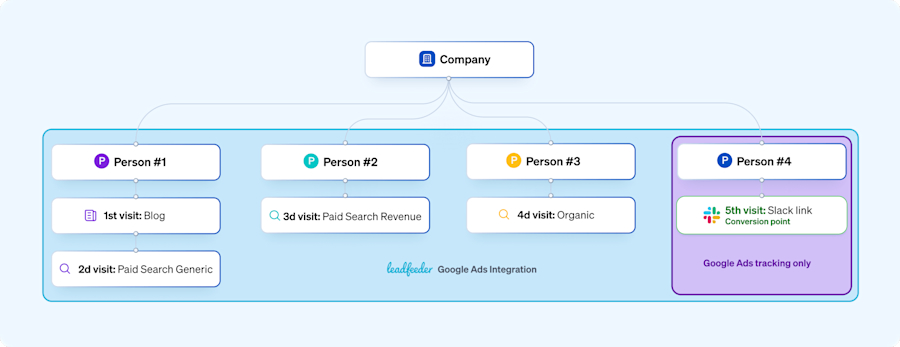
Under almost all tools currently available on the market. This purchase would be attributed 100% to Direct, regardless of what attribution model you use. This is because all these tools use cookie-based attribution models, which can only tie visits from the same user on the same device together.
In this example, only the visits from Person 4 are considered for attribution, even though they played only a very limited role in the decision-making process. They had only 1 visit from Slack, which is generally tracked as Direct. Do you think this accurately reflects what is driving conversions?
How can Leadfeeder help:
By leveraging a combination of IP and cookie-based tracking, Leadfeeder moves from individual to company-wide attribution models, providing a more comprehensive view of lead generation.
For instance, consider Company A's journey: Maria, a Product Marketer, reads a blog about Interactive Demos (1st Visit - Blog). The next day, she Googles "interactive demo software" on her phone and clicks on an ad (2nd Visit - Paid Search Generic). Later, she shares the software name, "DemoStack," with John, who then clicks on a branded ad (3rd Visit - Paid Search Brand).
John and Maria recommend DemoStack to their Team Lead, Anna, who researches further and clicks on an organic listing (4th Visit - Organic). Anna then shares a Slack link with Lisa, the VP of Marketing, prompting Lisa to purchase the tool (5th Visit - Slack link).
With Leadfeeder, all website visitor activities are tracked, not just lead form submissions. This allows for better attribution of value to touch points along the customer journey, even if they don't directly lead to a conversion.
For instance, Leadfeeder would capture all five visits from Company A's employees, providing insights into the true impact of each touchpoint on lead generation. By understanding the entire customer journey, from initial awareness to conversion, you will be able to identify high-performing channels and ultimately drive better results from the marketing efforts.
5. Multiple Touchpoints
B2B buyers typically conduct extensive research before making a purchase decision. They may interact with various touchpoints, such as ads, websites, social media, emails, and sales representatives, before converting. Attribution models struggle to accurately assign value to each touchpoint in the buyer's journey.
How can Leadfeeder help:
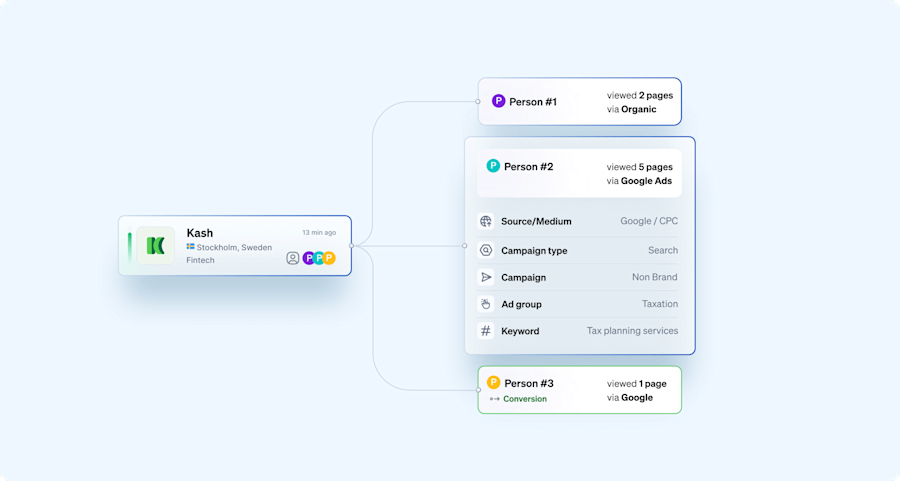
Leadfeeder tracks website interactions, enabling businesses to understand touchpoints beyond ad clicks throughout the buyer's journey. This enables more accurate value attribution to each touchpoint and a better understanding of the customer's path to conversion.
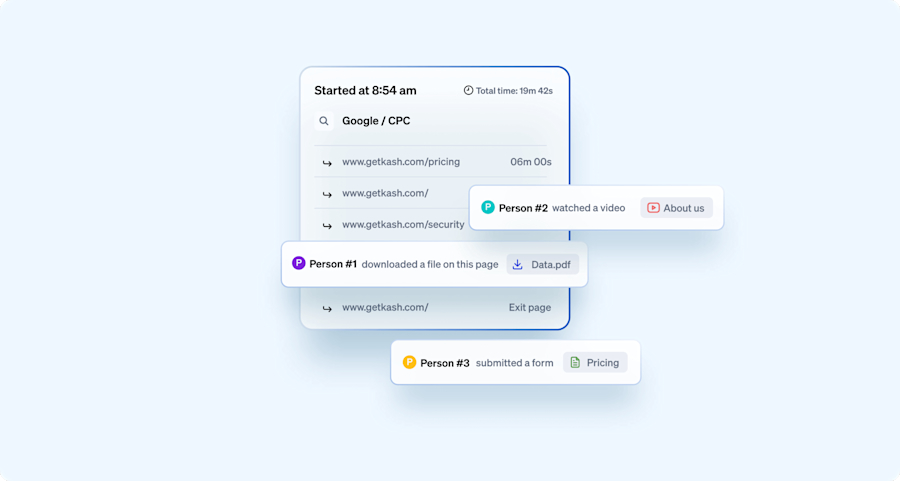
In the images below, you can see that Person 1 has downloaded a file, Person 2 submitted a form, and Person 3 watched a video. Leadfeeder captures all interactions that occur after your ICP visits your website from your ads. This gives you a holistic view of what your ICP is interested in on your website.
6. Data Privacy Regulations
Data privacy regulations, such as the General Data Protection Regulation (GDPR) and cookie consent requirements in Europe, have significantly impacted how businesses measure Google Ads conversions. These regulations aim to protect individuals' privacy by imposing strict rules on how companies collect, process, and store personal data.
Under GDPR, businesses must obtain explicit consent from users before collecting their personal information, including data collected through cookies for tracking purposes. This means that advertisers using Google Ads must obtain consent from website visitors before deploying cookies to track their online behavior, including ad interactions and conversions.
In addition to data privacy regulations like GDPR and cookie consent requirements, another factor complicating the measurement of Google Ads conversions is the trend of browsers increasingly disabling third-party cookies by default.
Major browsers such as Safari and Firefox have implemented measures to restrict the use of cookies for tracking users across websites, aiming to enhance user privacy and security. As a result, advertisers relying on cookies for tracking conversions may face significant limitations in accurately measuring the effectiveness of their Google Ads campaigns.
As a result, measuring Google Ads conversions has become more challenging for businesses operating in Europe, making it harder for advertisers to analyze and optimize their campaigns effectively.
How can Leadfeeder help:
Leadfeeder can help solve the challenges posed by data privacy regulations and browser restrictions on cookie tracking by providing an alternative approach to understanding website visitor behavior and identifying potential leads.
Unlike traditional cookie-based tracking methods, Leadfeeder uses IP address data to match website visits to specific companies, enabling businesses to see which organizations are engaging with their website content.
By focusing on company-level data rather than individual user data, Leadfeeder ensures compliance with GDPR regulations while still enabling businesses to identify and prioritize high-potential leads.
Additionally, Leadfeeder integrates seamlessly with Google Ads, providing businesses with a comprehensive view of website traffic and enabling them to attribute conversions to specific campaigns, ad groups, and keywords. This allows advertisers to overcome the limitations of cookie-based tracking and optimize their Google Ads strategies effectively, even in the face of evolving privacy regulations and browser restrictions.

7. Offline Conversions
Many B2B transactions, especially high-value ones, are completed offline through phone calls, meetings, or other channels. Tracking these offline conversions back to online ads is inherently difficult and often requires additional tools or manual processes.
How can Leadfeeder help:
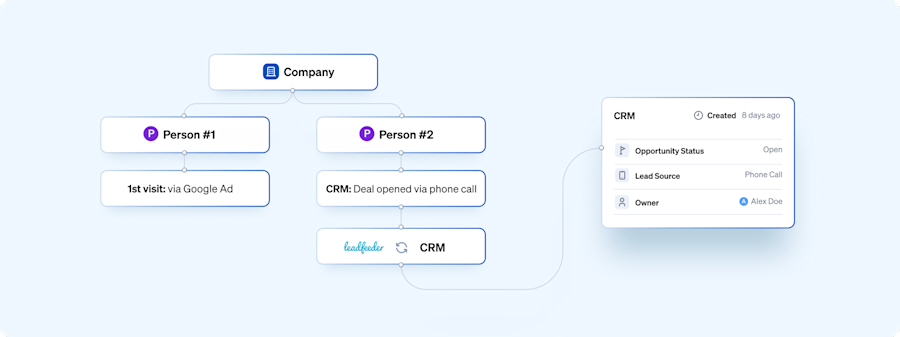
While Leadfeeder primarily focuses on online interactions, integrating it with CRM systems can facilitate tracking of offline conversions back to online ads. Let’s say Person A from a company landed on your product via your Google ad campaign. They were impressed and informed their boss about it, who decided to call the company directly.
A deal is opened for that company in the CRM after the call. This data is synced with Leadfeeder via our CRM integrations, and we now start showing you visits from that company, backtracking to the first time they visited your website from the Google ad campaign.
By connecting online and offline data, like stated in the example above, businesses can gain a more holistic view of campaign effectiveness. You can seamlessly sync data between Leadfeeder and your CRM system, allowing you to see how leads generated through Google Ads are progressing through your sales pipeline.
This visibility enables you to identify bottlenecks, optimize your sales process, and ultimately drive more revenue from your advertising investment.
8. Low Quality Leads
B2B Google Ads campaigns often produce a high percentage of leads that are of little or no value to the advertiser. These could be from B2C, students, or just fake leads, yet, using Google Ads standard conversions, they would all be counted as conversions, and worse still, they would be valued equally as a conversion from a company in your ICP.
This issue is compounded when using automated bidding strategies, as Google's algorithms assign equal value to all conversions, making it simpler for low-quality leads to proliferate. Consequently, the campaign may increasingly attract irrelevant or low-value leads over time.
How can Leadfeeder help:
Leadfeeder focuses on identifying companies visiting the website, filtering out irrelevant or low-quality leads. You can use our custom feed filters for all the ad data-related fields introduced in the visit to filter and qualify leads coming from Google Ad campaigns.
This ensures that only valuable leads from companies matching the ideal customer profile (ICP) are considered, providing a more accurate representation of campaign performance.

9. Cross-Device Tracking
B2B buyers often use multiple devices (desktops, laptops, smartphones, etc.) during their research and decision-making process. Tracking user behavior across devices and accurately attributing conversions to the right device and ad interaction is complex. Google Ads can only track across devices if you are logged into a Google Account on both devices. This is less likely to happen on business devices.
How can Leadfeeder help:
Leadfeeder's tracking isn't reliant on users being logged into a Google Account on both devices. It identifies website visitors by IP address, enabling cross-device tracking even on business devices where users may not be logged into Google Accounts.
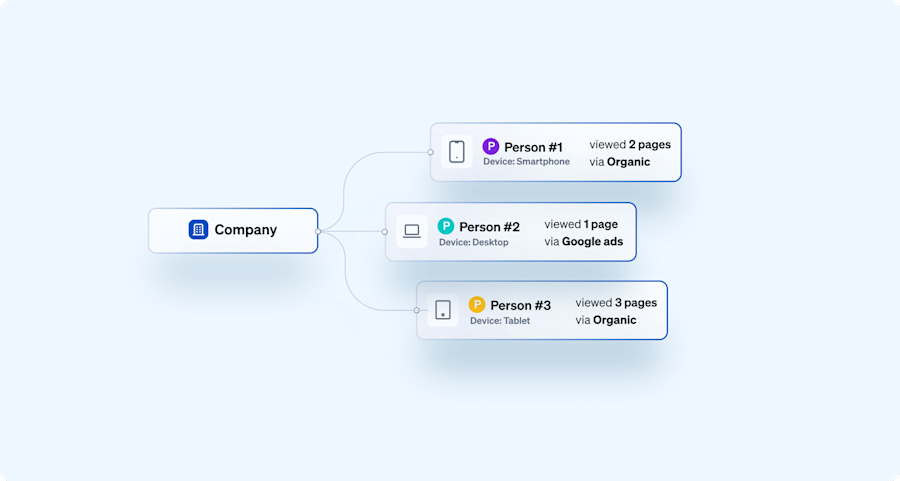
As you can see below, we track visits from mobile devices, desktops, and tablets, and highlight this so you can differentiate between visits by device. You can also use our custom feed filters to exclude visits from specific devices.
10. Awareness Advertising
Tracking the effectiveness of non-search campaigns designed to raise awareness, such as Display or YouTube campaigns, poses a considerable challenge in Google Ads. The targeting options in Google Ads are very B2C-focused, making it difficult to control campaign reach. On top of this, they don’t produce many conversions, making it difficult to gauge if your target companies are noticing your ads.
How can Leadfeeder help:
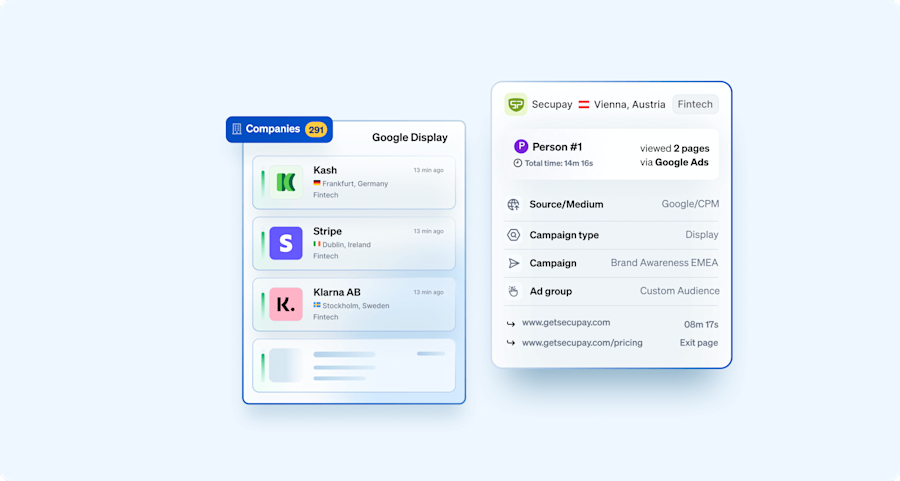
Leadfeeder complements Google Ads' limited tracking for awareness campaigns by providing insights into website visits from target companies. Even if these campaigns don't produce many direct conversions, Leadfeeder helps gauge whether the intended audience is engaging with the brand's online presence.
11. Outbound Sales
Companies using outbound sales strategies face a challenge in fully leveraging Google Ads campaigns because it is difficult to connect online ad interactions with offline sales activities. This results in a lack of visibility into the effectiveness of ad campaigns in driving leads and engagement from target accounts outside of immediate online conversion actions.
How can Leadfeeder help:
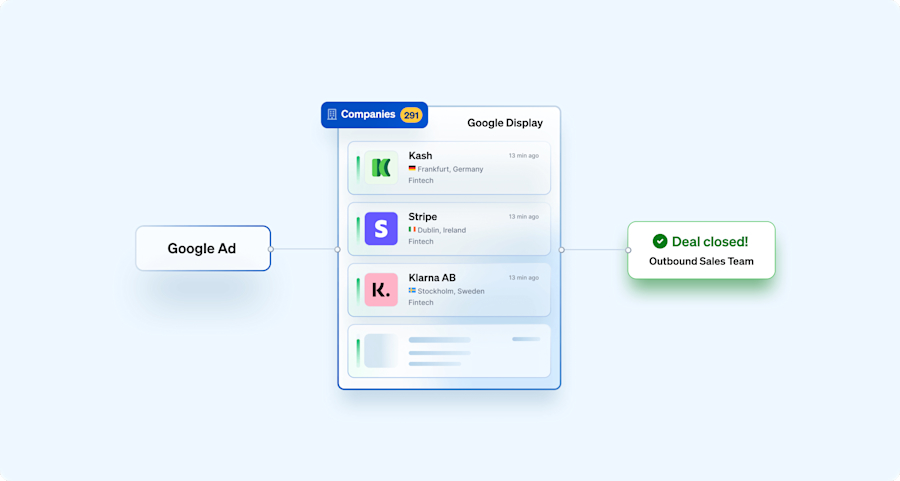
Leadfeeder's Google Ads integration can transform Google Ads campaigns for companies with outbound sales motions by bridging the gap between online ad interactions and offline sales activities.
It does this by identifying the companies that visit a website after clicking on a Google ad, even if those visitors don't convert immediately. This allows businesses to see which companies are engaging with their ads and track their website activity over time.
By integrating this data with CRM systems, businesses can attribute Google Ads website visits to specific companies and track their progress through the sales funnel, providing better insight into the impact of their ad campaigns on outbound sales efforts.
On top of this, B2B marketers can also use Leadfeeder to identify companies visiting the website from their Google ad campaigns and share them with their outbound team to proactively engage these prospects, nurturing relationships and driving conversions effectively.
How to Get Started with Leadfeeder’s Google Ads Integration?
If you are already a Leadfeeder user, you can just go to the Integrations overview page under Settings and set up the Google Ads integration by following this help article. In a few minutes, we will sync data from the past 7 days, and it will be visible in Leadfeeder.
If you are new to Leadfeeder, you can sign up for a 14-day free trial to take the product for a spin.
The integration between Leadfeeder and Google Ads offers B2B marketers a wealth of valuable insights to enhance their advertising strategy. By gaining visibility into engaged companies, understanding the keywords that drive conversions, tracking the full customer journey, monitoring deal progression, and measuring the impact of display ads, businesses can unlock new growth opportunities and drive better results from their Google Ads campaigns.
With these powerful tools at their disposal, marketers can gain a deeper understanding of their B2B Google Ads impact and see clear B2B Google Ads examples of what is driving revenue.