Testing works when you isolate one variable: the subject line. Keep everything else constant so you can confidently attribute performance differences to the headline alone. The same logic applies to segmentation. Test within similar personas and buyer stages, because a subject line that crushes with VPs often falls flat with ICs.
This guide gives you 50+ proven B2B subject line templates organized by scenario, a repeatable framework for writing your own, and a testing playbook your team can use weekly.
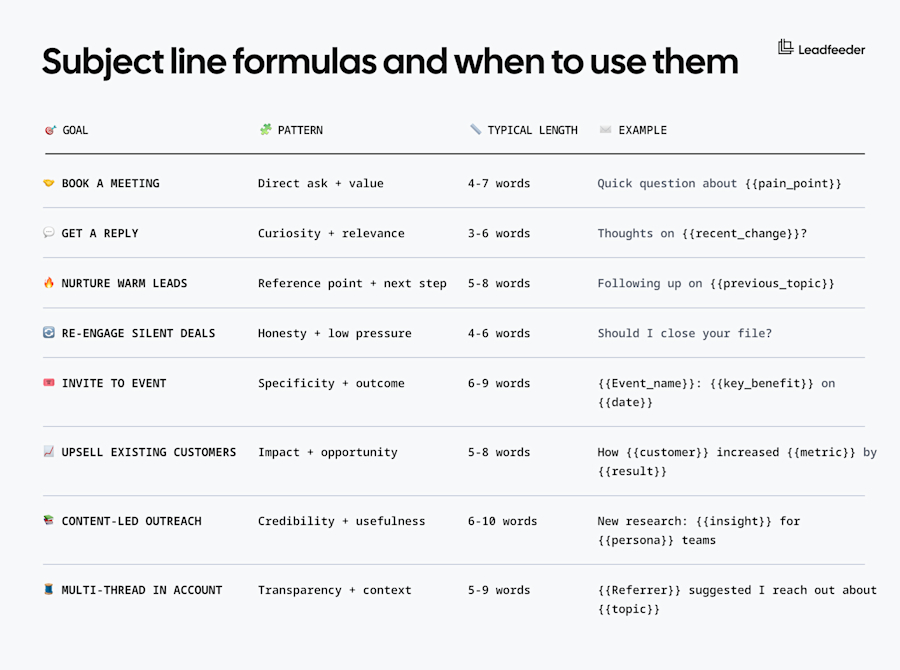
Quick reference: Subject line formulas and when to use them
Use this table to quickly match your goal with the right subject line pattern.
50 best B2B cold email subject lines by scenario
Good email subject lines gets opens, but the message inside must deliver. These business email subject line examples work as starting points and should be customized with real triggers, pain points, or account-specific context. Variable tokens like {{company_name}} or {{pain_point}} signal where to personalize.
Cold outbound to net-new prospects
When to use: First touch to accounts with no prior relationship. Best for one-to-one outreach, account-based marketing (ABM), or highly targeted lists where you have genuine context about the prospect or their company.
Why it works: Cold outreach demands relevance immediately and generic pitches get deleted. These subject lines earn opens by demonstrating you've done your homework or by being concise enough to feel personal, not automated.
Very short, conversational hooks
These work for executives and busy decision makers who scan their inbox quickly.
“Quick question” Works for senior executives who value brevity. Keep the email equally short.
“{{First_name}}?” Use when you have a warm referral or valid reason to reach out casually. Feels like internal communication.
“Thoughts on {{topic}}?” Best when the topic is timely (recent news, funding round, content they published).
“{{Company_name}} + {{your_company}}” Simple partnership or collaboration framing. Only use if there's logical overlap.
“Noticed {{observation}}” Most effective when you've spotted something specific about their company or market. Keep the observation genuine and relevant.
Pain or outcome-oriented lines
Lead with the problem they care about or the result they want to achieve.
“Reducing {{pain_point}} at {{similar_company}}” Social proof plus relevance. Replace {{similar_company}} with a recognizable peer or competitor.
“{{Metric}} improvement for {{persona}} teams” Outcome-focused. For example, “23% faster sales cycles for enterprise teams.”
“{{Company_name}}'s {{problem}} (and a fix)” Direct but not pushy. Only use when the problem is visible (job postings, tech stack gaps, public challenges).
“How {{competitor}} solved {{pain_point}}” Competitive trigger. Ideal when you know they're evaluating alternatives or losing deals to a competitor.
“{{Industry}} companies are switching to {{approach}}” Trend-based. Send this when you have data or case studies backing the claim.
Trigger-based lines
These work best for one-to-one and ABM when you have real signals like content engagement, hiring activity, funding announcements, or website intent.
“Saw you're hiring for {{role}}” Hiring signals intent to scale. Connect the role to a pain your solution addresses.
“Congrats on {{funding_round}}” Timing matters. Reach out within two weeks of the announcement while they're in growth mode.
“Your team visited our {{content}} page” Ideal when you have website visitor tracking (like Leadfeeder). Reference high-intent pages: pricing, integrations, case studies, or competitor comparison pages.
“Following your {{webinar/podcast/article}}” Content engagement shows active interest in the problem space. Refer to a specified takeaway.
“{{Company_name}}'s {{integration}} + {{your_product}}” Tech stack fit. Only use when you integrate with tools they already use and the connection is obvious.
Common mistakes: Using “Re:” or “Fwd:” without prior conversation can feel dishonest and often gets marked as spam. The same goes for claiming triggers you can't verify (“noticed your post” when they haven't posted in months) and sending personalized lines at scale when triggers don't apply (funding congrats to 500 companies when two got funded).
Warm prospects and booking meetings
When to use: Follow-ups after demos, calls, or prior conversations. Also for scheduling meetings with engaged prospects or multi-threading within target accounts.
Why it works: Warm doesn't mean they remember you. Specificity helps. Mention prior touchpoints, shared context, or clear next steps. For booking meetings, time clarity and outcome focus reduce friction.
Post-demo and follow-ups
Use these after conversations to maintain momentum and reference explicit discussion points.
“Following up: {{specific_topic}} from our call” Ties back to a conversation point. Better than a generic “checking in” message.
“{{Question}} you asked about {{feature}}” Shows you listened. Use this when they raised a certain question or objection during the demo.
“The {{resource}} I mentioned” Simple, helpful follow-up when you promised to send something. Keeps the conversation moving.
“Next steps for {{company_name}}” Assumes the deal is moving forward. Best for mid-funnel prospects showing intent.
Scheduling and meeting requests
Direct, time-specific lines that reduce friction and make booking easy.
“15 minutes tomorrow at 2 PM ET?” Direct meeting request with time. Most effective when they've already expressed interest. Spell out time zones to avoid confusion.
“{{Referrer}} said you're the right person” Multi-threading within an account. Name the internal referral explicitly for credibility.
“Quick sync on {{initiative}}” Best for scheduling internal alignment calls or executive briefings. Replace {{initiative}} with their project, quarter goal, or launch.
“{{Event_name}} on {{date}}: save your spot” Event invitations. Include the outcome or key speaker to increase interest.
“Confirmed: {{topic}} discussion on {{day}}” Meeting confirmation. Use this to reduce no-shows by restating the meeting purpose and time.
“Rescheduling our {{date}} meeting” When you need to move a meeting. Include alternative times in the body.
Multi-threading and recaps
Coordinate across teams and close loops after meetings.
“Talking to {{colleague}} about {{topic}} too” Transparency for multi-threading. Shows you're coordinating across their team, not spamming.
“Thanks for your time: {{next_action}}” Post-meeting recap with a clear call to action. Replace {{next_action}} with what they agreed to (trial signup, intro to finance, security review).
Common mistakes: Using vague phrases like “just checking in” or “circling back” without context. For multi-threading, failing to mention who referred you makes it feel like cold spam. Always specify time zones when booking meetings across regions.
Re-engaging silent or lost deals
When to use: Late-stage sequences when a prospect has gone dark after demos, proposals, or multiple follow-ups. Also for deals marked closed-lost that may reopen later.
Why it works: Honesty and low pressure work better than persistence. These subject lines make it easy to reply with a simple yes or no, reducing friction. They also earn respect by acknowledging reality instead of pretending nothing happened.
Breakup and honesty lines
Direct, low-pressure subject lines that acknowledge the silence and make it easy to respond.
“Should I close your file?” Classic breakup email subject line. This is your last attempt. Make the body email equally direct.
“Is this still a priority?” Softly asks if timing changed. Leaves the door open without guilt.
“Are you the wrong person?” Offers an out or an alternate contact. Many reps use this to find the real decision maker.
“Wrong timing?” Acknowledges that priorities shift. Leaves room for a future conversation without pressure.
“Last email from me” Sets clear expectations. Use only at the end of a sequence, and mean it.
Feedback and routing alternatives
Ask for direction or offer to find the right contact when your current thread has stalled.
“{{Company_name}}: still evaluating or on hold?” Direct question. Useful when a deal stalls mid-evaluation and you suspect budget or internal politics.
“Quick favor: what changed?” Soft ask for feedback. Best when you had momentum then silence. Frame it as learning, not selling.
“Alternate contact at {{company_name}}?” Assumes your current contact isn't responsive. Save this for when you've tried multiple times and need to multi-thread.
Common mistakes: Guilt-tripping (“I've reached out five times”), fake urgency (“This offer expires Friday”), or a passive-aggressive tone. These burn relationships and hurt your brand. Keep it respectful and low pressure. A breakup email should give them permission to say no, not manipulate them into a reply.
Customer expansion, cross-sell, and upsell
When to use: Outreach to existing customers about new products, additional seats, upgrades, or expanded use cases. Effective when tied to clear value milestones, adoption signals, or business outcomes already achieved.
Why it works: You already have trust. Speak to their results, usage patterns, or team growth to show you're paying attention. Avoid sounding like a cold pitch. Frame expansion as the logical next step, not a separate sale.
Results and growth-based expansion
Lead with the impact they've already achieved or capacity needs driven by their growth.
“{{Company_name}}'s results after {{timeframe}}” Lead with impact. Use real metrics from their account (response rates up 30%, deals closed faster, cost savings).
“{{Team}} is growing, your plan might not be” Tied to hiring signals or seat usage approaching limits. Use when you can see they need more capacity.
“How {{similar_customer}} scaled from {{baseline}} to {{result}}” Social proof from a peer customer. Works best when the comparison company is in the same industry or stage.
“You're using {{feature_A}}, have you tried {{feature_B}}?” Product-led expansion. Best suited when adoption data shows they'd benefit from an adjacent feature or module.
“{{Executive_name}}, quick update on {{team}}'s progress” Executive-level expansion email. Lead with outcomes their team achieved, then introduce the next capability.
Feature and capability expansion
Introduce new capabilities or use cases based on their expressed needs or usage patterns.
“Adding {{use_case}} to your {{current_product}} setup” Cross-sell based on a new use case. Only send when you know their team has this need (support tickets, feature requests, conversations with their team).
“{{Metric}} unlock: next step for {{company_name}}” Milestone-based. Examples: "Pipeline unlock" when they hit lead volume thresholds, "Scale unlock" when usage data shows readiness for enterprise tier.
“Your team asked about {{capability}}” Reference real questions from their users or admins. Shows you listen to their feedback and have a solution ready.
Common mistakes: Expansion emails that ignore current usage or results feel like new sales pitches. Avoid generic upsell language. Always tie the expansion to something about their account like growth, results, or expressed needs. Don't send these emails from marketing automation without account context.
Newsletter and content-led outreach for B2B
When to use: Outreach built around thought leadership, original research, case studies, or educational content. Best for warming cold audiences, nurturing early-stage leads, or positioning your team as experts before asking for meetings. These email marketing subject lines differ from sales-focused hooks by leading with value instead of asks.
Why it works: You earn attention by providing value first. The subject line should promise useful insights or credible information, not clickbait. Content-led emails build trust and keep your brand top of mind without asking for anything immediately.
“New data: {{insight}} for {{industry}} teams” Lead with research findings. Only use when you have legitimate data or original research to share.
“How {{company}} reduced {{metric}} by {{percentage}}” Case study format. Use real customer names and results when you have permission to share them publicly.
“{{Number}} lessons from {{experience}}” Experience-based content. For example, “5 lessons from scaling outbound to 50 reps”
“Why {{conventional_wisdom}} doesn't work anymore” Challenge status quo thinking. Best when you can back it up with data or fresh perspective.
“{{Persona}} benchmarks for {{metric}} in 2026” Industry benchmarks and trends. Use actual data points, not guesses. This works when timed around planning cycles.
“{{Topic}} mistakes {{percentage}} of {{persona}} teams make” Problem awareness content. Balance criticism with useful guidance. Don't just point out mistakes without offering solutions.
“Your monthly {{topic}} brief: {{date}}” Newsletter or digest format. Use this sparingly and only when you consistently deliver valuable content. Consistency matters more than frequency.
Common mistakes: Using curiosity gaps that mislead (“You won't believe this trick”), making bold claims without data, or writing subject lines that overpromise and under-deliver. Content-led outreach lives or dies on credibility. If your subject line promises insights but the email delivers a sales pitch, you lose trust permanently. Match your subject line to what's actually inside.
Frameworks: How to write your own high-performing subject lines
Templates are useful starting points, but you need a system for writing subject lines that work for your audience and offer. These frameworks help you evaluate and improve any subject line before you hit send.
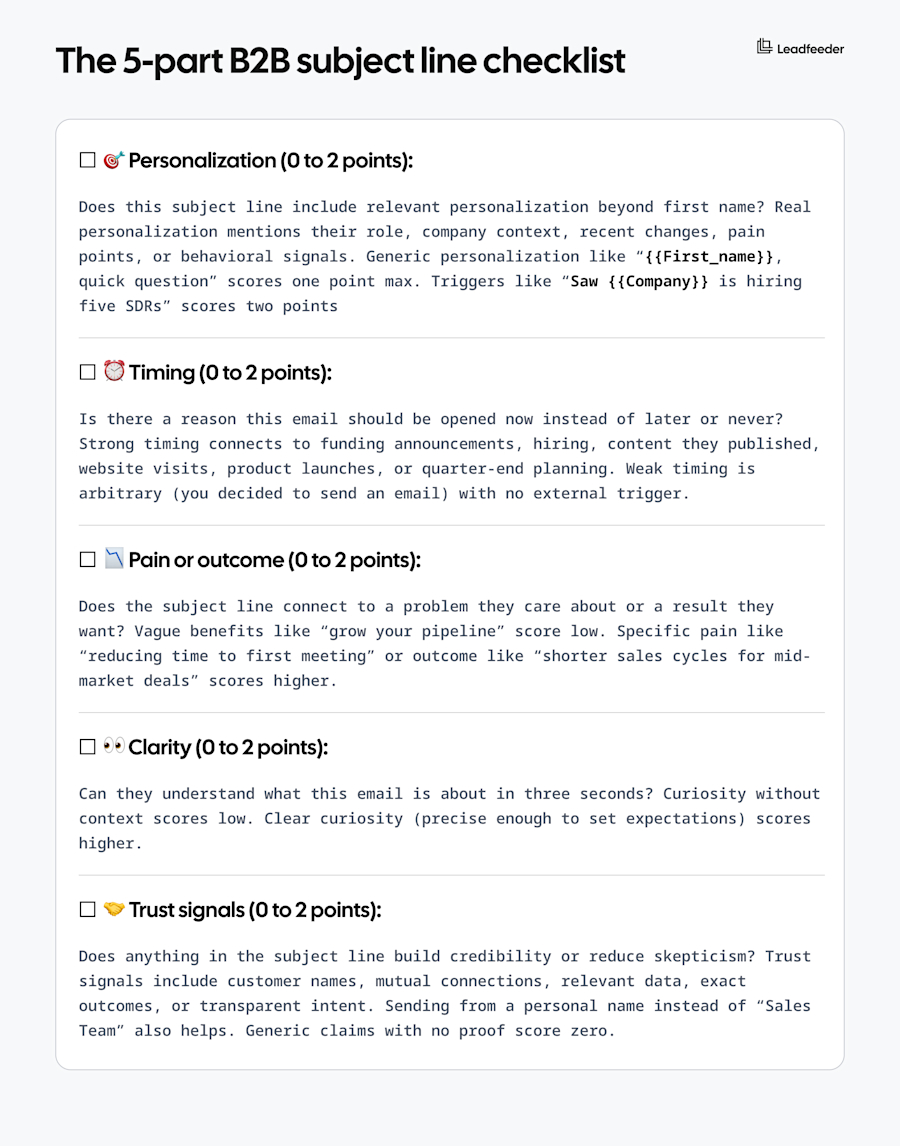
The 5-part B2B subject line checklist
Use this checklist before sending out any cold or warm email. Score each item zero to two points (zero is missing, one is weak, two is strong). Only send emails that score seven or higher out of 10 possible points.
Matching subject line style to buyer stage and persona
Different buyers and stages require different approaches. Use this guide to match your tone and content to where the prospect is in their journey.
Stage | C-Suite | VP Level | IC/Manager |
Cold | Ultra-brief, outcome-focused: “{{Metric}} improvement?” | Problem or trend: “How {{similar_company}} solved {{challenge}}” | Pain or curiosity: “Reducing {{pain_point}} for {{role}} teams” |
Engaged | Strategic: “{{Company}}’s {{initiative}}: next steps” | Specific: “{{Question}} from our call” | Helpful: “The {{resource}} I mentioned” |
Evaluation | ROI-focused: “{{Company}} financial impact summary” | Process: “{{Timeline}} for {{company}} rollout” | Tactical: “Setting up {{integration}} with {{tool}}” |
Customer | Growth: “How {{team}} can scale {{outcome}}” | Expansion: “Adding {{capability}} to your setup” | Usage: “{{Feature}} tips for your team” |
For SaaS companies, data and velocity matter. Use metrics and speed in subject lines. For professional services firms, relationships and outcomes matter more. Lead with results and peer proof. For manufacturing or logistics, compliance and efficiency win. Talk about cost savings and operational improvements.
Data-backed best practices for B2B subject lines
Opens matter less than replies. A subject line that generates 50% open rates but zero replies is worse than one with 20% opens and five qualified meetings. Focus on qualified engagement, not vanity metrics.
Personalization that moves the needle
First name personalization is table stakes. Real personalization uses contextual signals that prove you've done research or have legitimate reasons to reach out.
Here’s how to go beyond first name personalization:
Role and team context: Reference their function, team size, or reported challenges. For example, “VP Sales at 50-person teams” beats generic “sales leader.”
Company changes: Hiring spikes, funding, acquisitions, leadership changes, office expansions. These are public signals that timing matters now.
Tech stack and integrations: When you know they use Salesforce, HubSpot, or certain tools your product integrates with. For example, “{{Company}}'s Salesforce + {{your_tool}}” only works if it's true.
Website intent signals: This is where tools like Leadfeeder add value. When companies visit your pricing page, integration documentation, or case studies multiple times, you have real behavioral triggers for personalization. Call out the pages they viewed by saying, “Saw your team checked out our Salesforce integration twice this week.”
Competitive context: When you know they're evaluating alternatives or recently switched from a competitor. Use carefully and only when you have evidence.
There comes a time when you should invest in hyper-personalization. Here’s how to know when that is:
Tier 1 accounts (ABM): When the deal size justifies research time, go deep. Mention exact initiatives, recent content they published, or pain points visible in job postings.
Warm introductions: When someone refers you internally, name them explicitly in the subject line and explain the connection.
For other cases, semi-personalized templates wins:
Scaled outbound (50+ contacts per week): Use merge fields for company name, role, industry, and one contextual variable (like recent funding or hiring).
Early-stage prospecting: When you don't have strong signals yet, focus on clear value and pain over weak personalization attempts.
Length, clarity, and urgency without spam
Keep your subject lines tight enough for mobile screens while avoiding spam triggers. Most recipients scan on smartphones, so brevity and clarity matter more than clever wordplay.
Mobile subject lines should be under 50 characters (roughly six to eight words) to avoid truncation on mobile devices. You have more room (up to 70 characters or 10 to 12 words) via desktop, but avoid using all of it. Brevity still wins attention.
Distinguish between legitimate deadlines and manufactured scarcity, as recipients can tell the difference and fake urgency damages trust.
Modern filters flag certain patterns that signal low-quality mass emails. While catchy subject lines for sales can grab attention, avoid these spam triggers that hurt deliverability:
Excessive punctuation: “Amazing opportunity!!!” or “Quick question???”
All caps: “URGENT” or “IMPORTANT MESSAGE”
Money symbols and big promises: “$$$ Save 50% now $$$” or “Make $10K this month”
Misleading “Re:” or “Fwd:” without prior conversation
Testing and optimization: A simple playbook for your team
Effective testing requires discipline. Most teams test too many variables at once, making it impossible to know what actually drove results. The key is changing only the subject line while keeping everything else constant: same email body, same sender name, same send time. This isolation lets you attribute performance differences to the subject line alone. Similarly, keep your test segments consistent. A subject line that resonates with VPs may completely fail with individual contributors, so test within similar personas and buyer stages to get meaningful signals.
Track metrics that matter
Opens tell you whether the subject line worked. Replies tell you whether the email body delivered on that promise. Meetings tell you whether both elements worked together to drive real outcomes.
Sample size determines your approach
Different sample sizes require different approaches:
Large lists (500+): Run fixed-window tests. Send variant A to 50%, variant B to 50%. Wait 72 hours, then analyze. Look for statistical significance (at least 30% difference in reply rates).
Small lists (50 to 200): Use rolling tests. Send variant A one week, variant B the next. Track directional trends over four to six weeks. Accept that small samples mean noise, focus on consistent patterns.
Interpreting results requires context
When opens increase but replies drop, your subject line created curiosity that the email body couldn't fulfill. Either adjust expectations set in the subject line or improve your body content to match the promise.
When opens decrease but replies increase, you're filtering more effectively. Lower volume with higher quality may be exactly what you need. Test scaling this approach before abandoning it. When both metrics stay flat, your current angle isn't resonating. Change your pain point, trigger, or messaging approach entirely. Try a different scenario from the template list rather than making small tweaks.
Building your subject line swipe file
Store successful subject lines in a central repository your team can access like Google Sheets, a Notion database, or a CRM custom field. Use a simple tagging system to make them searchable by scenario, persona, and outcome.
Tagging scheme examples:
PAIN_SAAS_VP (pain-based subject for SaaS VPs)
TRIGGER_FUNDING (funding announcement trigger)
EVENT_WEBINAR (event invitation)
BREAKUP_HONEST (late-stage breakup email)
Assign one team member to own the file, review it quarterly to identify patterns, and retire any hooks that fall below 2% reply rate after 100 or more sends.
Putting it all together
Start improving your subject lines this week with this simple action plan:
Audit current sequences: Categorize your existing subject lines by scenario using the templates in this guide. Identify gaps and low performers.
Pick three new patterns: Choose three subject line templates from different scenarios and test them in active sequences.
Set up tracking: Log subject lines, open rates, and reply rates in a shared doc. Tag by scenario and persona for future reference.
Use intent signals: If you use tools like Leadfeeder, identify accounts showing website intent (pricing page visits, multiple sessions, integration research) and personalize outreach with those specific triggers.
Review and iterate: Check results weekly. Replace low performers with new variants. Build your swipe file as you learn what works for your audience.
Your subject line is the first impression. Make it count by being relevant, honest, and focused on the reply, not just the open.

Head of Web & Creative @ Leadfeeder
Hana Banacka leads Web & Creative at Leadfeeder, where she focuses on improving website performance and optimizing the digital buyer journey. With more than 10 years of experience in B2B SaaS marketing, she specializes in conversion optimization, experimentation frameworks, and data-driven website strategy.
Hana has led global CRO programs, managed cross-functional web teams, and implemented testing strategies that significantly improve funnel performance. Her experience optimizing complex B2B websites informs her perspective on how companies can reduce friction in the buying journey and turn website visitors into qualified leads