60-Second Summary
A martech stack is the collection of tools that powers your marketing processes, and it must be cohesive rather than a random list. Leadfeeder’s CMO, Andy Culligan, outlines six core categories and practical don’ts to build a stack that fits your team and customers.
Key takeaways: Build your stack around six core functions — CRM/data storage, data enrichment, campaign execution, marketing automation, follow-up/communication, and measurement — with the CRM as the central source of truth.
Standout strategies & tactics: Audit tools to remove redundancy, appoint one or two stack owners, pick channels first then personalize (e.g., LinkedIn + Influ2, AB Tasty for site personalization), and introduce marketing automation only when scale demands it.
Real-world lessons & frameworks: Don’t copy another company’s stack; avoid buying unnecessary or overlapping tools; prioritize integrations, data enrichment, and organizational adoption for reporting and measurement.
Practical framework: Define required functions, map one tool per function, ensure data enrichment feeds the CRM, enforce single ownership, and choose reporting tools the whole company will use.
*This summary was created with AI assistance, using our original content.
So what is a martech stack? The martech stack meaning is simple: it’s the marketing technology you use, and it impacts every part of your marketing process.
That said, most of the content out there about building a marketing technology stack doesn’t treat the subject with the nuance and care it needs. Plenty of articles pull together a list of random martech tools from Google search results and call it a day.
But a list of disparate martech tools doesn’t help you build a cohesive stack for your business and team. There are specific functions your marketing stack needs to check off, and all the tools need to work together to streamline your marketing planning and execution.
To that end, we’re sharing the actual stack we use here at Leadfeeder, as explained by our Chief Marketing Officer, Andy Culligan. Then, we talk about his tips for building your own martech stack.
Note: Is your martech stack missing data enrichment needed to fill out your lead and customer profiles? Try Leadfeeder free for 14 days to see which companies visit your website, the pages they visit, whether or not they’re in your CRM, and more.
Leadfeeder’s Own B2B Martech Stack
As Andy explained things, there are really 6 big categories of marketing technology that most B2B marketers need:
Data storage and CRM
Data enrichment
Marketing automation
Marketing channels, campaigns, and execution
Follow-up and communication
Marketing measurement and reporting
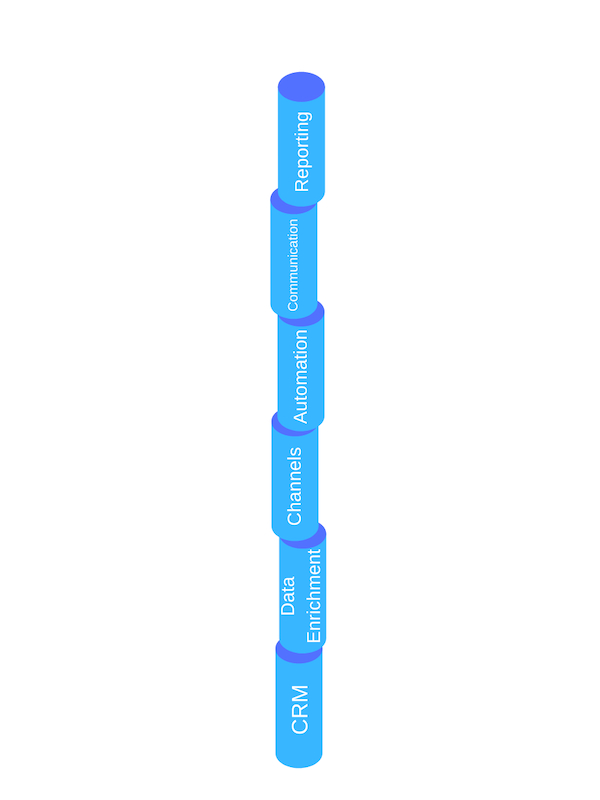
The tools in our martech stack fall into 6 buckets, and each plays a specific role in bringing our overall marketing strategy to bear. Below, we explain what each of these martech stack components entails and share the tools we use to fulfill it.
1. Data Storage and CRM
Leadfeeder uses: Pipedrive
The broadest and farthest-reaching tool in the perfect martech stack is your customer relationship management (CRM) software. As Andy explained, CRMs aren’t solely martech — they’re typically used by the sales team and, maybe, customer success, too.
That said, the CRM is where all of your customer and lead data lives, and it’s a vital component of communication and collaboration between marketing and sales. Among other things, your CRM needs to:
Store customer and lead data (like company name, location, size, etc.)
Hold your total addressable market list and your target account list
Track deal cycles and lead status as they move toward conversion, including integration with other martech in your stack
Enable collaboration and communication between sales and marketing
Having a CRM that ticks all those boxes helps to ensure your customer and lead data is organized, complete, and accessible to everyone who needs it.
2. Data Enrichment
Leadfeeder uses: TaskDrive, BuiltWith, Lead IQ, Vainu, and Leadfeeder (of course)
When it comes to leads and target accounts, you probably start out with a few pieces of information — their name, their industry, and maybe where they’re located. But that level of insight into your leads won’t cut it. You need more in-depth information about prospects, their businesses, and their needs to effectively market to them.
That means finding a martech tool that can pull the accounts and leads from your CRM and populate those entries with additional data to fill out the profile. That can be information like:
Firmographic
Technographic (which tools and software they use)
Company financials
Buying intent signals
Data enrichment martech can also use preset filters on the data above to add new potential targets to your CRM, as well as fill in the blanks for any existing accounts.
Note: Looking for more in-depth data to fill in the profile of your leads and target accounts? Try Leadfeeder free for 14 days to see which companies visit your website, which pages they visit, whether or not they’re in your CRM, and more.
3. Marketing Campaigns, Channels, and Execution
Leadfeeder uses: LinkedIn, Facebook Ads, and Google Display Network
Once you have all the back-end data and management you need, the next rung of your martech stack involves executing on your strategy — including the digital marketing channels you’ll use to do that.
Here, Andy recommends asking yourself 2 important questions:
What channels do we want to use?
How personalized do we want to get with those channels?
Most digital marketing channels (like LinkedIn, Facebook Ads, and the Google Display Network) have their own internal martech solutions tailored to their platforms and users. That portion of your martech stack is pretty straightforward.
There’s more room to grow and add to your stack, however, when it comes to personalizing each of those marketing channels.
For example, you can use Influ2 to personalize your LinkedIn Ads for the individual decision-maker, as well as for the company itself. You can use AB Tasty to personalize your website and landing pages. You can even use tools like Reachdesk to add a layer of personalization to offline channels (such as direct mail).
4. Marketing Automation
Leadfeeder uses: ActiveCampaign
As we’ve written about previously, not every marketer needs a marketing automation tool — but once your operation reaches a certain level of sophistication and scale, marketing automation software can help things run more smoothly.
In short, marketing automation streamlines and automates the execution level of marketing (#3 in our stack). But, of course, marketing automation is a huge term, so there’s a lot these tools can do, including:
End-to-End Marketing Automation
Email Marketing Automation
Social Media Marketing Automation
Customer Journey Automation
Pricing Automation
Advertising Automation
Loyalty and Referral Marketing Automation
When you look to find the right marketing automation tool, it’s important to consider which of those features you actually need — and which you don’t.
5. Follow Up and Communication
Leadfeeder uses: Slack, Intercom, and email
There are three types of communication tools every marketer needs:
Communication within the marketing team
Internal communication with other teams
Customer communication
That said, your martech stack doesn’t necessarily need three different communication tools. We use Slack and email to communicate within our team and with the broader company, and email and Intercom to communicate with and follow up on customers and leads.
Intercom lives on our website and in our help center, and it helps us communicate with customers in real time. Meanwhile, Slack helps us collaborate across multiple teams and keep internal conversations more organized, quick, and cohesive.
6. Marketing Measurement and Reporting
The last level of your martech stack includes the tools you use to measure and report on marketing performance. There are a few important capabilities at this level:
Integration with the marketing channels and marketing automation tools that make up the rest of your stack
Data visualization
Andy explained that, at this level of the stack, one of the most important factors is organizational adoption. The best bet for your marketing team is to use reporting and measurement tools that the rest of the company also uses.
Our CMO’s Do’s and Don’ts for Building the Best Martech Stack
Actually, they’re all don’ts. Andy walked us through some of the mistakes he’s made and the things he’s learned while building martech stacks. The gist of his advice was to ensure your martech stack is tailored to your marketing team's needs — and nothing else.
For more details on that, here are his four biggest don’ts to avoid during the process:
1. Don’t Have Too Many Tools That Do the Same Thing
Across a large marketing team, it’s easy to end up with multiple marketing tools that all serve the same purpose. Whether the reason is a lack of communication or personal preference, you might end up with a handful of people using Slack, while another handful use Microsoft Teams.
The problem with that is that it creates redundancy, disorganization, and uncertainty.
And the solution is simple: Audit the tools you have across the marketing department and the organization, and go from there, selecting one tool per function.
2. Don’t Let Too Many People Own Your Stack
Flowing from that first don’t, Andy recommends appointing one or two people to own and manage your entire end-to-end martech stack. When someone fully owns the responsibilities of building your stack, owning the total addressable market list, populating the CRM with data, and more, there’s a clearer path to getting those things done, and you can avoid duplicating efforts.
3. Don’t Buy Martech Stack Tools You Don’t Need
The stack above outlines the martech tools we consider vital to our stack. And while the functions your stack has to serve will vary for your own team and company, don’t let anyone (internal or otherwise) convince you that you need more (quantity) or more complex tools than you really do.
The vast majority of marketers, for example, don’t need complex (and expensive) multi-touch marketing attribution tools. And according to Andy, there’s really no such thing as a full end-to-end tool for account-based marketing (ABM) — you have to hack it together — so don’t buy into that kind of martech.
4. Don’t Carbon Copy Someone Else’s Martech Stack
As Andy said, every sales cycle and every customer is different—and your martech stack needs to reflect that. For example, we’ve shared our own stack right here in this post.
Pipedrive for CRM
TaskDrive, BuiltWith, Lead IQ, Vainu, and Leadfeeder for data enrichment
LinkedIn, Facebook Ads, and Google Display Network for execution
ActiveCampaign for marketing automation
Slack, Intercom, and email for communication and follow-up
Google Analytics and Tableau for measurement and reporting.
But copying martech stack examples like ours and trying to make them fit your business isn’t likely to work very well. Instead, build your own stack based on what works for your customers and your team.
How to Build a Martech Stack That Works for You
In today’s marketing world, martech is marketing. You can’t run effective marketing efforts without using some form of martech. The trick, then, is to build the ideal martech landscape for your business and your team and to avoid over-stacking.
One thing that sits underneath all of it is your website, and our CMO has written separately on how AI is reshaping B2B websites and what that means for the tools you plug into them.
With the categories outlined above and Andy’s tips for putting together the perfect martech stack, you can build a system that works for you, making your life easier and your marketing more effective.