All Free Tools

Free UTM builder

Build clean, consistent campaign URLs and see exactly how they’ll appear in GA4.

Check a link

Choose a channel

We’ll prefill the source and medium for you.

Add campaign details

Required fields first. Clean-up happens automatically.

https://leadfeeder.com/pricing

Example: google, linkedin, newsletter

Example: cpc, paid_social, email

Example: spring_launch_2026

Used to connect GA4 traffic with imported advertising cost data. Example: lf-sp-002

Advanced parameters

Paid keyword. Example: {keyword}

Creative or link variant. Example: blue-cta

Example: Search Ads 360, DV360

Not currently reported in GA4.

Not currently reported in GA4.

Custom parameters

Add extra query keys. Names can’t start with utm_ if that parameter is already in use.

Dynamic parameter helper

Insert an ad-platform macro into term or content. Anything inside braces is left untouched.

  • Google Ads: {keyword}
  • Google Ads: {campaignid}
  • Google Ads: {adgroupid}
  • Google Ads: {creative}
  • Google Ads: {device}
  • Google Ads: {matchtype}
  • Google Ads: {targetid}
  • Google Ads: {lpurl}
  • Meta: {{campaign.name}}
  • Meta: {{adset.name}}
  • Meta: {{ad.name}}
  • Meta: {{site_source_name}}
  • Meta: {{placement}}
Cleanup options
Cleanup options

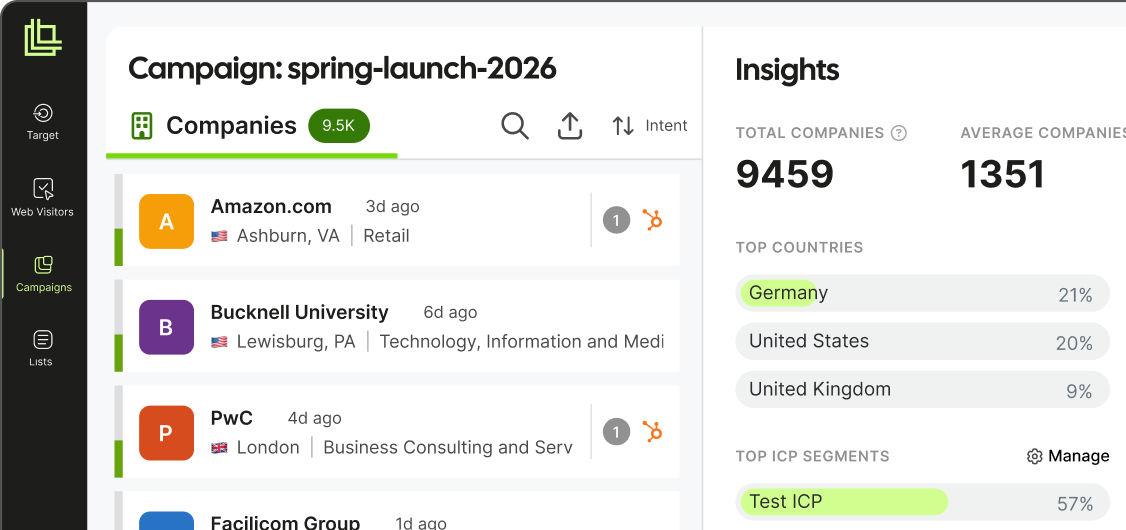
In Leadfeeder, this campaign becomes a feed.

See the right-fit companies visiting from this campaign, the pages they viewed and the people worth following up with.

Campaign feed recipe

Fill campaign details to build this recipe.

Install free Leadfeeder Tracker →

My campaign links

Saved in your browser only. Nothing is sent to us.
Source / mediumURLCreatedActions
No saved links yet. Generate a URL and add it to keep it in this browser.

This page processes no personal data. Links you build never leave your device — we don’t store them on our servers, set no cookies of our own, and make no third-party requests from this tool.

How to use the UTM builder

  1. Choose the channel you are promoting: Google Ads, LinkedIn, Meta, email or another source.
  2. Add your campaign details. Source, medium and campaign name are required. Term and content are optional.
  3. Copy your link. The builder shows the full URL and how GA4 will group the visit, so you can fix problems before the campaign goes live.
What each UTM parameter means

  • utm_source: where the traffic comes from, for example linkedin or newsletter.
  • utm_medium: the type of channel, for example cpc, paid_social or email.
  • utm_campaign: the name of the campaign, for example q4_webinar.
  • utm_term: the paid keyword, mainly used for search ads.
  • utm_content: which ad or link was clicked. Useful when you test two versions of an ad.

Tips for consistent UTM links

  • Use lowercase. GA4 treats “LinkedIn” and “linkedin” as two different sources.
  • Agree on one naming format and use it across the team.
  • Use medium values GA4 recognises, such as cpc or email, so visits land in the right channel instead of “Unassigned”.
  • Don’t add UTM parameters to links between pages on your own site. Doing so replaces the visitor’s original source.

Frequently asked questions

Is the UTM builder free?

Yes. You don’t need to sign up.

Is a UTM builder the same as a UTM generator or a campaign URL builder?

Yes. They are different names for the same kind of tool.

Does it work with Google Analytics 4?

Yes. For every link, the builder shows which GA4 channel the visit is likely to be grouped under.

Where are my saved links stored?

In your browser only.

Already have a link? Test it with our UTM checker.

See what companies and ICP visits your campaign brought to your website

Try Leadfeeder for free →

Free 14-day trial. Included.
No credit card required.

Leadfeeder campaign view showing companies and insights from a tracked campaign