60-Second Summary
Audiences are now fragmented across apps, streaming platforms, and countless digital channels, so traditional mass advertising no longer performs as it once did. With company-level website intelligence—like the signals Leadfeeder provides—marketers can identify who visits, what they care about, and prioritize high-intent accounts to improve conversion and prove campaign ROI.
Key takeaways: Company-level visitor identification converts anonymous traffic into actionable leads—revealing source, behavior, and intent so teams can prioritize high-value accounts and measure ROI more accurately.
Standout strategies & tactics: Use granular filters (campaign, ad content, keyword, referrer, pageviews) plus integrations into CRM and email platforms to build ABM lists, personalize outreach, and retarget companies that show high engagement.
Real-world lessons & frameworks: Build data-backed buyer personas, align sales and marketing around qualified leads, repurpose high-performing content, and act quickly on intent using automated alerts and CRM syncs.
Implementation framework: Install the tracker, create custom feeds and notifications, integrate with your martech stack, evaluate acquisition channels, and iterate—scaling efforts that deliver high-quality account engagement.
*This summary was created with AI assistance, using our original content.
Traditional mass advertising no longer delivers the same results it once did. Today’s audience is fragmented across apps, streaming platforms, social media, and countless digital channels.
But while attention has become harder to capture, marketers now have something they didn’t have before: data.
With the right tools, you can see not just who is visiting your website, but which companies are showing intent, what they are interested in, and how likely they are to convert.
Tools like Leadfeeder make this possible by identifying website visitors at the company level and revealing their behavior on your site, helping you focus your marketing efforts on real opportunities rather than anonymous traffic.

Note: Ready to start proving the ROI of your marketing campaigns? Sign up for Leadfeeder’s free 14-day trial.
What exactly is Leadfeeder?
Leadfeeder is a B2B visitor identification software that tracks and identifies companies that visit your website — even if they don't leave their contact information.
This information helps you better understand your site visitors — so you can build more effective marketing strategies.
That's the official spiel, but what does Leadfeeder actually do?
Basically, Leadfeeder provides detailed data about which companies visit your website — including where they come from, and what actions they take once they are on your website.
If you are a marketer who loves data, then Leadfeeder is going to be your new BFF. 👯

Here's an example:
Say you create a paid Facebook social media campaign. You want to know how effective it is, right?
Facebook will tell you how many clicks you get and maybe even how many sales you make directly from your campaign.
But it doesn't measure things like brand awareness, or if someone tells their boss about your solution.
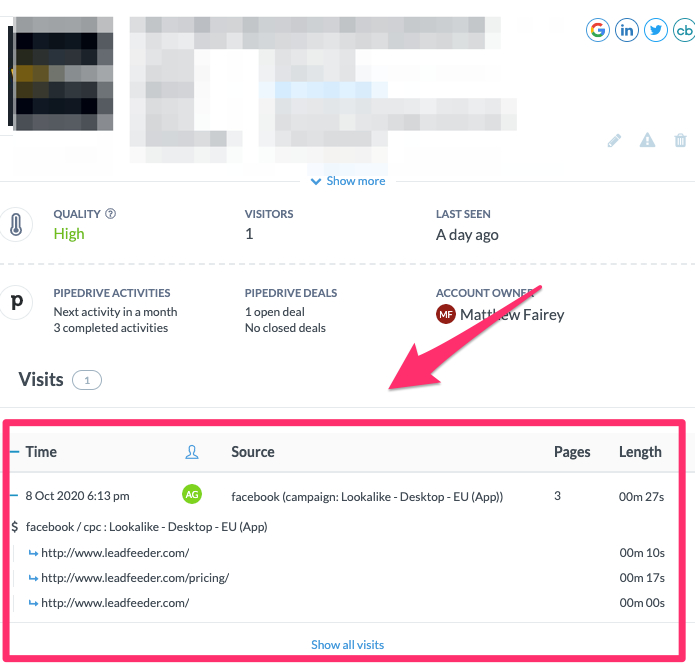
Leadfeeder's filters help you track not just how many people come to your site from that paid campaign, but also how long they stay on your site, what pages they visit, and — most importantly — what company they work for.
Like this.
It’s like magic.

Or, machine learning.
Here is an example of the custom filters in Leadfeeder to track your Facebook leads.

This super-valuable information can help you better target that company or improve lead qualification before sending leads to your sales team.
Leadfeeder is incredibly valuable if you use ABM (account-based marketing), but its data is useful regardless of your marketing approach.
Is Leadfeeder only for sales teams?
Not at all!
Leadfeeder is used by both sales and marketing teams to track site visitors, measure campaign success, and find more qualified leads.
Marketers love Leadfeeder because it helps put a company name on otherwise anonymous traffic.
Here’s how to use Leadfeeder for your marketing team
Now that we've covered the basics of what Leadfeeder is, let's talk about how it can help you better understand which companies visit your site and build more successful marketing campaigns.
Here's the thing — you don't need another hard-to-use tool that doesn't deliver on its promises.
You need answers — about who your audience is, where they work, what part of your product or service they are interested in, and how to move them through marketing and sales funnels.

And that's exactly what Leadfeeder provides.
In this section, we'll outline how Leadfeeder fits into your overall marketing strategy; then I'll show you how to install Leadfeeder and set filters to uncover prospects that have been slipping through the cracks.
Step 1 of your marketing strategy: Build your buyer personas
Buyer personas are those research-backed profiles that describe your company's ideal customer.
They are fictional representations that bring together key characteristics of your best customers.
(We also like to call them ICP — ideal customer profiles.)
There's a good chance you already have a solid buyer persona, but if not, we'll cover how to get started.
Look at your current customer base
Who are your most profitable customers? Not just the ones that buy the most often, but the ones that stick around and get the most value out of what you have to offer.
Those are the customers you want more of, so gather a ton of information about who they are and what they need.
Look at your current customers and gather data about:
Age
Location
Language
Industry
Size of company
Job description
Spending power
Challenges they face
Use that data to create a fictional person. Give them a name, a title, a job. What do they do when they're off work? What type of car do they drive? Where do they live?
Here's an example:
Name: Kyle Johnson
Age: 42
Job: Marketing Director at XYZ Automotive
Language: English
Location: Schaumburg, IL
Buyer Profile: Kyle is a married father of two who enjoys playing basketball and coaching his kids' little league team. He's been with XYZ Automotive for 10 years and has risen through the ranks to marketing director.
His team is small, so he is looking for nimble solutions that help his team work more efficiently. He is tech-savvy and responds well to in-depth content that helps him learn new strategies quickly.
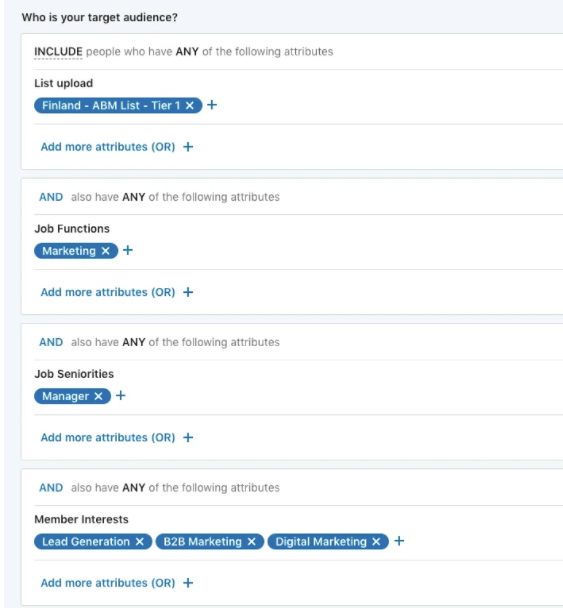
Once you have this information, you can use it to build more targeted content or even create highly targeted LinkedIn ads, like this one we created:
Use Leadfeeder to build a more accurate buyer persona
Here's the thing — buyer personas aren't always accurate.
Ideally, they are based on data, but there's a good chance that your company is attracting a wide range of prospective clients — some that you may not have considered before.
Here's how Leadfeeder can help:
Leadfeeder shows you more information about which companies come to your website, including where they are located, what industry they are in, and their location — incredibly valuable data for building an accurate buyer profile.
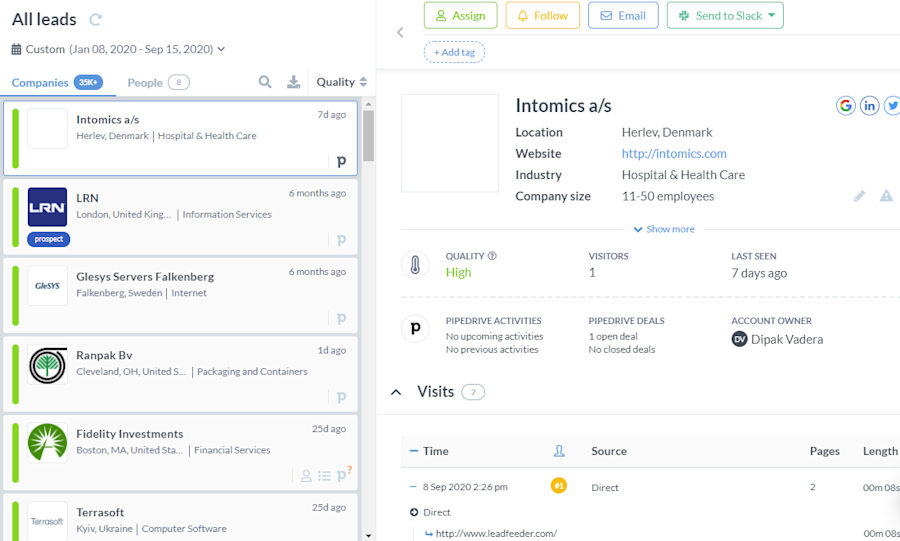
Take a look at the screenshot of the Leadfeeder dashboard below.
On the left, you can see which companies have visited the site recently, along with their locations.
Click on a specific lead, in this case, Intomics a/s. You can see how many visitors from that company have visited your site, the industry, the size of the company, how long they were on the site, what pages they visited, and the business's name.
Let's say your buyer persona is a marketing manager at small service-based firms in the United States.
With Leadfeeder, you might discover that many people from Ireland are visiting your website.
Interesting, right?
What will you do with that information? Well, it depends on your company's goals.
If you are looking to grow globally, you might expand your marketing to attract more companies from Ireland — or you might realize that you need to readjust your website copy and social media targeting to show you are targeting only US-based firms.
What you do with the information Leadfeeder provides is totally up to you — the point is you have better data, so you can make informed decisions.
Huzzah!
Step 2 of your marketing strategy: Identify your martech stack and Leadfeeder integrations
A martech stack is the apps and software you use to improve the effectiveness of your marketing strategy.
Those tools should share information and work together to help gather data, deliver better results, and automate portions of the process.
Basically, your martech stack should be like your superpower — a set of tools that help you work harder, better, faster, stronger.
Your stack should provide an overview of all your marketing efforts.
For example, your email provider shouldn't just make it easier to send emails — it should integrate with your CRM so you can see which prospects responded to a recent campaign.
What should your martech stack include? Do you really need all the apps on the market?

Here's the deal — there's no one-size-fits-all list of solutions every company should use.
There are hundreds of tools on the market — don't let the options overwhelm you. Instead, focus on the main categories and make sure you've got those covered.
Advertising: These tools create, manage, and track your paid ads, including platforms like Google Ads. Leadfeeder can fill the gaps of many tracking platforms by showing you where leads on your site come from — and what they do when they get to your site.
Conversion: Next, you need technologies that track engagement and effectiveness to improve your conversion rates. This might include testing software or tools like Leadfeeder to better understand your leads.
Email platform: Email is one of the most effective communication methods, especially for B2B companies. Your email tool might include full-featured platforms like MailChimp or SendinBlue, or integrated tools, like ConvertKit or Drip.
Social media: Solutions that help you schedule, manage, and monitor social media posts and engagement. It may also handle the paid ads portion of your social media marketing strategy.
Customer relationships: This is a broad range of tools that covers managing relationships, like a CRM connected through the Leadfeeder Salesforce integration or the Leadfeeder Pipedrive integration, and customer service. Customer complaints and communication are incredibly valuable in helping companies better understand who their customers are and what they need.
So, how do you select the right tools to help your business grow?
Here are three questions to ask as you compare and contrast the huge range of solutions.
What core problem are you trying to solve — and does this solution actually help? Many solutions offer tons of shiny features — but you might not need them. In fact, too many cool features can make tools hard to use! Make sure each tool helps you solve a problem you are struggling with right now.
Does it integrate with other solutions? The true power of a martech stack lies in the whole being greater than the sum of its parts. For example, Leadfeeder integrates with Mailchimp, allowing users to see not only how many clicks an email campaign drives but also which pages people view once they reach your site, and the Leadfeeder HubSpot connection does the same for your CRM. Siloed data is less useful, so look for tools that bring all your data together.
Does it reduce my workload? The ideal solutions should make your life easier. For example, by automating tedious tasks or providing custom notifications so you can focus on building and testing campaigns — not checking in on a dozen or more different tools.
Step 3: Evaluate your acquisition channels and assets
As a marketer, you need to know not just who visits your site, but also how they get there.
Finding the most effective acquisition channels and assets helps you better understand your audience — and measure the success of campaigns.
But tools like Google Analytics only give you part of the picture, which is why marketers so often put Leadfeeder Google Analytics reporting side by side. In fact, most tracking systems only provide a small portion of the information you need to make informed decisions.
Your social media tracking can tell you how many clicks a paid campaign received — but it can't tell you how many pages a person visited or how long they stayed on your site.
Google won't tell you what key terms someone searched before landing on your website, or what company they work for, or where they are located.
With all these limits, how can you really tell how effective your marketing is?
You can't, not really.
So, what is a marketer to do? Keep plugging away, hoping at least a few campaigns will work?
Or you could get access to more data to make more informed decisions.

Here are a few examples of how Leadfeeder can help you better evaluate traffic acquisition:
Track the effectiveness of PPC campaigns by showing which leads come to your website.
Track organic traffic by measuring leads generated.
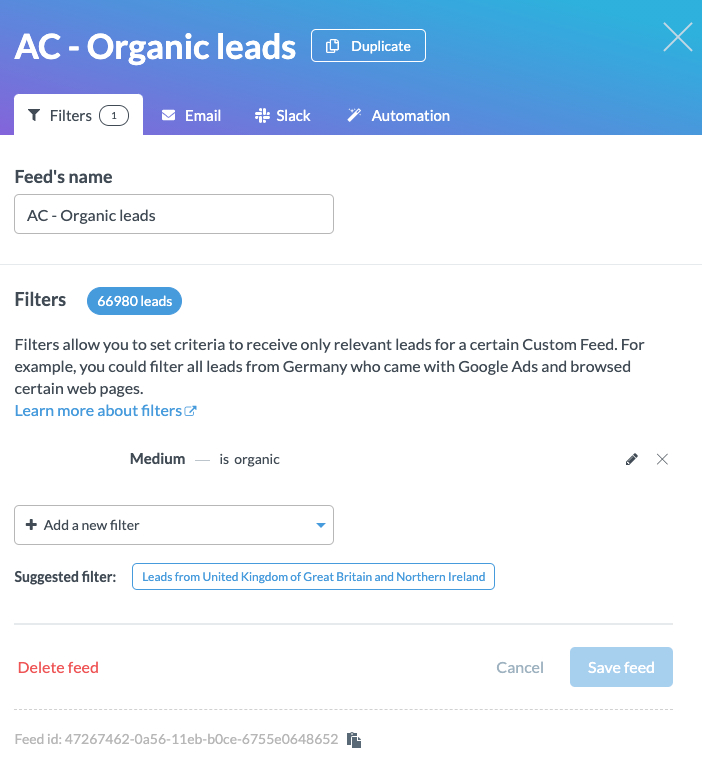
See how social campaigns perform.
Show how assets, like an ebook or webinar, impact the quality of leads.
Sounds good, right?
I want to talk about Leadfeeder's filters— it's where all the magic happens.
We've got a ton of them, and they provide marketers with a wealth of information about acquisition, behavior, company information, email marketing, and information you've stored about users in your CRM.
I could go on.
You want more data? We've got more data.
Here's what our acquisition filters can show you:
Ad content: Leads that have seen a specific ad
Campaign: Leads that have followed a particular campaign
Keyword: Leads that used a specific key term
Referring URL: Leads from a specific UTM parameter, such as a partner organization or your webinar page.
Source: Allows you to see leads from a specific source, such as a search engine or a domain.
Medium: Leads from a specific category - for example, organic, CPC, or referral traffic.
Source/Medium: Combines source and medium. For example, if you want to see organic search from Bing, you'd filter for: “Bing (source) / organic (medium)”
These filters will tell you which acquisition channels are the most effective, so you can focus more of your time on the efforts that are attracting traffic.
Step 4 of your marketing strategy: Scale your approach
Building a successful marketing strategy takes time and data.
But once you've figured out what works, then what?
As your business grows, you've got to figure out how to scale your marketing efforts.
Here's the thing — scaling marketing efforts isn't about doing more marketing. It's about doing marketing more efficiently.
Here are a few tips for creating a scalable marketing strategy — and how Leadfeeder can help.
Get sales and marketing on the same page
According to HubSpot, 79 percent of marketing leads never actually turn into sales. Which means the vast majority of marketing efforts are wasted.
That's a lot of wasted time — and wasted ad spend.
Remember that part of the process is a warm handoff to sales — getting the leads is just one step.
Leadfeeder provides the information both sales and marketing need to understand the leads' quality — not only the number.
Get personal
Personalized content is kind of a big deal these days. According to Instapage, 77 percent of customers will choose, recommend, or pay more for a brand that provides a personalized experience.
ROI Amplified, for example, used data from Leadfeeder, Zapier, and its CRM tool to build a full history of every page a company visited on its site before ever sending the lead to the sales team.
This helps the sales team build a much more personalized pitch — and they found out that their clients were more interested in higher-level content, which they were then able to create.
Imagine what your sales team could do with that kind of data — and what you might learn about your marketing efforts.
Repurpose high-quality content
The average B2B lead reads three to five pieces of content before they engage with a sales rep — and 96 percent of buyers choose to buy from companies that offer relevant content.
Creating high content takes time — a lot of time. If you are looking to scale your marketing strategy, you need to focus on working more efficiently.
Leadfeeder can show you which pieces of content drive the most high-value leads.
By filtering by behavior, you can target people who read a specific blog post, for example.
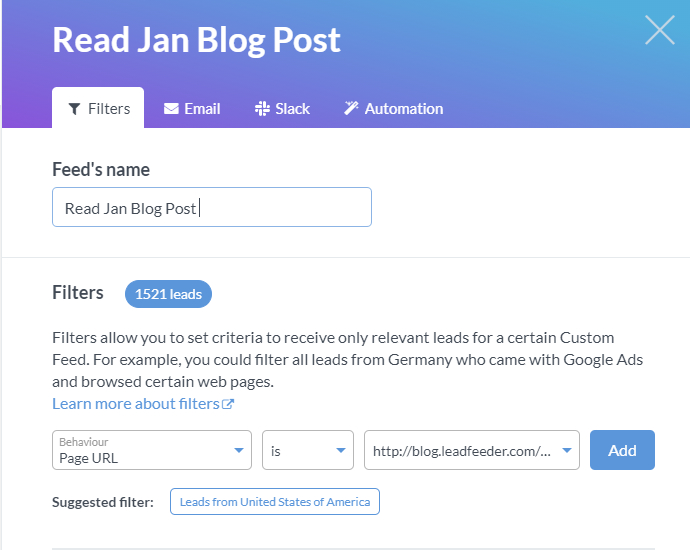
You might see that people who click to read your January blog post are more likely to read other pages, including the contact page.
So, make the most out of that content! Turn that blog post into a listicle, an ebook into three or four blog posts, or a video into a webinar series.
Then, retarget people at the same companies on LinkedIn with your fresh new content on a topic you already know they care about.
Step 5 of your marketing strategy: Find new opportunities
Leadfeeder can also help uncover new markets and new opportunities.
Let's say that Leadfeeder shows you organizations you weren't trying to target are coming to your website.
Now what?
Take a deep breath.
You've got two options here:
Change your tactics, because your marketing strategy is attracting companies outside your target audience.
Shift gears, because your ideal audience might not be who you thought they were.
Say you discover that you are getting a ton of leads from a specific ad campaign, but they are falling off before reaching the sales team.
In that case, you might need to focus on different search engines or move to another social media campaign. LinkedIn might be a better source for high-quality leads than Google.
Or, maybe you're targeting SMB and not having much success.
If Leadfeeder shows a lot of traffic coming from larger corporations, it might be time to adjust your approach and go after those big fish!
How to set up the Leadfeeder tracker for your marketing team
Now that you understand what Leadfeeder has to offer, you might be wondering how to set it up.
Fair enough.
The first step is to add the Leadfeeder tracking code to your website.
Here's how to install Leadfeeder's tracker so you can get access to all that sweet, sweet data.
Next, you'll want to create your filters. These can be edited at any time, so don't feel like you have to go crazy with them off the bat.
Say, for example, you want to see who views multiple pages of your site per day. These people or companies keep coming back, so they're clearly interested in what you have to offer.
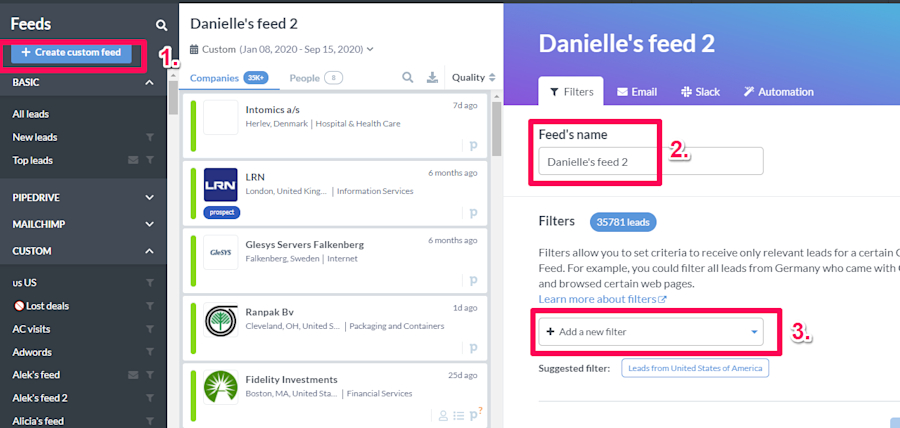
Go to your Leadfeeder dashboard and click "Create Custom Feed" in the top left corner. Give your feed a name, then click "Add a filter."
This is where you'll get to choose the actions you want to track.
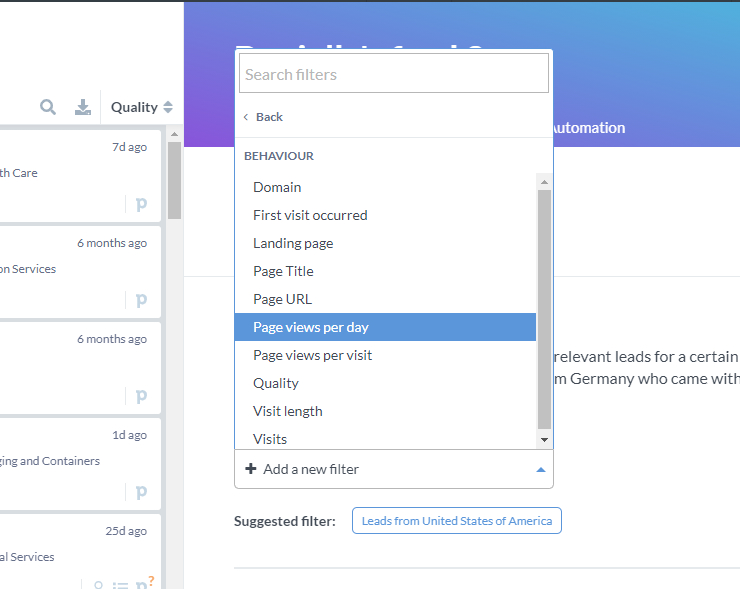
To see visitors who view multiple pages in a single day, select "Page views per day."
As you can see in the screenshot below, you can also filter by when the first visit occurred, their visit length, and much more.
We strongly recommend setting up email notifications, so you know when a new lead visits your site.
Don't worry; we won't send you a million emails. You can choose to receive a daily or weekly digest and create notifications for specific filters you've created.
Once you have the code installed and feeds set up, it's a matter of waiting for leads to roll in.
Personalize your marketing campaigns with Leadfeeder
Leadfeeder provides marketing teams with incredibly valuable data about their target audience, what they do on your website, and how effective your marketing strategies actually are.
Quite simply, Leadfeeder helps you do your job better, faster, and more accurately. What's not to love?
Note: Ready to start proving your ROI of your marketing campaigns? Sign up for Leadfeeder’s free 14-day trial.