

60-Second Summary
CRMs are the backbone of customer data, and integrating website visitor identification with your CRM (via Leadfeeder) turns anonymous traffic into actionable, warm leads. This two-way sync speeds sales, sharpens marketing targeting, and helps recover lost deals and grow customer value.
Key takeaways: Two-way Leadfeeder–CRM integration reveals anonymous visitors, auto-populates warm leads into your CRM, surfaces deal status inside Leadfeeder, and enables faster, prioritized outreach, upsells, and win‑backs.
Standout strategies & tactics: Build custom feeds with Leadfeeder’s 50+ filters to surface high‑intent companies, automate pushing and assigning leads to your CRM, enable real‑time alerts (email/Slack), and use CRM deal‑status filters and tags for focused action.
Real-world lessons & frameworks: Prioritize warm web visitors over cold sourcing, act quickly on behavioral signals to beat competitors, re‑engage highly engaged lost deals, and align sales and marketing to avoid duplication and increase conversion velocity.
Marketing & measurement wins: Link web behavior to CRM records to craft hyper‑targeted campaigns, use Promote and email integrations for efficient ad and email targeting, and track campaign impact back to CRM metrics to improve ROI and funnel design.
*This summary was created with AI assistance, using our original content.
CRMs are the backbone of many companies - they are where you keep records of customer interactions, hold the most up to date customer contact details and track what stage of the opportunity you’re at. They’re invaluable for growing and maintaining customer relationships and can significantly increase your customer lifetime value.
Integrating your website visitor data with your CRM is a game-changer for sales and marketing teams. Sales teams can spend less time sourcing new leads and handling admin and more time doing what they do best: selling. Marketing teams can achieve much greater visibility over the entire prospect and customer landscape.
We know how tricky it can be to add another piece of software to the mix. That’s why, to make life easier all round, our integrations connect your website visitor identification data from Leadfeeder directly with your CRM. Even better, our CRM integrations sync data in both directions, putting us ahead of much of the competition! Not only can you push your Leadfeeder data to your CRM, but you can also see the CRM status of your web visitors within Leadfeeder and use this data within the app.
In this article, we’ll explore strategic ways sales and marketing teams can enhance customer interactions and targeting efforts, and ultimately boost conversion rates through intelligent CRM integration.
Why Use Leadfeeder to Reveal Your Website Visitor Data
Leadfeeder provides website visitor identification software, a simple-to-use app with an effective set of core features, all designed to help you get the most out of knowing which companies are visiting your website. We’ve briefly highlighted some of the key features below.
1. Powerful filtering features
The many filtering possibilities within Leadfeeder enable you to segment your visitors by creating custom feeds. The 50+ filters can be mixed and matched to both profile the visitors coming to your site and highlight buying intent.
There are 6 types of custom feeds to choose from: Behavior, Acquisition, Company info, Leadfeeder activities, CRM activities, and Email marketing integrations.

Leadfeeder filters
2. Alerts in real-time
Our tracking code pulls data in near real time, so companies appear in the app almost in real time. Email or Slack notifications can help you respond quickly when certain companies visit your website or take a specific action.

Custom Feed Automation
3. Integrate with your CRM
Leadfeeder seamlessly links your website visitor data from Leadfeeder with several leading CRMs. This connection enables you to add newly identified companies to your CRM and track the activity of your open and lost deals.
The CRMs we support are: Pipedrive, Salesforce, Microsoft Dynamics 365, HubSpot, and Zoho. If your CRM isn’t listed, you may be able to use Zapier instead.
Your Sales Strategy and CRM Integration
First up, we’ll look at the different ways CRM integration with visitor identification software can supercharge your sales strategy.
1. Fill up the top of the funnel
A majorly time-consuming task in a sales professional’s day is sourcing net new leads - meaning companies and contacts which were previously unknown to the business. As a manual task, this is heavily time-consuming; with web visitor identification software, it’s immensely quicker!
Plus, these are warm leads. They’ve heard of you because they’ve actively viewed your website. You’re not just sourcing cold leads who have never heard of your product or service.
With CRM integration, Leadfeeder first checks whether a company visiting your website is already in your CRM. If they are, they are tagged with an integration icon (matching the logo of your connected CRM).
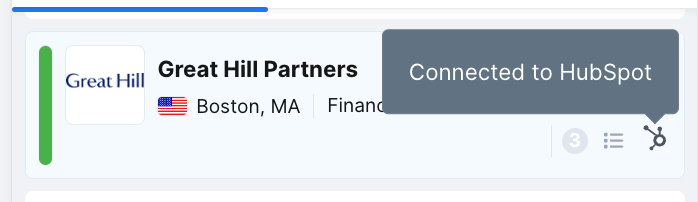
Connected to HubSpot
If they’re not, they’re a potential warm net new lead! You want to be able to find these new leads quickly, though - scrolling through a long list is not the way - this is where custom feeds come in. Instead of browsing one of the default company feeds, you can create your own based on our filters. First off, you need to add ‘Connection to CRM’ as ‘is not Connected’, as well as ‘is not Awaiting user confirmation’.
Then choose some qualities or actions that make leads worth pursuing. Simple filters include number of visits, company industry, number of employees, or you can get more in-depth and filter by the device type, video viewed, or form filled out. Or filter for high intent pages, such as pricing or solution deep dives.
The number of companies you see depends on the type of business you operate. If you’re a high-volume, low-value product, you might see a higher quantity of companies than a low-volume, high-value solution.
You now have an easy-to-access list of pre-qualified companies, or warm leads, who are ready to be connected to your CRM. It’s possible to automatically add every new company in this feed to your CRM by setting up a feed automation.
You can configure this automation to add every new company that enters this feed to your CRM and assign it to an owner of your choosing. You can also automate creating new deals or tasks (or equivalent terminology, depending on the CRM you use) when you push each company to your CRM.
If you’d rather review each company before pushing them to your CRM, you can do this manually in a few clicks. You can still select who should be the owner of the new company and decide whether to send previous visits, as well as new visits, to your CRM.
Once the company has been connected, new Tasks and Deals can be created directly within Leadfeeder. You can set up as many custom feeds as you like per salesperson or account manager, if they cover separate regions or industries, for example.
Regardless of which method you use, CRM integration eliminates the need to manually copy data from one screen to another, filling your top of funnel with fresh, warm leads fast!
2. Increase your response rates with personalized outreach
Data captured from companies visiting your website can inform a more streamlined, personalized sales process, leading to higher response rates. Once your Leadfeeder setup is complete and automated, there should be no barriers to adoption by your sales team.
For every company that has visited your website, they can access all website activity directly within your CRM, without having to switch apps.
Website visitor data can influence when to outreach, which sales cadence to use, and which resources to share. It can also help determine how interested that company is in your product or service, and therefore how much effort to put in.
What can you infer from your visitors’ actions? As an example, we can look at frequency and pages viewed. If multiple visitors from one company are visiting the same or similar pages, it could mean the wider buying committee is exploring your offering. If there’s one repeated visitor to a few varied pages, they may still be in the early discovery stages, or be a smaller deal.
Armed with this knowledge, you can prioritize your leads and focus your energy first on getting those conversations started.
3. Beat the race against your competition
Your prospects are likely reviewing multiple vendors at any one time, so being quick to react is vitally important. Having seamless connectivity between your CRM and website visitor data can help you to win!
Our integration recognizes visiting companies based on their stage or status. To beat the competition, you want to know where your open deals stand.
You can also add email automation to custom feeds. This can be set to send an email every time a new company appears in your feed. The email recipient can be any email address of your choosing, so your own, one of your internal sales team, or external business development professionals.
To achieve this, you need to create a custom feed using the ‘CRM Deal Status’ filter of ‘at least one is Open’. You can then add a secondary filter for ‘CRM Company Owner’ to only notify each individual salesperson about their own open deal activity.
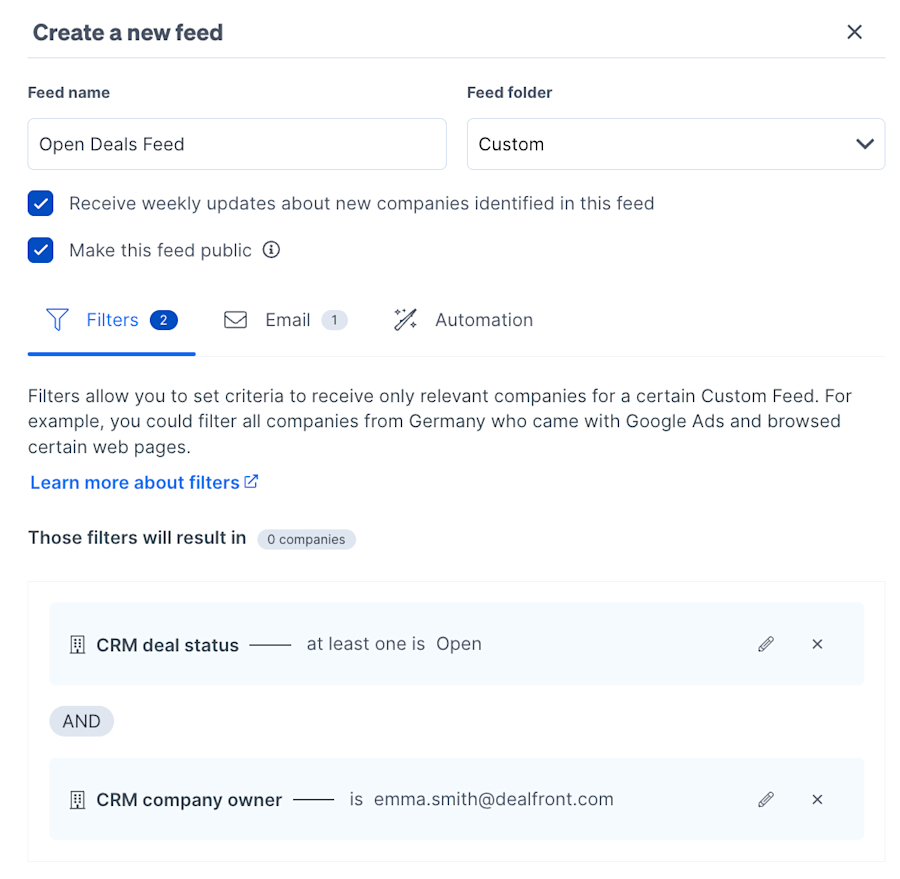
Open Deals Feed
Getting these near-instant notifications can give you the edge over your competition, helping to both prioritize which accounts to spend the most time on and know when to reach out.
4. Win back lost deals
Wouldn’t you like to know whether your lost deals are still checking out your website and what they’re doing there? Maybe the grass wasn’t greener on the other side, and they feel they made the wrong supplier choice. Or maybe you’ve launched a new feature that they’re super interested in.
With your website visitor data integrated with your CRM and your open deals tracked, you can also see the activities of your lost deals.

Lost Deals Filter
Time flies, and contract terms aren’t typically that long, so while you might have lost the deal the first time around, if you spot a highly engaged lost prospect on your website and their intent looks strong, it could be worth reaching out again.
5. Upsell to existing customers
We all know how many opportunities there are to upsell to your existing customers. With CRM integrated web visitor identification, this strategy can become even more valuable.
In Leadfeeder, you can not only see which companies are connected to your CRM, but you can filter by the CRM lifecycle stage of ‘Customer’ deal status. You can then apply additional filters, looking for key upsell markers, perhaps visits to a new product launch landing page, and save this search as a custom feed for upsell opportunities. If you’d like to highlight existing customer visits in a more visible way, you can also apply tags to companies, so their status can be instantly see regardless of which feed they appear in.
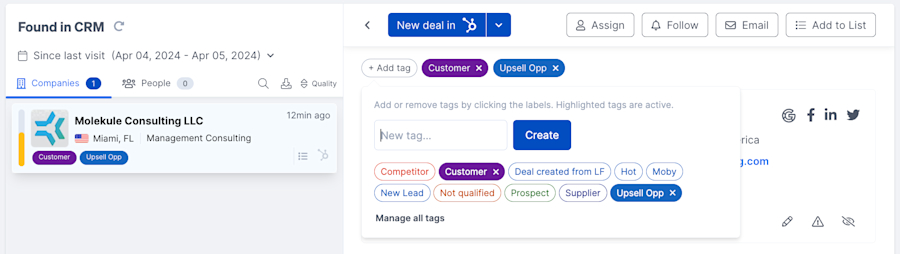
Customer and Upsell Tags
Make the most of your existing, hard-earned relationships by putting more strategic focus into your current customer base through web visitor identification.
Maximize Your Marketing Efforts with CRM Integration
The partnership of CRM data and website visitor identification is a marketer’s dream come true. Integration can transform generic marketing campaigns into highly converting strategic assets with laser-focused targeting,
1. Analyze Customer Behavior
Gaining a deep understanding of customer behavior is critical to retaining customers and winning new ones.
Your CRM, combined with your website visitor data, holds a wealth of information about how your customers behave. You can use this knowledge to improve engagement, promote cross-sells, and personalize services.
In Leadfeeder, you can set up a custom feed using CRM-specific filters, such as CRM deal status (Won or Lost) and CRM deal value. You can then explore the activities taken by your web visitors who meet this criteria, and any more you choose to set. Once you’ve explored the web activity, you can compare and contrast this to the logged activity in your CRM, for example, the time between the initial call and the final demo.
You might look at:
How you acquired the customer. Can you see any correlations among customers who viewed many web pages, filled out a form, and had multiple calls before purchase? Are they more likely to place a renewal, for example, compared to a customer who bought with no sales contact? This information could lead to an overhaul in your sales process or a redesign of your website, depending on the outcome.
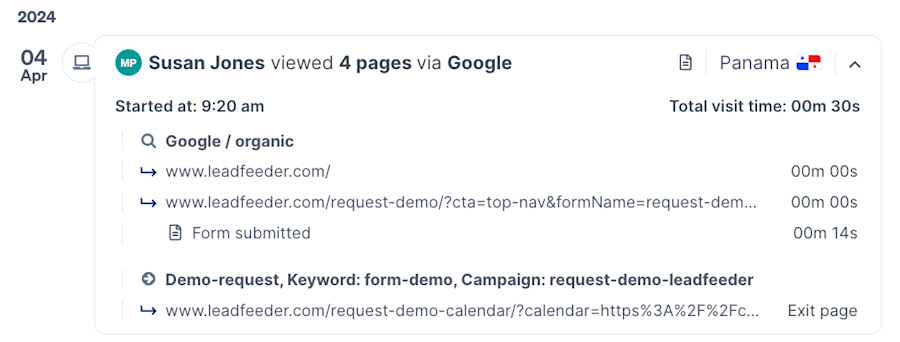
Form fill activity in Leadfeeder Form Fill Activity
Why was a customer lost? Is it recorded in your CRM why they were lost? If it were to a competitor, for example, can you see any similarities in website behavior between these specific lost deals? You could use this newfound information to run re-engagement campaigns.
How the customer is using your product. This is mainly applicable for digital products where you track usage, rather than ‘sales website’ tracking. Can you see which features of your product or app your customers use most or least? Do you need to run any education campaigns or product tours?
How the customer interacts with you on an ongoing basis. Which of your customers engage with your online resources? Once they’ve purchased, do they ever come back, or is your website a pre-sales tool only - is that the intention?
There’s a lot to unpack and explore in the combination of CRM data and website visitor activity, but integrating the two can improve the process.
2. Craft highly targeted campaigns
Associating website behaviors with specific companies that exist in your CRM can skyrocket your ability to create effective targeted campaigns. Whether this is personalizing on-site content or delivering in-person custom gifts, your marketing efforts need no longer be a shot in the dark. Every activity you plan can be strategically aligned with your customers' needs and behaviors.
If you also set up custom feeds to filter by specific actions or intent signals, you can further segment your audience. You can then add these companies to a list to continue building your campaign from there. Leadfeeder’s Promote enables you to place highly targeted brand or product awareness B2B display ads in front of a chosen list of companies. Such specific targeting can both improve the efficiency of your ads and reduce wasted campaign spend.
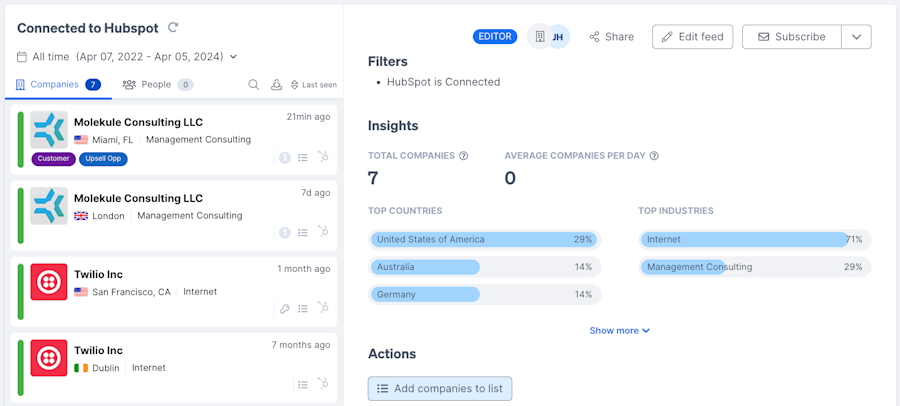
Add Companies to a List
3. Enhance collaboration with sales
This doesn’t take much explanation, but it is a hugely valuable benefit to integrating with your CRM. When you’re crafting your campaigns based on website visitor data, you can also check which of these companies are already being targeted by sales and what outreach methods have been used so far. Based on this information, you can choose which campaign flow would best suit where they’re at in the process.
Without this connection, marketing would need to first manually check if that company is in the CRM, before knowing if they’re already involved in sales activities.
The goal here is to use the data to work together and avoid duplicating, or even hindering, the efforts of either team.
4. Improving Campaign ROI
Using CRM integration with website visitor data for campaign planning is only the first piece of the puzzle. In addition to customer analysis, you can use it for campaign analysis.
Understanding which campaigns resonate with your audience is crucial. By tracking interactions on your website back to your CRM, you can measure campaign success more accurately and fine-tune future campaigns for even better ROI.
Aside from purely tracking, for example, landing pages, Leadfeeder can also integrate with the leading email marketing solutions, Mailchimp and ActiveCampaign. With email integration, as well as CRM integration, you can get a complete picture of your campaign activity.

EMS Filters
This level of insight empowers you to optimize every aspect of your strategies, from content to timing.
Turn Data into Action with CRM Integration
In this article, you’ve discovered how CRM integration can empower you to actually do something with your website visitor data. It enables you to enhance the customer journey, using anonymous website visitor identification to push visitors further down the funnel with every interaction and closer to becoming hot prospects and even converting customers.
CRM integration is the key to unlocking the full potential of your website's data and transforming it into impactful sales and marketing strategies. By aligning your sales tactics with seamless data flow and your marketing campaigns with curated customer journeys, you can maximize your efforts and see significant returns on investment.
If you’re not a Leadfeeder user, you can sign up for a free 14-day trial in minutes. You’ll find everything you need to know about getting started with Leadfeeder in our dedicated Help Center Collection.
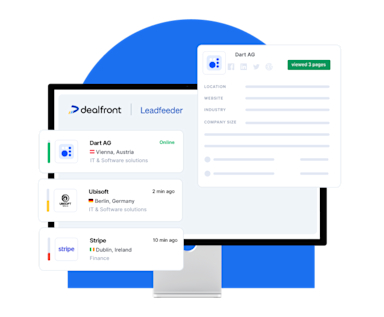
Your website visitors are already showing intent.
Leadfeeder identifies which companies they work for, what they looked at, and when to reach out -- then gives your team the contacts to follow up with. Trusted by 15,000+ B2B teams. Try it free.
Start Discovering Now