60-Second Summary
Leadfeeder helps SEOs connect technical and content efforts to real business outcomes by identifying which companies visit your site and how that traffic turns into leads. Use its custom feeds, behavioral filters, A/B testing support, and CRM integration to prove and improve SEO ROI.
Key takeaways: Link SEO performance to revenue by identifying company visitors, tracking source/medium, and measuring lead quality—not just traffic volume.
Standout strategies & tactics: Create custom Source/Medium feeds (organic, direct), filter visitors by page behavior and visit frequency, support A/B tests with visitor-quality filters, and route high-intent companies to sales.
Real-world lessons & frameworks: Use the ROI formula (Revenue from Organic Search – Cost of SEO) / Cost of SEO, avoid relying solely on last-touch attribution, and prioritize lead quality over raw visit counts.
Actionable implementation: Integrate Leadfeeder with your CRM, set geo/behavior feeds (e.g., Germany + services page), and use those signals to prioritize outreach and improve SEO-driven conversion rates.
*This summary was created with AI assistance, using our original content.
SEO covers everything from sitemaps and robots.txt files to keyword research and content optimization. The challenge is making sure those efforts are understood in terms of revenue and bottom-line results, not just technical performance.
That is where Leadfeeder comes in. It is primarily a lead generation tool, but it also helps SEOs connect their work to real business outcomes by showing which companies are visiting your website and how SEO traffic contributes to actual leads
Note: Ready to maximize B2B leads using SEO magic? Try Leadfeeder free for 14 days to improve your ROI by tracking which companies visit your website and what pages they visit.
Leadfeeder for SEOs: Generate B2B leads & prove SEO ROI
Leadfeeder is a website visitor tracking software that helps B2B marketers and sales teams turn website visitors into leads by matching IP data with our contact database.
That's the official spiel. But what does it mean for your day-to-day work? Leadfeeder shows you what companies visit your website, what they do when they get there, and then makes it easier to sort that data with our feed filters.
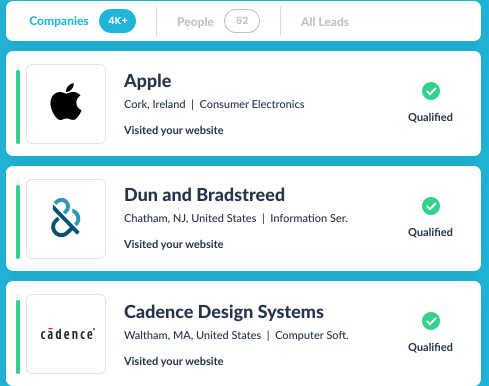
Leadfeeder can also improve the quality of leads generated by SEO and make it easier to prove ROI, which makes it easier to brag about how fabulous you are.
Here's how.
1. Use Leadfeeder to Track SEO ROI
There's no one-size-fits-all method for tracking SEO ROI.
Methods like last-touch attribution (which, of course, gives all the credit to the last touch) can leave a lot of credit — and ROI — on the table.
Lame. I'm all for teamwork, but incorrect attribution can lead to wasting time, resources, and money.
At its core, ROI is pretty easy to calculate — subtract the cost of SEO from revenue, then divide by the overall cost of SEO.
It looks something like this:
ROI = (Revenue from Organic Search – Cost of SEO) / Cost of SEO
That doesn't give you the whole picture, though. You might use Google's Goals or track organic traffic increases to see how your SEO efforts are paying off.
But what about that less direct ROI, like higher quality leads, or how that perfectly optimized piece of content is driving leads? A little more complex to track, but a pretty effective way to show what SEO is doing.
The truth is, using Google Analytics isn't giving you the whole story. Even your lead-generation tools might not provide all the data you need to demonstrate the impact of SEO efforts.
Because Leadfeeder helps you identify website traffic, you can better track the number and quality of leads from your SEO efforts.
2. Track organic traffic and turn them into leads
Yes, you already know how to track organic traffic. (I hope.)
Leadfeeder's custom filter feeds mean you can track not just the amount of organic traffic you get; you can see exactly what leads you are bringing in — and often get contact info for them.
Here's how:
Sign up for Leadfeeder (You knew that was coming, right??)
Set up a custom feed for Source/Medium.
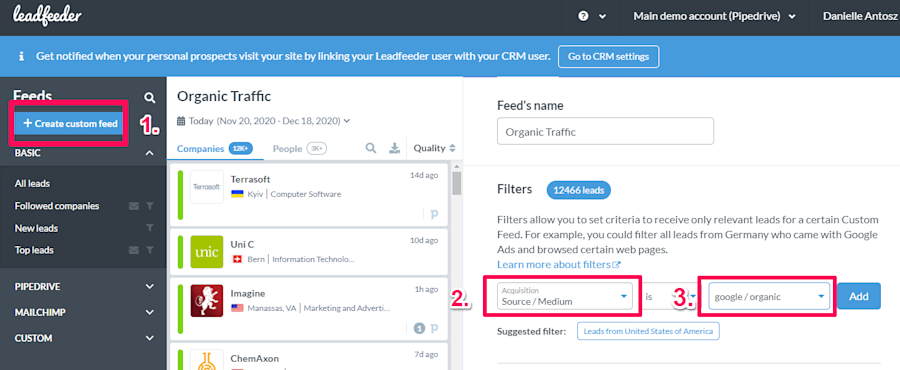
This will show you exactly which leads came to your site via organic Google search. (You can create a custom Source/Medium feed for Bing as well.)
Here's the cool part — tracking your organic traffic doesn't just tell you how many people visited you. It tells you which companies visited your site, so you can send them to sales for nurturing or to marketing for retargeting. Check out this sweet use case from Global Call Forwarding.
Protip: Set up a custom feed filter with Source = Direct to alert you when users visit your site directly by typing your URL. High-five for brand awareness.
3. Set up filters based on onsite behavior
The average conversion rate is pretty low — somewhere in the range of 2 percent if you are lucky.
This means 98% of site visitors poke around and then head off without ever taking action, like leaving their contact info or downloading a white paper.
To be fair, a lot of those people aren't in your target audience. You'd waste a lot of time chasing down every visitor to your site. (You'd also look pretty creepy.)
But what about traffic in your target audience that still doesn't leave their contact info?
With Leadfeeder, you can filter site visitors based on behavioral insights — such as who visited your service page or viewed a specific product page.
Say you're working on a B2B software site and create a new landing page targeting businesses that use account-based marketing. With Leadfeeder, you can track visitors who land on that page — and show whether they are higher-quality leads — and then follow up with them.
4. Optimize landing pages
Fun fact: you can also use Leadfeeder to support your A/B testing as well.
The easiest way to track landing page quality is to track traffic and conversions, right? If one landing page drives more traffic and more conversions (say a white paper download), then clearly that landing page is more effective?
Right? Maybe. What if one landing page is driving more conversions — but they aren't in your target audience?
Using Leadfeeder's filters, you can filter for visitors that are already in your CRM, visit five or more pages, or any other number of factors you want to sort for. (Here's how to set up the number of visits and CRM filters.)
More data = more effective SEO.
5. Pay attention to the quality of traffic to your site
Do you know what's better than lots of traffic? Better quality traffic. We'd all rather get 500 monthly visits from qualified leads than 1,000 leads from businesses that aren't even in your target audience.
Leadfeeder makes this possible by helping you qualify leads through integration with your CRM. The higher the engagement rate, the better qualified your leads are.
A quick visit by one person from a company would be considered a low-quality lead. In contrast, several visits (or longer visits) might be considered medium- or high-quality leads.
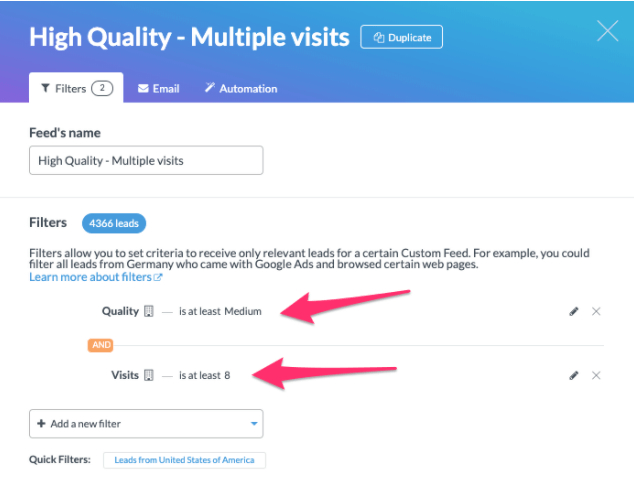
Remember, you can also set your own parameters for feeds — for example, you could create a feed for companies from Germany that came from Google organic search and then viewed your services page.
More leads, better SEO ROI with Leadfeeder
Generating leads from SEO isn't just possible — it can be pretty straightforward. Lead generation tools like Leadfeeder can help your company find more leads and even improve the ROI of your SEO.
Here's the thing — SEO is constantly changing. If you want to be effective, that means finding new data and new tools to help you be more effective. Leadfeeder can help prove your SEO is working—— and make it more effective.
Note: Ready to maximize B2B leads using SEO magic? Try Leadfeeder free for 14 days to improve your ROI by tracking which companies visit your website and what pages they visit.