


60-Second Summary
2026 brings many Leadfeeder alternatives, but the right pick depends on reliable data, the features you actually need, smooth integrations, and pricing that scales. Leadfeeder remains strong for identifying website visitors and often works best when combined with specialist tools.
Key takeaways: Prioritise accurate visitor identification, core features over feature bloat, native integrations, and transparent pricing — Leadfeeder’s free plan and combination approach make it a viable anchor for many stacks.
Standout strategies & tactics: Combine visitor-identification (Leadfeeder/Leadinfo) with specialised tools for enrichment and outreach (ZoomInfo, Cognism, lemlist, Breeze/Mailchimp) and automate handoffs into your CRM to act on intent quickly.
Real‑world lessons & frameworks: Diagnose the weakest part of your lead funnel before switching, run pilots or free trials, and measure uplift from combined stacks versus full replacements to minimise disruption and cost.
Selection checklist: Evaluate data reliability, essential features, native integrations, pricing transparency, and trial/pilot options — prefer adding specialised tools to Leadfeeder where possible rather than a full swap.
*This summary was created with AI assistance, using our original content.
With so many Leadfeeder alternatives 2026 has on offer, it’s easy to get overwhelmed. Focus on what matters, such as reliable data, the right features (not just more), smooth integrations, and pricing that makes sense as you scale. Leadfeeder now starts with a free plan, so whether you’re after cheaper alternatives to Leadfeeder on paid tiers, a free way to get started, or stronger integrations, the right pick comes down to the job you need done.
That said, many Leadfeeder alternatives for B2B lead tracking focus on just one part of the process. Leadfeeder remains one of the few solutions built specifically for identifying website visitors and turning that intent into actionable leads, which is why many teams continue to use it, either on its own or alongside other tools. Before switching, it’s worth understanding what you actually need to improve and whether a replacement, or a combination, will get you there. To help you decide, here’s how the main Leadfeeder competition compares.
Let’s take a look at the 10 top Leadfeeder alternatives and competitors. We’ll give a quick overview of each platform in turn, along with a handy table showing how each Leadfeeder competitor stacks up.
1. Lead Forensics
We’ll start with a summary of Lead Forensics vs Leadfeeder.
Lead Forensics is a well-known name in the website lead tracking space because it was one of the first products to launch, all the way back in 2009. It’s a straightforward B2B website visitor identification solution that uses website visitor ip tracking alongside a business IP address database to determine which companies are accessing your site.
It then lets you filter the resulting contacts by job title or seniority level so you can home in on the decision-makers you need to get in touch with.
The Lead Forensics product is available in two tiers, Essential and Automate, targeted at SMEs and enterprises respectively.
Strengths:
Long-standing player (since 2009)
Reliable reverse IP tracking
Unlimited users
Limitations:
No lead scoring
No transparent pricing
No self-serve trial (a short trial runs only as part of getting a custom quote)
Not ideal if: You want modern UX or pricing clarity
Lead Forensics vs Leadfeeder
2. Cognism
Cognism is a sales intelligence solution that specializes in building and maintaining a comprehensive B2B contact database for its users.
Unlike Leadfeeder, it doesn’t focus on a client website as a way of identifying leads. Instead of tracking potential contacts via website visits, it pulls its data from a variety of sources, including third-party data providers, publicly available information, strategic partnerships, and its own team’s manual research. It also uses machine learning technology to verify its data.
You can choose between two packages: Grow (the basic service) and Elevate (the premium tier, which includes more AI-powered bells and whistles and extra signals data).
Strengths:
Strong data verification
Global B2B database
Intent data + AI enrichment
Limitations:
No website visitor tracking
Pricing not public
Not ideal if: You rely on inbound web traffic insights
Cognism vs Leadfeeder
3. Breeze by HubSpot (formerly Clearbit)
The next option on our list isn’t a specialist lead generation product but has a more general focus. Breeze by HubSpot is a wide-ranging suite of AI tools designed to integrate with the HubSpot CRM platform.
It includes a number of elements, such as the virtual assistant Breeze Copilot, Breeze Agents for automating workflows, and Breeze Intelligence, which is a sales intelligence tool.
It’s this sales intelligence tool that invites the most obvious comparison with Leadfeeder. Breeze Intelligence uses a combination of reverse-IP tracking and enriched company data to furnish clients with user intent data, so in that sense, it’s a similar product.
The downside is that you can’t simply slice off the Breeze Intelligence tool from the rest of the package. You can only purchase it as an add-on to an existing HubSpot account, so it can end up being quite a costly choice.
Strengths:
Deep CRM integration
AI-powered automation
Combined intelligence + workflows
Limitations:
Requires HubSpot subscription
Credit-based pricing (can scale quickly)
Not ideal if: You want a standalone solution
Breeze vs Leadfeeder
4. Albacross
Albacross is a lead generation and account-based marketing specialist that uses IP tracking to help companies find leads based on user intent. It also offers a few AI-powered features like automated buyer persona recommendations and lead insights.
If you’re looking for advanced security settings you can tailor to your business, you’ll need to opt for the enterprise package, known as the “Organization” tier. It’s considerably more expensive than the starter package, but it does give you access to advanced roles and permission options.
When comparing Albacross vs Leadfeeder, one of the main points of difference is in the integrations. Both solutions offer integration with Zapier and widely used business platforms such as Slack.
However, if your organization relies on Salesforce or Google Analytics, Albacross only supports integration with Zapier via a third-party tool rather than through a native connection.
Strengths:
Strong intent data
AI insights
ABM-focused features
Limitations:
Limited native integrations (e.g., Salesforce via third-party)
Advanced features locked behind higher tiers
Albacross vs Leadfeeder
5. Visitor Queue
Any comparison of Visitor Queue vs Leadfeeder will show that the two are fairly similar products in a number of respects.
Both are lead generation specialists that offer website visitor tracking in near real-time, and both have a comprehensive bank of useful contact data for clients to access. The two software suites also support quite a few native integrations, including with popular platforms like Salesforce, Slack, and Zapier.
One important update: Visitor Queue is being migrated onto the Leadinfo platform, so new customers are now directed to Leadinfo. Its pricing historically started at around $39 per month for a small number of identified companies and scaled with volume. If you’re weighing it up, look at Leadinfo’s current plans (below), since that’s where the product now lives.
Strengths:
Simple, volume-based pricing
Similar core features to Leadfeeder
24/7 support
Limitations:
Lead caps on lower tiers
Some integrations require workarounds
Not ideal if: You need scale immediately
Visitor Queue vs Leadfeeder
6. lemlist
The lemlist product is primarily an outreach automation platform rather than a lead generation or sales intelligence tool per se. Its focus is squarely on email sequencing, LinkedIn integration, and personalized messaging.
In other words, if you’re looking for a tool that will help you refine your approach to contacts once you’ve identified them, lemlist could fit the bill. However, it doesn’t track visitors to your website or generate a list of leads for you. You’ll still need to do that another way.
As you might expect, though, it’s pretty strong on CRM and workflow tool integration. It supports integrations with Salesforce, HubSpot, Pipedrive, and Capsule, along with many different workflow management apps, such as Zapier.
Strengths:
Email + LinkedIn automation
Personalization tools
Strong integrations
Limitations:
No visitor tracking
Not a lead discovery tool
Tip: Use it with Leadfeeder, not instead of it
lemlist vs Leadfeeder
7. ZoomInfo
ZoomInfo is another B2B lead generation tool that uses a script to track your website visitors. It matches those visitors against a contact database to help you find high-quality leads.
When comparing ZoomInfo vs Leadfeeder, a few points stand out. First, although both products draw from a global contact base, ZoomInfo does place a few restrictions on how much of its database clients can access at lower tiers. And if it’s buyer intent data you’re after, you’ll also have to opt for one of the higher-priced plans.
ZoomInfo also uses a really complex credits-based pricing model. It doesn’t make the details publicly available either, so you’ll need to contact them for a quote.
Strengths:
Massive database
Advanced intent data
Strong enterprise features
Limitations:
Expensive
Complex pricing (credits + tiers)
Not ideal if: You want simplicity
ZoomInfo vs Leadfeeder
8. Leadinfo
Leadinfo is another useful platform for identifying website visitors and qualifying leads, and it’s now also the home of Visitor Queue following that product’s migration. Its principal focus is on helping companies achieve real-time engagement with prospects rather than on generating detailed analytics about web visitor behavior. To that end, it’s a worthwhile tool if you want to get into granular detail about leads, as it provides pretty comprehensive visitor profiles.
It also offers a substantial number of integrations with many common business tools including Salesforce, Asana, and Slack. However, it can be a little clunky when trying to integrate with Google Analytics compared to some other solutions. If that’s something your teams lean heavily on, you should bear that in mind.
Strengths:
Detailed visitor profiles
Strong integrations
Real-time insights
Limitations:
Less smooth Google Analytics integration
Leadinfo vs Leadfeeder
9. Snitcher
The aptly-named Snitcher is another B2B lead generation tool that specializes in website visitor identification. You can use it to sync data with your CRM in real time, using integrations with well-known solutions including Salesforce and Zoho.
The pricing structure is very straightforward compared to what you’ll find at some of Snitcher’s competitors. There are no premium add-on features. All features are available on all tiers, and the price you pay automatically adapts to your usage level.
Pricing starts at $49 per month (billed annually) for up to 100 identified companies, scaling to around $299 per month at higher volumes; monthly billing starts at $79. There’s also a 14-day free trial, no credit card required.
Strengths:
Transparent pricing
All features included
Scales with usage
Snitcher vs Leadfeeder
10. RB2B
RB2B’s USP is its emphasis on integrating with Slack to provide real-time lead notifications to your team. It specializes in identifying individual web visitor intent, rather than generating broader company-level behavioral analytics information. Its focus is squarely on the US market, so it’s a good option if your company is looking to carry out individual-level outreach to US-based prospects.
One area where it could improve is in the range of integrations offered. While it does provide integrations with around 50 or so tools including big names like Salesforce and HubSpot (as well as the aforementioned Slack), it’s not as comprehensive an out-of-the-box selection as some other visitor identification or lead generation solutions offer.
Strengths:
Real-time Slack alerts
Individual-level tracking
Free plan to get started
Limitations:
US-focused
Fewer integrations
RB2B vs Leadfeeder
Leadfeeder Integrations: Could Combining Tools Be the Better Alternative?
As you’ve seen, different tools solve different parts of the lead generation process. While some may fit your needs on their own, others work best when combined.
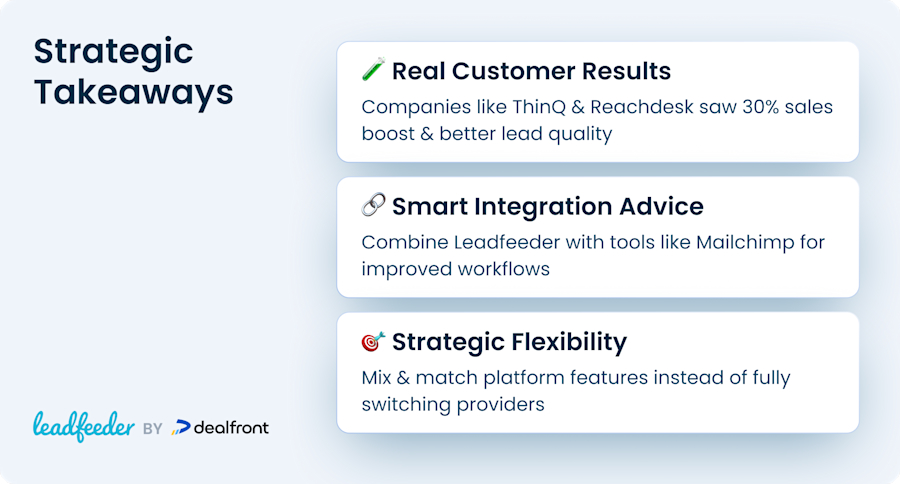
That’s where integrations come in. Leadfeeder connects with a wide range of tools, making it easy to extend its capabilities without replacing your entire setup. Instead of switching platforms, many teams choose to layer in additional tools, adding functionality where needed while keeping what already works.
For example, if you want to strengthen your outreach, integrating Leadfeeder with a tool like Mailchimp lets you move from visitor identification to automated engagement, without disrupting your existing workflow.
Leadfeeder Reviews: Why Leadfeeder Customers Stick Around
You don’t have to rely on feature lists alone. Many teams continue using Leadfeeder because it delivers where it matters: visibility and results.
For ThinQ, investing in SEO meant needing a way to identify who was actually visiting their site. After evaluating other options, they chose Leadfeeder to uncover anonymous traffic, and within a quarter, exceeded their sales goals by nearly 30%.
Reachdesk had a similar goal: understanding whether their content was attracting the right audience. With Leadfeeder, they were able to identify high-fit companies visiting their site and connect that insight directly to their CRM and outreach tools. Out of 500 monthly identified companies, 350 matched their ideal customer profile, including 50 entirely new prospects.
Best Leadfeeder Alternatives: Could Leadfeeder Still Be Your Best Option?
It may sound counterintuitive, but switching tools isn’t always the best move. In many cases, Leadfeeder already covers the core need, identifying website visitors and turning that intent into leads.
Rather than replacing it, the better approach is often to build around it. By combining Leadfeeder with more specialized tools, you can expand your capabilities without the cost and disruption of starting from scratch.
If you’re evaluating alternatives, it’s worth comparing the best website visitor identification tools before you decide.
If you’d like to know more about what Leadfeeder can do for your company, why not reach out to one of our experts today?
What Are Some Alternatives to Leadfeeder?
The most widely used alternatives to Leadfeeder include Lead Forensics, Cognism, Breeze by HubSpot, Albacross, Visitor Queue (now part of Leadinfo), lemlist, ZoomInfo, Leadinfo, Snitcher and RB2B. Leadfeeder itself now starts with a free plan, but if you want a cheaper paid alternative that still has strong integrations with CRM tools, Albacross and Leadinfo are worth considering, while teams that need the widest native CRM coverage often stay with Leadfeeder.
Disclosure: This comparison was researched and published by Leadfeeder, a product of Dealfront Group GmbH. As a competitor in this space, we have a commercial interest in this topic and have aimed to present an objective, balanced analysis. All third party competitor pricing, features, and claims reflect publicly available information at the time of writing. Product details change frequently. We encourage you to confirm current information directly with each provider before making a purchasing decision. Trademarks and brand names referenced in this article belong to their respective owners and are used solely for identification.