

Web traffic analytics refers to collecting data about who comes to your website and what they do when they get there. That data is crucial to building effective sales and marketing strategies. [1]
Depending on which web traffic analytics tools you use, some of the data you’ll see might include:
How much traffic your site gets in a given time period
Which content is most popular
Your bounce rate
How many new visitors you get
Where your traffic comes from
How long people stay on specific pages
How often users return to your website
When you track website traffic analytics consistently, you can:
Optimize content: See which pages visitors stay on, and which they abandon, so you can create more of what works.
Understand your audience: Identify who’s visiting, when they visit, and how they interact with your site to refine targeting and messaging. Website visitor tracking software solutions, like Leadfeeder, provide detailed insights into who’s visiting your website, the times they’re visiting, and so on.
Improve site performance: Analytics expose UX and speed issues. In fact, Google research shows that when page load time increases from 1 to 5 seconds, bounce rates rise by up to 90%, directly impacting conversions.
Strengthen SEO: Traffic data reveals which keywords, pages, and visitor segments drive results. According to HubSpot, companies that prioritize blogging and SEO are 13x more likely to see positive ROI.
In short, the right website traffic analytics help you attract better visitors, keep them engaged, and convert them more effectively. In this guide, we’re going to share everything you need to know about the 8t key analytics that you need to be tracking.
We’ll also share a few tips to help you gain access to more data than the market leading Google Analytics currently provides.
Note: Leadfeeder is a web traffic analytics tool that identifies which companies are on your site and what actions they take. Try us free for 14 days.
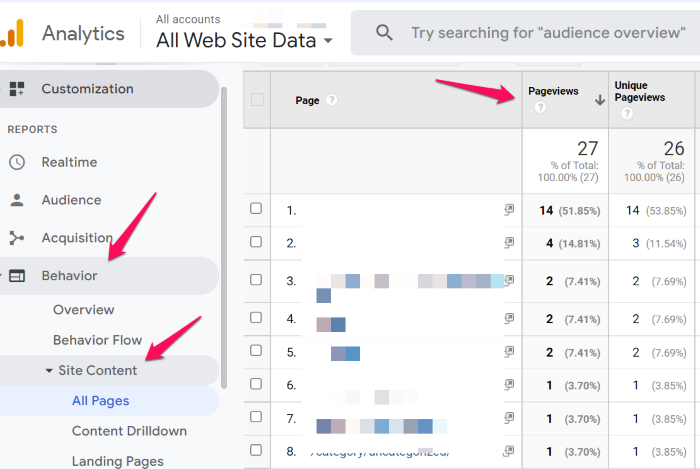
1. Page Views
This tracks the number of times visitors land on a specific page, including repeat visitors. The number will be the same whether you have 10 visits from 10 different visitors or 10 visits from one visitor.
This metric helps pinpoint which website content is most popular. For example, if a blog post about cold email templates is getting tons of page views, you know it’s the type of content your users care about.
What it measures: The total number of times a specific page is viewed, including repeat visits.
Why it matters in 2026: Page views show which content attracts attention. High-performing pages reveal what topics drive traffic and interest.
How to track it: GA4 → Reports → Engagement → Pages and Screens → Views
What to watch for:
Pages with high views but low conversions
Sudden traffic spikes (campaign impact)
2. Views per User
While page views track the overall number of times a piece of content was viewed, views per user will show you how many times an individual user has viewed a piece of content. If you’re familiar with previous versions of Google Analytics, “Views Per User” replaces the old “Unique Pageviews” metric.
Comparing unique page views versus page views highlights which content users return to repeatedly.
What it measures: The average number of times a single user views a page.
Why it matters in 2026: This metric shows repeat engagement. If users revisit content, it may indicate strong value, or confusion that requires clarity.
How to track it: GA4 → Engagement → Pages and Screens → Views per user
What to watch for:
High views per user on product pages (buying consideration)
Repeat views on pricing pages (purchase intent)
Repeated blog visits (pillar content opportunity)
3. Sessions
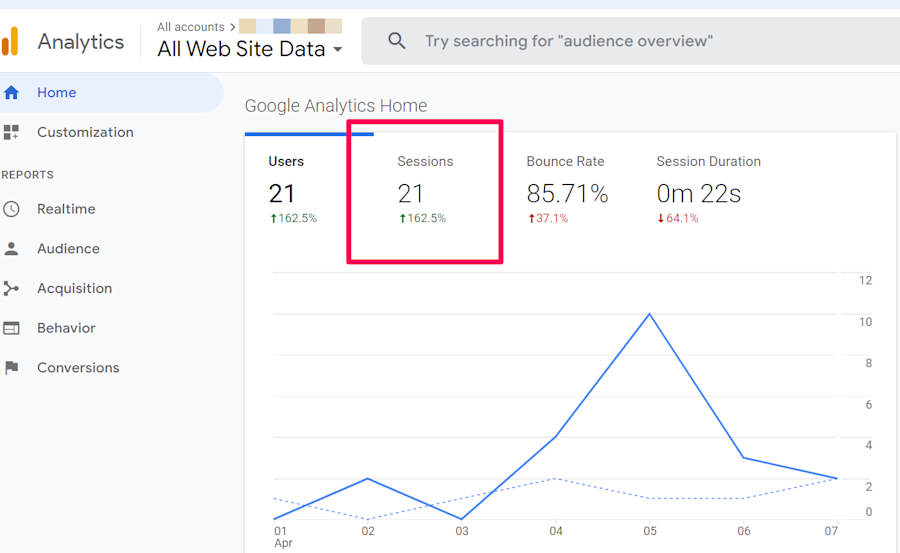
Google defines sessions as "a group of user interactions that take place over a given time frame." This means that a single session can include several page views, transactions, or events.
For example, if a user comes to your site from Facebook, views three blogs, and then converts, that’s considered one session.
Sessions generally end after a set time or when a user switches campaigns. If they arrive at your site from a LinkedIn post, leave, and then return from a Google Ad, those are counted as separate sessions.
GA4 will automatically consider each ‘session’ as around 30 minutes, but you can adjust this on a granular level in your session settings.
What it measures: A group of interactions within a set timeframe (default 30 minutes in GA4).
Why it matters in 2026: Sessions show overall activity trends and campaign performance. It’s more meaningful than raw page views because it reflects visit instances.
How to track it: GA4 → Reports → Engagement → Sessions
What to watch for:
Session growth tied to campaigns
High sessions with low engagement
Seasonal traffic patterns
4. New Visitors
New visitors are visitors who have never visited your site before, at least as far as Google's snippet can tell. (Note: this isn't 100% accurate; if the cookie expires or if the user clears their cache, Google won't recognize them.)
Comparing new visitors with returning visitors can show whether a new campaign is attracting interest or whether the same visitors are returning to your site again and again.
Like many of the metrics in this guide, it's not 100% accurate, so use it only as guidance!
What it measures: First-time visitors to your site (based on device/cookie tracking).
Why it matters in 2026: Indicates brand awareness growth and campaign reach.
How to track it: GA4 → Reports → Acquisition → User Acquisition → New Users
What to watch for:
Spikes from paid campaigns
Growth from organic search
High new users but low engagement (targeting issue)

Note: A major drawback to using GA to track new visitors is you can't tell who those visitors are. Leadfeeder uses IP addresses to identify what companies visit your site. That info can help you build stronger marketing campaigns or even inform sales outreach.
5. Returning Visitors
Returning visitors are essentially the opposite of new visitors. They've been to your site before on the same browser in the last few weeks.
Either they find your information interesting, they're trying to make a buying decision, or maybe it's a competitor creeping on your pricing. While there's no way to know why they’re on your site, you will know that they've been there before.
What it measures: Visitors who have previously visited your website.
Why it matters in 2026: Returning users often show stronger intent and higher conversion likelihood.
How to track it: GA4 → Reports → Acquisition → Add Returning Users dimension
What to watch for:
Increasing return rate (brand stickiness)
Returning visitors hitting pricing or demo pages
Drops in return traffic (retention issue)
6. Traffic Sources
This site metric tells you where traffic comes from. Did a site visitor find you via organic search, paid ads, social media, or something else? This info helps you see how customers are finding you and how well your campaigns are performing.
What it measures: Where visitors come from:
Organic search
Paid ads
Social media
Referral
Direct
Why it matters in 2026: Helps allocate marketing budget and identify high-ROI channels.
How to track it: GA4 → Reports → Acquisition → Traffic Acquisition
What to watch for:
Over-reliance on one channel
Organic growth trends
Paid traffic with low engagement (target mismatch)
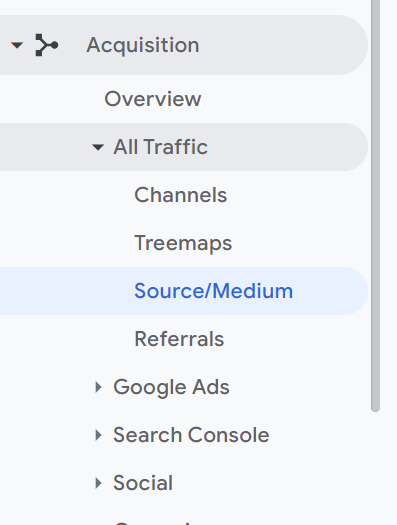
Leadfeeder provides similar data, but it tells you the source for specific companies. For example, you can see whether traffic from Microsoft came from organic search, social, or even a specific paid campaign.
7. Engagement Rate
Engagement rate measures the percentage of visitors who meaningfully interact with your website or app. This metric is a key indicator of how effectively your content or site captures users' attention and encourages them to interact beyond simply landing on a page.
Research shows that websites with strong engagement metrics tend to rank better in search results and achieve higher conversion rates, driven by stronger user signals and longer dwell time.
This can be more specifically defined by individual businesses, but generally, a session is considered ‘engaged’ if it meets the following criteria:
The session lasted 10 seconds or longer
The user viewed more than one page
The user completed a conversion event
Engagement rate is calculated by dividing the number of engaged sessions by the total number of sessions.
What it measures: The percentage of sessions that meet engagement criteria (10+ seconds, multiple pages, or conversion event).
Formula: Engagement Rate = (Engaged Sessions ÷ Total Sessions) × 100
Why it matters in 2026: Engagement signals content quality and correlates with SEO performance and conversion potential.
How to track it: Customize GA4 reports → Add Engagement Rate metric
What to watch for:
Low engagement on high-traffic pages
Engagement differences by traffic source
Improvements after UX or content updates
Keep in mind, GA doesn't tell you who is engaging with your site. Luckily, Leadfeeder can help. To see exactly who is engaging with your platforms, create a Leadfeeder custom feed. This will show you exactly which companies are visiting your site.
8. Company Names
GA4 provides tons of web traffic analytics data, but there are several gaps. For example, it might tell you users found your page through organic search, but not which terms they used to get there.
GA4 also doesn't identify who visits your site due to obvious privacy concerns. (It's also hard to track this accurately since people often switch between browsers and devices.)
However, in B2B, you don't need to know that John, who works at Microsoft's Washington headquarters, visited your site at 12 pm on Saturday.
You just want to know what companies are landing on your site. Leadfeeder has got you covered. It can even show you companies with home workers visiting your site!
This data can show whether your ABM campaigns are working, whether your ICP is on point, and so on
What it measures: Which companies are visiting your website and what pages they view.
Why it matters in 2026: For B2B teams, this reveals buying intent before form fills. It supports account-based marketing (ABM) and proactive outreach.
How to track it: Use company-identification tools like Leadfeeder (requires tracking installation).
What to watch for:
Target accounts visiting multiple times
Visits to pricing, case studies, or demo pages
Increased traffic from ideal customer profile (ICP) companies
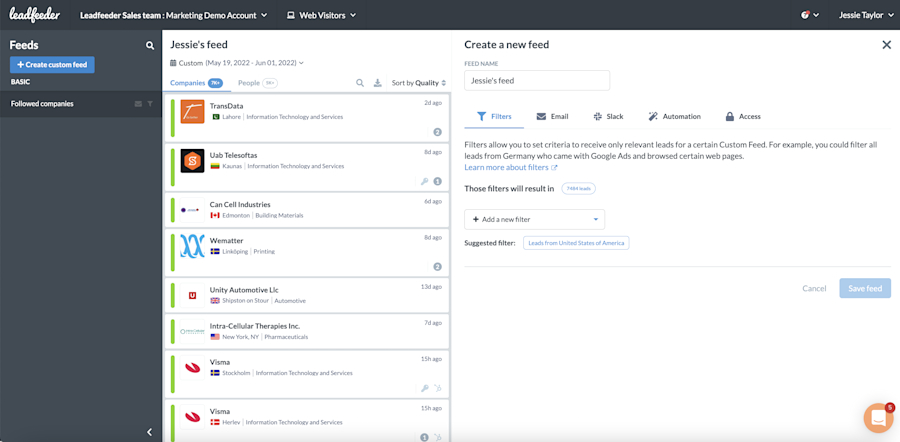
Want to get notified when specific companies visit your site, or users take specific actions? Create a custom feed. Don't forget to set up notifications to get an email or Slack message when hot leads hit your website!
Website Traffic Analytics Summary Table
Metric | Why It Matters in 2026 | How to Track It |
Page Views | Identifies popular content and traffic-driving pages | GA4 → Engagement → Pages and Screens |
Views Per User | Reveals repeat engagement and high-interest content | GA4 → Engagement → Pages and Screens |
Sessions | Tracks overall site activity and campaign performance | GA4 → Engagement → Sessions |
New Users | Measures audience growth and campaign reach | GA4 → Acquisition → User Acquisition |
Returning Users | Signals buying intent and brand loyalty | GA4 → Acquisition → Add Returning Users dimension |
Traffic Sources | Shows which marketing channels drive results | GA4 → Acquisition → Traffic Acquisition |
Engagement Rate | Indicates content quality and conversion potential | Customize GA4 report → Add Engagement Rate |
Company-Level Visitors (B2B) | Identifies high-intent companies for sales outreach | Company identification tools (e.g., Leadfeeder) |
FAQs on Website Traffic Analytics
Why is website traffic analytics important?
Website traffic analytics help you to better understand your audience. Good web traffic analytics will tell you a lot more than just how many people are visiting your website.
Traffic data for your website will also tell you what demographics those people fit into, how they behave on your website, the pages they linger on, the pages they quickly bounce from, and more.
You can use all this data on website traffic to optimize your site and give your customers a better user experience.
What do website traffic analytics tell you?
Traffic metrics show who is visiting your website and how they interact with your content. Ideally, this data highlights which content resonates most and where opportunities exist to improve conversions.
How do you see website traffic analytics?
You can see website traffic analytics by using dedicated traffic analysis tools.. Popular website traffic analytics tools include:
Leadfeeder
Leadfeeder’s ultimate aim is to turn visitors into leads and get more visitor conversions. To do this, Leadfeeder gathers highly detailed information on visitors to your website.These platforms collect and report data about who visits your website, how they behave, and where they come from.
Note: Want more detailed web analytics data? Try Leadfeeder free for two weeks.
Google Analytics 4 (GA4)
GA4 is the most widely used analytics platform for tracking:
Traffic volume
Sessions
Engagement metrics
Traffic sources
Conversions
It provides a comprehensive, anonymized overview of website performance. However, it does not identify individual visitors or companies, which can be limiting for B2B teams that need account-level visibility.
How can I analyze website traffic?
There are lots of ways to analyze website traffic. Website traffic analysis tools like Google Analytics will automatically analyze your website traffic to a certain extent.
You can add web traffic analysis tools like Leadfeeder to your tech stack in order to get deeper into web traffic data and draw valuable leads and insights about those leads from your traffic metrics.
How often should I analyze my website traffic?
How often you should analyze your website traffic depends on several factors, including the size of your website, your audience, how often you update your website, and your web traffic goals.
Many brands continuously analyze site traffic and set up their analytics tools to alert them to significant changes or alterations in web traffic patterns. This allows them to act quickly to rectify things when something goes wrong or to capitalize on an influx of website visitors.
How can I see which devices visitors are using?
Google Analytics will break down visitors by device under its Reports tab.
Website traffic information from Leadfeeder will give you a detailed breakdown of everything that visitors to your site do and the devices they use to do it.

Director of Content Marketing @ Leadfeeder
Jamie Pagan is Director of Demand at Leadfeeder, where he leads demand generation and pipeline growth initiatives. His work focuses on connecting marketing activity with revenue by combining intent signals, campaign performance data, and audience insights.
With experience building scalable demand engines and launching growth-focused campaigns, Jamie brings a practical perspective on how marketing teams generate and capture demand. His experience working with intent data and marketing analytics informs his approach to identifying high-intent buyers and converting interest into qualified opportunities.