60-Second Summary
Forward DNS maps domain names to IP addresses, while reverse DNS maps IP addresses back to hostnames. For B2B teams, reverse DNS can reveal which companies visit your site so you can convert anonymous traffic into qualified leads.
Key takeaway: Reverse DNS turns visitor IPs into hostnames you can map to companies, surfacing firmographic details (industry, size, location) and enabling B2B lead identification with tools like Leadfeeder.
Standout strategies & tactics: Use nslookup/dig for single lookups or a bulk service (install a Leadfeeder script) to match many visitors, filter out ISP/mobile noise, then retarget identified companies via LinkedIn and CRM-driven outreach.
Real-world lessons & frameworks: Focus on commercial intent, not raw traffic (avoid the traffic trap); act quickly on high-intent visitors; apply ML filters to surface genuine prospects and integrate results into sales workflows.
Technical notes & cautions: PTR records live under in-addr.arpa and are controlled by IP block owners/ISPs (many consumer IPs show ISP hostnames), rDNS aids email deliverability (PTR + DKIM/SPF), and analytics like GA4 report users while tools like Leadfeeder report companies.
*This summary was created with AI assistance, using our original content.
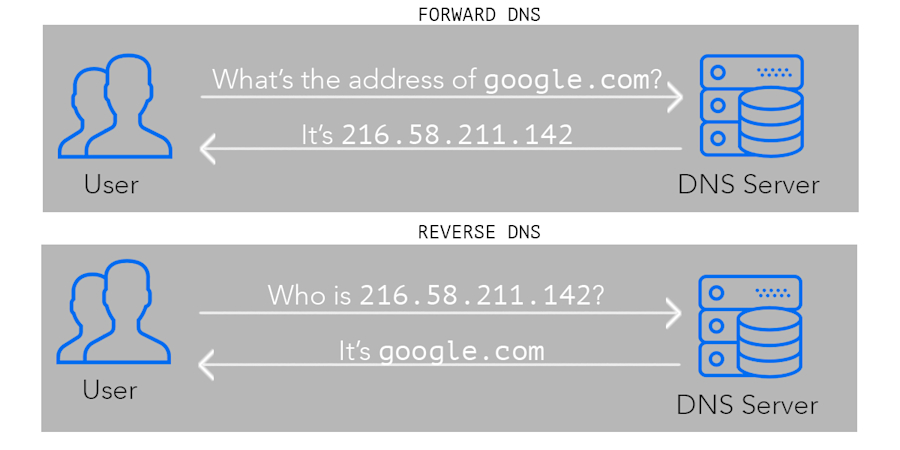
Put simply, DNS forward vs reverse lookup comes down to direction: forward DNS maps domain names to IP addresses, while reverse DNS maps IP addresses to domain names. It’s the same system working in reverse.
For B2B companies, this is valuable because reverse DNS can help you see which companies visit your website based on their IP addresses. That information can then be turned into potential sales leads and business opportunities.
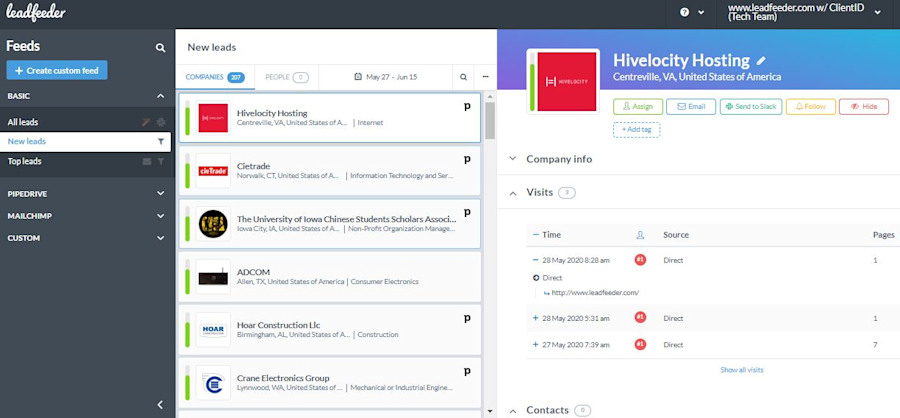
Knowing who’s looking at what you have to offer is the kind of information Tinder charges a premium for.
Note: Want to identify the B2B sales leads lurking within your website? Sign up and try Leadfeeder free for 14 days. Check our pricing here.
What does a reverse DNS lookup tool do?
Unlike a chainsaw (which does not saw chains), a reverse DNS lookup tool does exactly what you’d expect it to. It allows you to perform a reverse DNS IP lookup.
Of course, it does a little bit more than that. A reverse DNS lookup tool provides additional information, such as the country and city associated with the IP address.
To run a single lookup, type nslookup 8.8.8.8 or dig -x 8.8.8.8 in a terminal, or use any free online reverse DNS lookup tool.
Want to run a bulk reverse DNS lookup on all of your website visitors? Leadfeeder Web Visitors matches your visitors' IP addresses to companies, so you can see which companies visit your website. Install the Leadfeeder script to see the companies visiting your site. Get started with a 14-day free trial.
What is reverse DNS in layman's terms
In plain terms, a reverse DNS lookup asks which hostname belongs to an IP address. For 8.8.8.8, the answer is dns.google.
If you’re operating a B2B business, there’s a huge advantage to knowing what companies are accessing your website — these are the people who are most likely buying what you’re selling.
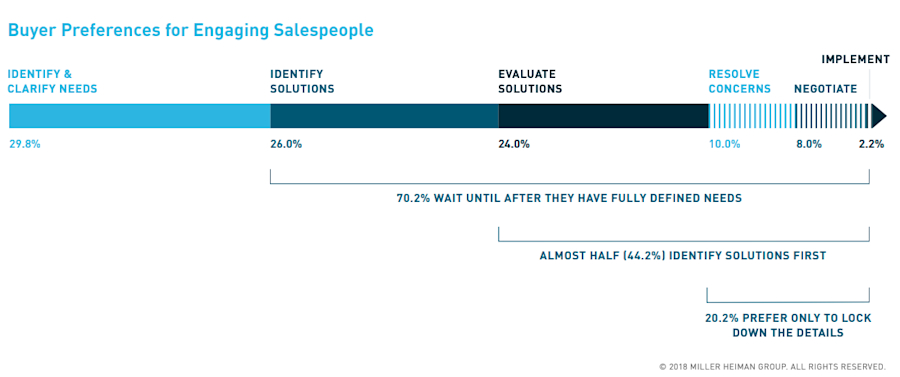
When you identify a B2B buyer early in the process, you have a chance to swoop in with a solution (your solution). Even if it’s not a product the purchaser has fully embraced — yet.
So, you want to see this kind of data for all of your website visitors? Of course, you do. You’re not opposed to making money — this is America, after all (or whatever country you’re in).
Leadfeeder Web Visitors shows you which companies visit your website. Simply install the Leadfeeder script to see the companies visiting your site. Get your toes wet (with leads) with a 14-day free trial.
Breaking down reverse DNS so your sales team gets it
Whenever you navigate to a certain webpage, your browser checks for the IP address of that domain name and uses that address to find the correct page. All right, buckle up — we’re about to get into the types of acronyms and phrases Silicon Valley bros use to trick rich people out of venture capital.
DNS stands for Domain Name System. It’s an address list of computers connected to the internet. If you go to Google, you’ll see the DNS record that shows the company's location online.
Just as you would use a Rolodex to find an address in real life. Just kidding, no one uses a Rolodex in real life. What you can’t do with a Rolodex is find a person’s name by searching their address.
However, thanks to the digital revolution, reverse DNS (rDNS) lookup lets you find the hostname that belongs to an (internet) address.
An rDNS lookup is the process of resolving Internet hosts by their IP addresses. Hence the “reverse” distinction in the name. Besides searching for what Google’s IP address is, you can also determine which company operates from the IP address 8.8.8.8.
If you spend any time on the internet (particularly in the YouTube comments section), it can sometimes feel like a chaotic, anarchic hellscape. However, the DNS address book is a stable system that everyone on the internet must agree upon.
So, at least until Skynet takes over, you can trust that if the DNS says a company is Google.com, it’s really Google.com.
Every single internet-connected device has an IP address. Yes. That means your phone, Roomba vacuum, Amazon Echo, and — most importantly in the B2B world — work computers all have their own IP address. Though not every IP address has a reverse DNS record, most do.
For example, when you accessed this blog post, your device provided your IP address to our server, and your browser knew our IP address. All thanks to the DNS! If it weren’t for this system, you’d need to remember the IP address for any website you wanted to visit. This would be a problem if, like most of us, you remember names better than numbers.
Now that you’re up to speed with how the internet works, you’ll be able to understand how Leadfeeder works to help with a reverse DNS query. Leadfeeder is a tool that can help you identify which companies have shown interest in your services or products by having their employees visit your website.
By running a reverse DNS, Leadfeeder traces the IP address of those who visit your website right back to their company. It’s not rocket science — but it gets the job done.
What are “ptr-record” and “in-addr.arpa?”
Sorry, we’re not done with the technical lingo of understanding a reverse DNS yet. The DNS is defined by zones. A zone is a separate portion of the domain name space. Historically, it was administered as a single zone file.
Most often, a domain is one zone. The owner of the zone maps different addresses to different domain names in their zone. For example, it maps the IP address 23.25.62.12 to the hostname “www” in the zone “example.com.” This is done with DNS records.
This would mean that writing www.example.com would direct your browser to the address 23.25.62.12. This is usually done with an A record (or ALIAS record) and is the most common form of forward DNS.
How about a reverse DNS zone? A PTR record is the record for reverse DNS. So, does the zone owner just add that IP address to their zone, and it’s all good? No. Reverse DNS works the other way around. PTR record is stored in a special zone called .in-addr.arpa.
This zone is administered by the owner of the block of IP addresses. In the example case, the zone for the PTR record would be 12.62.25.23.in-addr.arpa. The owner of the IP address is usually the Internet Service Provider (ISP), and if you want to add a PTR record to your IP address, you need to contact your ISP.
Wait. Fight the glaze spreading across your eyes! We’ve still got a few more related concepts to discuss.
Why does anybody care about how to do a reverse DNS lookup?
Well, to be honest, most people don’t care. But anyone running a B2B business should care, because failing to take notice is like running $100 bills through the shredder.
Let’s break it down:
You have a website. We know this because you’re running a business in the 21st century. This website is constantly gathering IP addresses from the devices that visit it. With a reverse DNS tool, you can translate these IP addresses into hostnames — many of which can result in meaningful leads.
Now, the person doing the first round of research isn’t likely to be the same person who has the power to make purchasing decisions for their company. However, because the business can be identified via reverse DNS lookups, Leadfeeder can then show company details such as industry, size and location.
We’ll even give you the information you need to reach out to the executives who will make the final decision on a purchase. Of course, this is not always the case. While most IP addresses can be translated into hostnames, the resulting hostname is often not very useful.
The thing is, most normal people don’t own their IP address. That’s because there’s a finite number of IP addresses available and a seemingly infinite number of new mobile phones, laptops, refrigerators, and other smart devices.
Most people are renting an IP address from their ISP. That’s usually the case for mobile phones and home broadband connections. Your hostname will be something like 62.78.145.65.bb.dnainternet.fi.
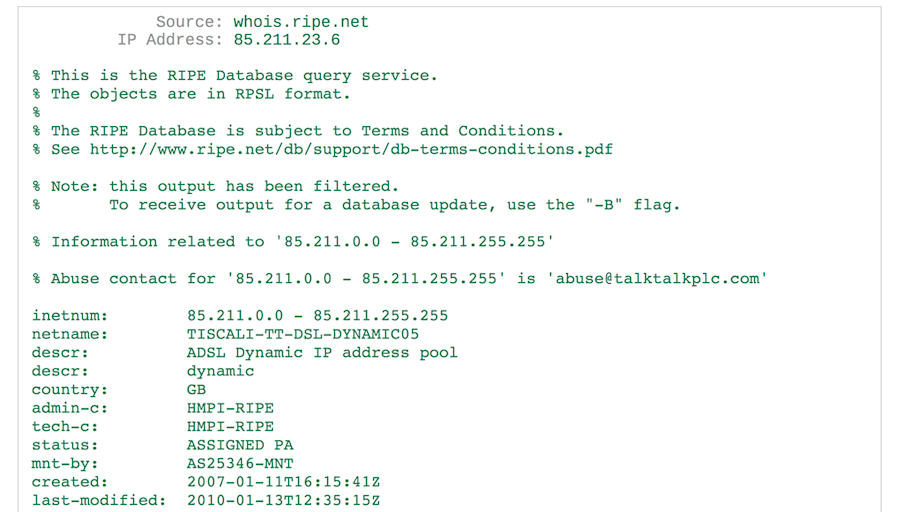
Surprisingly, there’s still a lot of information hidden in that IP address. You can suss it out with WHOIS. For example, that address tells you the user is from Helsinki, Finland, and their ISP is DNA. You can even use this data to pinpoint a more accurate location inside Helsinki where the connection was made.
That’s nice, but there’s still no way you can identify the exact individual with this information.
For business-to-consumer (B2C) marketers, that’s the end of the line when it comes to what a reverse DNS search can accomplish. You can use the location data to better target regions with your marketing efforts or expand your business in those areas.
However, things are very different in B2B sales and marketing. Unlike the average Joe Rando, most companies have their own IP addresses. So, put on your thinking cap and consider what that means for your B2B marketing team looking to fully utilize the power of reverse DNS searches.
If you managed to put on the correct hat (not the cone-shaped one with “dunce” written on it) you probably figured out the obvious: with a reverse DNS lookup, it’s possible to see exactly which companies visited your website.
If the IP address is from a larger company, you can even see which offices their connection came from. Then, all you have to do is launch that LinkedIn retargeting campaign to zero in on the people with power — purchasing power!
Reverse DNS and email
Though it might not affect your marketing efforts (unless you’re doing something wrong), it’s worth understanding the role reverse DNS plays in spam filtering. Email servers use reverse DNS (among other systems) to verify that the sending server is not a malicious spammer.
When someone sends an email from the address john.doe@example.com, the receiving server checks whether the IP address of the sending server has a reverse DNS record associated with example.com.
If the sending email server doesn’t have a reverse DNS record at all, it might as well be packaged in a blue tin — because it’s probably spam. In such cases, most servers reject the email.
If you are running your own mail servers, you can avoid problems like this by setting up a PTR record for your server. If the email server has a reverse DNS, but it’s not for your domain, that’s not a problem.
Just remember that under such circumstances, it’s even more important to set up correct DKIM and SPF records.
Reverse DNS data in web analytics tools
Some web analytics tools have shown reverse DNS data in the past. Google Analytics stopped showing its network domain and service provider data in February 2020.
GA4 reports on users and sessions; Leadfeeder reports on companies, so the two work side by side. And even when the tool is fine, the traffic often isn’t. Sam Dunning, Founder of Breaking B2B, calls this the traffic trap:
"One of the biggest [mistakes] is falling into what we call the traffic trap — [marketers] look for a keyword that has high traffic... an informational keyword rather than a commercial intent. It's less likely to drive sales leads or demos." - Sam Dunning, Founder of Breaking B2B
If your content strategy is attracting researchers instead of buyers, reverse DNS will only magnify the noise. The reports are filled with home broadband and mobile phone visitors, which skews your data and makes it harder for your sales and marketing team to identify genuine prospects.
If you are serious about discovering which companies are visiting your website, try out a 14-day trial of Leadfeeder. Leadfeeder uses machine learning to filter out ISPs and non-relevant hostnames from your data. It also effortlessly integrates with other marketing and sales tools for better data sharing.
Final thoughts: What is reverse DNS lookup & why should you care?
Congratulations! You’re still awake.
Don’t worry, there won’t be a pop quiz at the end — because the real test is how well you implement your understanding of reverse DNS searches to unlock the vast amount of commercial potential they provide to your B2B company.
Note: Want to identify the B2B sales leads lurking within your website? Sign up and try Leadfeeder free for 14 days.