60-Second Summary
Intent data boosts sales productivity by helping reps focus on accounts most likely to buy, but only when combined with clear processes and fit criteria. This guide shows a practical, repeatable approach—prioritise by fit + intent, route signals into your CRM, personalise outreach, use intent on active deals, and measure impact.
Key takeaways: Combine first-party website intent with a well-defined ICP and score both fit (0–100) and intent (0–100); prioritise recent, high-value signals (pricing, demo, repeat visits) and apply decay windows.
Standout strategies & tactics: Push intent into your CRM, create focused alerts and automated tasks, route to the right rep or SDR, and personalise outreach based on pages viewed and stakeholder roles.
Real-world lessons & frameworks: Use a simple scoring framework (fit + intent → composite priority), start with strict thresholds to avoid alert fatigue, multithread accounts, and apply intent throughout active deals for revival or expansion signals.
Measure impact & avoid traps: Track connect/meeting rates, conversion velocity, win rate and cost per qualified lead; beware poor-fit signals, variable third‑party quality, over‑automation, privacy compliance and the volume trap—iterate from a 30‑day pilot.
*This summary was created with AI assistance, using our original content.
Intent data makes sales teams more productive by helping them focus on the accounts most likely to buy. But most teams either:
Don’t have it
Have it, but don’t use it
Have it, but don’t make the most of it
According to Salesforce, sales reps spend just 28% of their working week actively selling. The rest goes on administration, research, forecasting and internal tasks. At the same time, Forrester found that more than 85% of companies using intent data report business benefits, yet fewer than half use it to accelerate pipeline. Even if the data is there, teams still have that process problem.
This guide explains how to leverage intent data for sales in a practical, repeatable way. You’ll learn how to: Prioritise accounts using fit and intent data together
Route intent signals into your sales workflow
Personalise outreach using real buying signals
Accelerate active opportunities
Measure whether your approach is actually working
If you need to learn the fundamentals of intent data before you get started, you should first check out our Guide to Buyer Intent.
A quick primer: What sales intent data tells your team
How to use intent data for sales? Before we get to that, it’s worth understanding the two main types you’ll encounter.
First-party intent data comes from activity on your own website. It shows how companies engage with your brand and content. Common signals include:
Visits to pricing pages
Views on product and solution pages
Content downloads
Repeat website visits
Because these signals come directly from your website, they tend to be timely and highly relevant to your sales team.
Third-party intent data comes from research activity happening elsewhere online. It shows which companies are actively researching topics related to your category, even if they have never visited your website.
It’s essential to understand the distinction. First-party intent data tells you which companies are engaging with your business right now. Third-party intent data tells you which companies are researching the broader problem or solution area. Both have value, but for sales teams implementing intent data for the first time, first-party website intent is often the most practical place to start. The signals are immediate, specific and directly connected to your sales process.
Take a look at our Guide to Buyer Intent for a deeper explanation of intent data types and sources, as well as the buyer intent funnel.
Step 1: Prioritise accounts by combining fit and intent
The biggest mistake sales teams make with intent data is assuming every signal deserves the same attention. Just because a company is researching your category does not mean it is a good sales opportunity. Intent data can tell you who is showing interest, but it cannot tell you whether that account fits your business.
For example, a company might visit your website several times, download a piece of content and spend time on your product pages. On the surface, that looks promising. However, if the company is outside your target market, too small to afford your solution, or operating in an industry you do not serve, it is unlikely to become a customer. This is why intent data works best when combined with fit.
Before you start scoring intent signals, define your Ideal Customer Profile (ICP). This is the set of characteristics shared by the companies most likely to buy from you and succeed with your product. Your criteria might include:
Industry
Company size
Geography
Technology stack
Revenue band
Team size
Document these criteria before building any scoring model. Otherwise, your sales team risks spending time on accounts that show interest but have little chance of converting. Once your ICP is established, you can start layering intent signals on top.
Imagine two accounts enter your pipeline:
Account A
Matches your ideal company size
Operates in your target industry
Visited your pricing page this week
Account B
Falls outside your target market
Downloaded a whitepaper once
Both accounts have shown intent. However, Account A should receive immediate attention because it combines strong fit with strong buying signals. Together, intent and fit create a far more reliable way to prioritise sales activity.
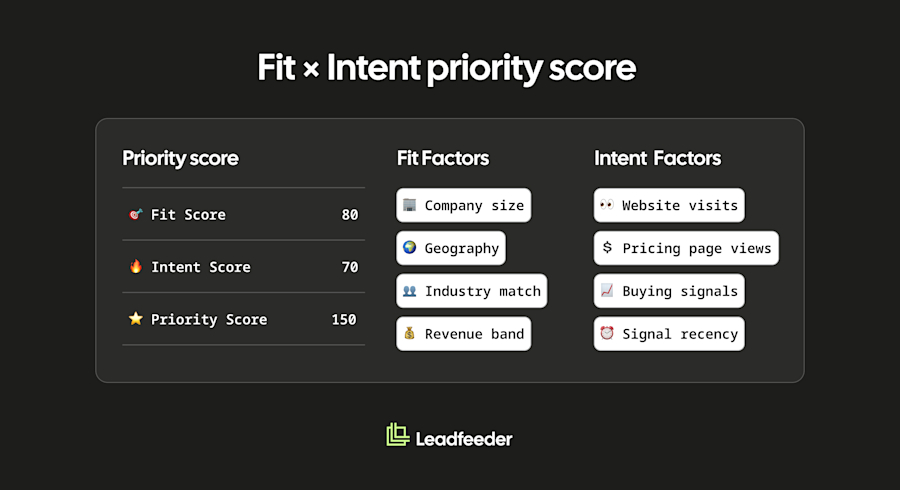
To make prioritisation repeatable, create a simple scoring framework to quantify fit and intent together. Start by assigning every account two separate scores:
Fit score (0-100)
Intent score (0-100)
Your fit score reflects how closely an account matches your ICP. Factors might include industry, company size, geography or technology stack. Your intent score reflects buying activity. Factors might include pricing page visits, product page views, demo page visits and repeat website sessions. You can then combine the two scores into a single priority score.
Here’s an example. The exact numbers matter less than having a consistent framework. The goal is to help sales teams focus on the accounts most likely to convert.
Not all intent signals deserve the same weight. A visit to your pricing page usually indicates stronger buying interest than a blog post view. Similarly, an account that returns to your website several times is typically more engaged than one that visits once and disappears.
Consider assigning higher scores to high-intent actions, such as visits to:
Pricing pages
Product comparison pages
Demo request pages
On the other hand, lower-value actions might include:
Blog visits
Single content views
Timing also matters. Intent signals lose value as they age. An account that visited your pricing page yesterday is usually a higher priority than one that last engaged three weeks ago. Many sales teams apply a 14 to 21-day decay window to first-party intent signals. Once activity falls outside that window, reduce its weighting and focus on accounts showing more recent engagement.
This level of prioritisation matters because modern B2B buying journeys are increasingly complex. Research by HockeyStack found that the average B2B SaaS deal now involves 266 touchpoints before purchase. When buyers interact with so many channels, content assets and stakeholders, sales teams cannot afford to spend equal time on every account. Prioritisation helps them focus on the opportunities most likely to move forward.
Step 2: Route intent signals into your sales workflow
Too many companies don’t get the most from their intent data because they don’t have their sales processes working in the right way.
If intent signals sit in a separate dashboard that sales reps rarely open, very little changes. Reps already spend their day working inside CRM systems, email platforms and sales engagement tools. Asking them to monitor another platform often creates friction rather than action.
Instead, intent data should flow directly into the systems your sales team already uses. For most organisations, that means pushing intent signals into a CRM such as Salesforce, HubSpot, or Pipedrive. The goal of doing this is to make it visible where sales teams already manage accounts and opportunities. Intent data can appear in several ways:
Account-level properties that show fit and intent scores
Activity timelines that record recent website engagement
Contact records enriched with behavioural information
This gives sales teams a clearer picture of what an account is doing without forcing them to leave their existing workflow.
Once intent data is available in the CRM, the next step is to create alerts. A well-designed alert tells the right person about the right account at the right time. It should only trigger when an account reaches a meaningful level of intent. Depending on your sales structure, alerts might be routed to:
The account owner
An SDR responsible for qualification
A round-robin queue for new opportunities
The alert itself should provide enough context to support immediate action. Useful information might include:
Company name
Pages visited
Number of visits
Time period over which the activity occurred
The delivery channel matters too. Some teams prefer CRM tasks. Others rely on Slack notifications or email alerts. Whatever channel you choose, the important thing is that the salesperson can understand what happened and decide what to do next within a few seconds. Keep alerts focused. Too many notifications quickly become background noise. A smaller number of high-quality alerts usually drives far better adoption than a constant stream of low-priority activity.
For accounts showing the strongest buying signals, automation can help sales teams act faster and more consistently. Once an account reaches a predefined intent threshold, you can trigger actions such as:
Creating a CRM task
Updating the account stage
Adding the account to a sales sequence
Syncing the account to a retargeting audience
The goal here is to automate the administrative side of the sales rep role, so they can spend more time selling. Salespeople should spend their time deciding how to engage an account, not manually updating records or moving data between systems.
It’s equally important to know how to align sales and marketing with intent data by defining a clear handoff between the two teams. Decide in advance what qualifies an account for sales follow-up. This might be a minimum intent score, a specific combination of high-value signals, or a fit-and-intent threshold. When an account is handed over, the sales rep should receive enough context to act immediately. That could include recent website activity, pages viewed, intent score, and any relevant fit information. Response times should also be agreed in advance. The longer an account sits in a queue, the greater the chance that buying momentum fades.
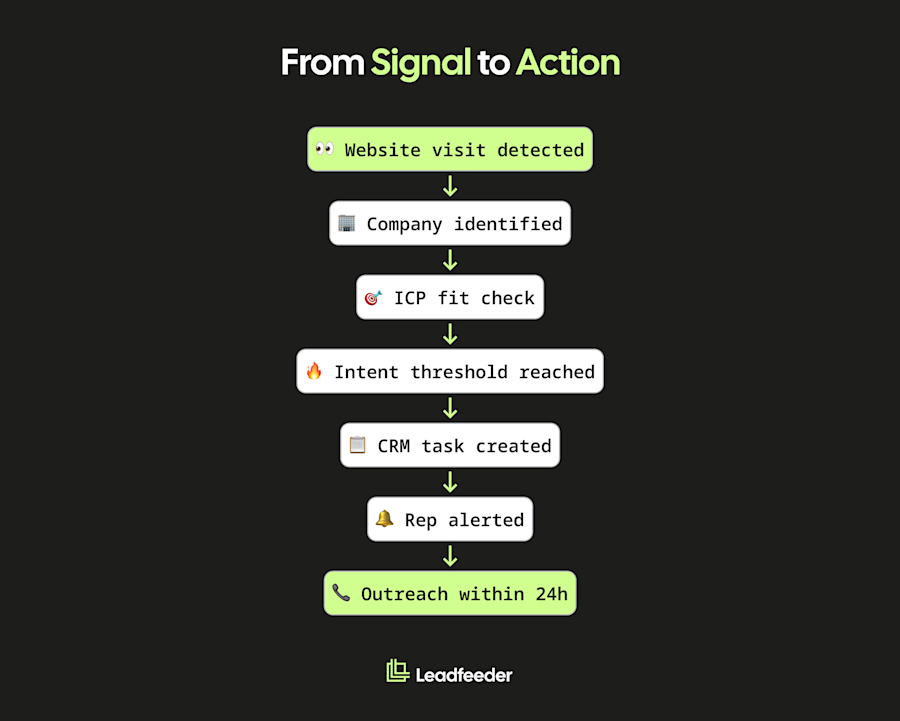
A typical workflow might look like this:
Website visit detected
↓
Company identified
↓
ICP fit check
↓
Intent threshold reached
↓
CRM task created
↓
Rep alerted
↓
Outreach within 24 hours
This process ensures that high-priority accounts move quickly from signal to action, rather than getting lost between marketing and sales.
Step 3: Personalise outreach using intent context
Once you’ve identified and prioritised the right accounts, the next question is what to say. This is where intent data becomes especially valuable in providing sales teams with the context for the conversation. Instead of starting with a generic pitch, reps can tailor their outreach to the topics, pages, and content that the account has already engaged with. Buyers are far more likely to respond when the message reflects what they are actively researching
The most useful form of personalisation is often the simplest. Use intent signals to understand what stage of the buying process an account may be in and adjust your outreach accordingly. For example:
A visit to a comparison page may indicate that the account is evaluating different solutions
A pricing page visit may suggest interest in budget, implementation, or purchasing timelines
Engagement with problem-focused content may reveal the challenge the account is trying to solve
Each signal gives sales teams an opportunity to make their outreach more relevant.
Imagine an account has spent time reading content about lead qualification. Rather than opening with a broad product overview, a salesperson could focus on the challenges of identifying high-quality opportunities and prioritising sales effort. The conversation starts closer to the buyer’s area of interest.
Timing is equally important. Intent signals are most valuable when they are fresh. An account that visited your pricing page this morning is likely to be more engaged than one that last visited a month ago. Reaching out while research activity is still happening can make conversations feel more relevant and timely. That doesn’t mean every website visit deserves an immediate call. However, when strong intent signals appear from a target-fit account, sales teams should aim to engage while interest is still active.
Intent data helps you understand how buying decisions are made in your target accounts. If multiple people from the same company are engaging with your website, there is a good chance a buying committee is forming. Different stakeholders often focus on different topics. A marketing leader may be interested in campaign performance, while a sales leader focuses on pipeline impact. Someone from operations may be looking at implementation requirements. When several stakeholders from the same account start showing intent, tailor your outreach accordingly. The more closely your message aligns with each person’s priorities, the more relevant it becomes.
Intent signals can also reveal when an account is evaluating alternatives. This might come from third-party intent data showing competitor research activity, or from visits to your own comparison pages. In these situations, outreach should focus on helping buyers evaluate their options. Highlight relevant differentiators, address common objections, and provide proof points that support your position. Try to make the decision process easier for the buyer.
Here are some examples you can try:
A pricing page visit could trigger an email focused on implementation, expected outcomes and commercial considerations.
“I noticed your team has been looking at pricing and implementation options. Many companies at this stage are trying to understand time-to-value and rollout requirements. Would it be helpful to see how similar organisations approached implementation?”
A comparison page visit could trigger a LinkedIn message addressing key differences between approaches or solutions.
“Saw you've been researching different approaches to solving this problem. If you're currently comparing options, this side-by-side breakdown might be useful.”
A content download could trigger a follow-up centred on the challenge discussed in that asset and related resources.
“You recently downloaded our guide on lead qualification. One challenge we hear regularly is separating genuine buying signals from general website activity. Is that something your team is dealing with at the moment?”
The common thread here is relevance. Your outreach relates directly to an action they performed.
According to Gartner, 67% of B2B buyers prefer to complete their purchase without engaging a rep. Buyers increasingly research solutions independently before engaging with vendors. Generic outreach that ignores buying signals is easy to dismiss. Outreach informed by intent data feels more timely and useful because it reflects what the buyer is already trying to learn.
Intent data will not guarantee a response. It can, however, help sales teams start more informed conversations with the right people at the right time.
Step 4: How to drive sales with intent data on active deals
You don’t have to stop using intent data once an opportunity enters your pipeline. In fact, it can be a mistake. Intent signals remain valuable throughout the sales process because they provide visibility into how an account’s interest evolves over time.
Start by continuing to monitor engagement from active opportunities. If contacts keep returning to your website, viewing product information, or revisiting key pages, it may indicate that internal discussions and evaluation are still underway. On the other hand, a sudden drop in engagement may signal that momentum is slowing. Some intent platforms can also reveal when an account begins researching competitors, allowing sales teams to address concerns before the deal drifts further.
Intent data can help revive stalled opportunities. A deal may appear dormant inside the CRM for weeks. However, if the account suddenly returns to your website and starts engaging with relevant content again, that behaviour can provide a strong reason to reconnect. Rather than sending a generic check-in email, sales teams can use the renewed activity as a signal that interest may be returning.
Multi-threading is also a valuable use case. Buying decisions rarely involve one person. If new stakeholders begin researching your solution during an active opportunity, intent data can help you identify them. For example, visits from new stakeholders may reveal different priorities:
Finance teams may focus on pricing and ROI
Procurement teams may review contracts and commercial terms
Operations teams may assess implementation requirements
This creates an opportunity to build additional relationships and address the concerns of different decision-makers before they become blockers.
Finally for this step, intent data can uncover expansion opportunities within existing customers. If a customer begins researching product areas they do not currently use, there may be an opportunity for an upsell or cross-sell conversation. Interest in additional features, services, or use cases can signal growing needs long before a customer reaches out directly.
All this matters because much of the buying process happens before vendors are formally engaged. According to Forrester, 92% of buyers begin their journey with a shortlist of vendors already in mind. Intent data helps sales teams stay visible throughout the research process and identify important changes in buyer behaviour before they appear in the pipeline.
Step 5: Understand the limitations (and avoid the traps)
Intent data can be extremely valuable. However, like any sales signal, it has limitations. Teams that understand those limitations tend to get better results because they use intent data as one input into decision-making, rather than treating it as a shortcut to qualification.
One of the most common mistakes is assuming that every intent signal represents a buying opportunity. Just because someone is researching does not always mean they’re considering a purchase. Someone might be gathering information for a report, benchmarking vendors, or exploring a topic out of professional interest. An intern researching potential suppliers can generate many of the same signals as a decision-maker evaluating solutions.
This is another reason why combining fit and intent is so important. Strong intent from a poor-fit account may not deserve attention. Moderate intent from a highly qualified account may be far more valuable. Intent data helps identify interest. Your ICP helps determine whether that interest is commercially relevant.
It’s also important to understand that not all intent data is created equal. First-party website signals are generally straightforward because they come directly from your own digital properties. Third-party intent data can vary significantly between providers. Differences in data collection methods, coverage, and update frequency can all affect quality.
When evaluating a provider, ask yourself these questions:
How are the intent signals collected?
Which sources contributed to the dataset?
How frequently is the data refreshed?
Is the provider transparent about its methodology?
The answers can tell you a lot about the reliability of the signals you receive.
Next, avoid the temptation to over-automate. Intent data is excellent for prioritising accounts, triggering alerts, and helping sales teams decide where to focus their attention. It should not replace human judgement. An intent score cannot write a personalised message, nor can a workflow understand the nuances of a complex buying process. The strongest sales teams use intent data to support decision-making, then apply experience and context to determine the next step.
You should also think about privacy and compliance when evaluating intent data providers and processes. First-party intent data collected through your own website generally provides clearer visibility into how information is gathered and used. Third-party intent data can be more complex, so it’s important to perform due diligence on potential providers. If your organisation operates under GDPR or other privacy regulations, consider involving the appropriate internal stakeholders when evaluating new intent data sources.
Finally, stay clear of the ‘volume trap’. If thresholds are set too low, intent data can quickly generate a flood of alerts and a long list of supposedly high-intent accounts. That makes prioritisation harder, not easier. Start with stricter criteria and a smaller group of high-confidence accounts. You can always loosen thresholds later as your team gains confidence in the process.
Step 6: Measure whether intent data is actually working
Some teams implement intent data and automatically assume it is delivering value. But you can only know for sure by measuring the impact directly. Before rolling out intent-based workflows, establish a baseline for your current performance. This gives you something to compare against later. Where possible, create a comparison group and track intent-sourced accounts separately from non-intent accounts. That makes it easier to identify whether improvements are genuinely linked to your intent data strategy.
Several metrics can help you evaluate performance:
Connect rate: Are sales reps successfully reaching more prospects when they prioritise intent-qualified accounts?
Meeting booked rate: Does intent-informed outreach generate more meetings than standard prospecting activity?
MQL to SQL conversion rate: Are intent-qualified leads becoming sales-accepted opportunities more frequently or more quickly?
Pipeline velocity: Are intent-flagged opportunities progressing through sales stages faster?
Win rate: Are deals influenced by intent data closing at a higher rate than comparable opportunities?
Cost per qualified lead: Is sales efficiency improving as reps spend less time pursuing poorly qualified accounts?
Each metric reveals something different. Connect rates and meeting rates show whether intent data is improving engagement. Conversion rates and pipeline velocity help measure sales effectiveness. Win rates and cost metrics provide a broader view of commercial impact.
Measurement should be an ongoing process rather than a one-off exercise. Review performance monthly to identify trends and operational issues. After a full quarter, evaluate the results and decide whether scoring thresholds, alert criteria, or workflow rules need to be adjusted. The goal is continuous improvement rather than perfect settings from day one.
It’s also important to watch for signs that intent data is creating noise instead of value. Common warning signs include:
Sales reps ignoring alerts
Growing alert fatigue across the team
No improvement in meeting booked rates
Pipeline velocity remaining unchanged
If these issues appear, revisit your scoring model and thresholds. In many cases, the problem is not the intent data itself, but that too many weak signals are being treated as high-priority opportunities.
Where to start: A 30-day implementation plan
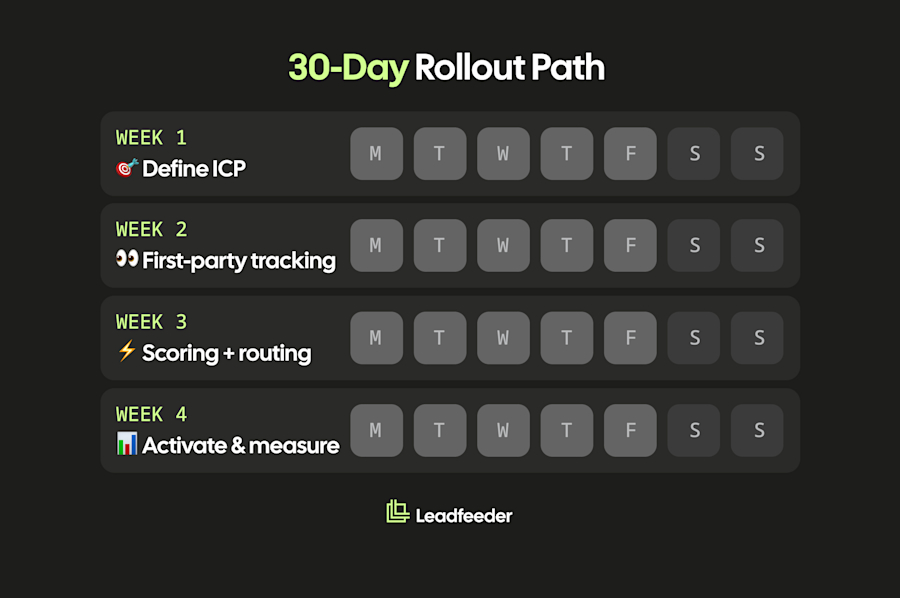
If you’re implementing intent data for the first time, don’t try to build a complex system from day one. Start small, establish a process, and prove the value before expanding. Here’s a simple plan you can follow.
Week 1: Define your ICP
Document the characteristics of your best customers, including:
Industry
Company size
Geography
Technology profile
Without a clearly defined ICP, intent signals are difficult to prioritise and easy to misinterpret.
Week 2: Set up first-party intent tracking
Start with your website. Learn how to identify which companies are visiting your site, which pages they engage with, and how often they return. This is usually the lowest-friction way to begin using intent data because the signals are immediate and directly related to your business.
Tools such as Leadfeeder can help identify website visitors, surface intent signals, and highlight accounts that match your ideal customer profile.
Week 3: Build a simple scoring and routing process
Create a fit score, an intent score, and a simple lead scoring model to help prioritise the right accounts. Then build a simple workflow that creates a CRM task or alert when a target account crosses that threshold. Focus on one workflow first and refine it over time.
Week 4: Activate and measure
Start outreach to intent-prioritised accounts and begin tracking the metrics discussed in the previous section. Review results at the end of the month, identify what is working, and adjust your scoring thresholds and workflows accordingly. By this point, you should have a clear understanding of how to leverage intent data across the sales process.
Ready to start with Step 1? Leadfeeder identifies which companies are visiting your website, and automatically routes the best-fit ones to your sales team. Start a 14-day free trial; no credit card required.