

60-Second Summary
Webflow is excellent for building fast, polished B2B sites, but it doesn't identify which companies visit by default. This guide shows how to add company-level visitor identification on Webflow, what data you'll receive, and key GDPR considerations.
Key takeaways: Use a tracker (e.g., Leadfeeder) to turn anonymous visits into company-level accounts—see company name, firmographics, pages viewed, traffic source, and visit time; this converts traffic charts into actionable account lists for B2B teams.
Standout strategies & tactics: Install the tracker via Google Tag Manager (recommended) or paste it into Webflow’s Custom Code head (requires a paid site plan); configure Leadfeeder filters and integrations to push companies into your CRM or Slack and follow up while intent is fresh.
Real-world lessons & frameworks: Identification works by reverse-IP lookup against business databases to map visits to companies—focus on the business-level signal, not individuals, to enable sales and marketing outreach ahead of conversion.
GDPR & compliance: An IP can be personal data, so company-level ID reduces but doesn't eliminate GDPR/ePrivacy obligations—verify legitimate interest and implementation with your DPO/legal counsel and use transparent vendors that honour objections; this is general information, not legal advice.
*This summary was created with AI assistance, using our original content.
Webflow is great for building a fast, polished B2B site, but out of the box it will not tell you which companies are landing on it. This guide shows you how to set that up on Webflow, what data you get, and what to check for GDPR. It is the same company-level approach we cover in our visitor identification guide, applied to Webflow; for the wider how-to, see how to identify anonymous website visitors.
What Webflow visitor identification is (and what it is not)
It is not a visitor counter. Webflow visitor analytics tools tell you how many people visited; visitor identification tells you which companies visited. You see the business behind each visit, not an individual person. For B2B teams on Webflow, that is the difference between a traffic chart and a list of accounts you can actually act on.
How to set up Webflow visitor tracking on your site
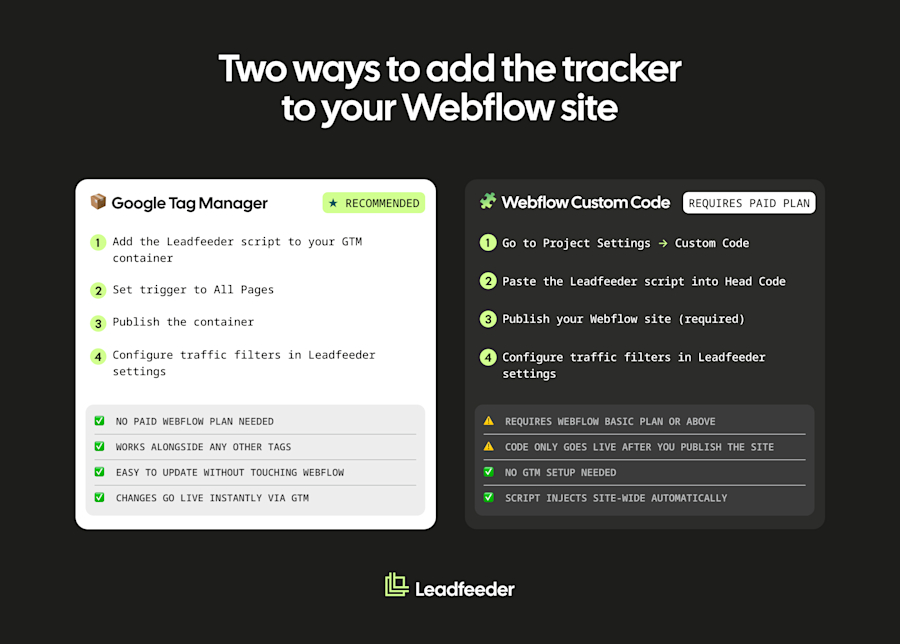
To identify the companies visiting your Webflow site, you add the Leadfeeder script to your site. Webflow has no plugin marketplace, so you add it as custom code. There are two ways:
Google Tag Manager (recommended): add the tracker script to your GTM container. This is the easiest route and does not need a paid Webflow plan.
Webflow custom code: in your Webflow project, go to Project Settings > Custom Code and paste the tracker script into the Head Code field (it injects before the closing </head> tag site-wide). This requires a paid Webflow Site plan (Basic or above), and the code only goes live once you publish the site.
Then set your traffic-filtering rules in your Leadfeeder settings; data typically starts appearing within about an hour. Full setup steps are in our guide to installing the tracker on a website builder.
What visitor data you get
Once the tracker is running, each identified company can include the company name and firmographics (industry, size, location), the pages they viewed, the traffic source and medium, and the time of the visit. You can push companies into your CRM or Slack through Leadfeeder’s integrations and follow up while intent is fresh. It stays company-level throughout, so you are acting on the business, not tracking a named individual. This helps sales and marketing teams spot engaged accounts before they convert.
Webflow tracking and visitor IP addresses
Webflow does not hand you visitor IP addresses directly, and on their own they would just be numbers anyway. Visitor identification does the useful part for you: it matches a visitor’s IP to the company it belongs to using reverse-IP lookup and a business database, turning an anonymous visit into a named company. We break this down in how to find the company behind an IP address.
Is Webflow visitor identification GDPR-compliant?
An IP address can be personal data, so GDPR applies. Company-level identification points to the business behind a visit, not a named person, which makes it lower risk, but not outside GDPR. Whether legitimate interest applies is a question for your legal team, and GDPR and ePrivacy are separate questions. Even so, your GDPR obligations still depend on implementation, jurisdiction and legal review, so check your setup with your DPO or legal counsel. We cover the detail in visitor identification and GDPR. Use a tool that is transparent about its data sources and honours objections. This is general information, not legal advice.
Frequently Asked Questions for Webflow Visitor Identification
How do I see which companies visit my Webflow site?
To see which companies visit your Webflow site, add a website visitor identification tracker via Google Tag Manager or Webflow’s custom code. It reveals the companies behind your visits, even the ones who never fill in a form, along with the pages they viewed and where they came from.
Can I track visitors on Webflow without a plugin?
Yes. Webflow has no plugin marketplace, so you add a visitor identification tracker through Google Tag Manager or by pasting the script into Webflow’s custom code. Both work, and GTM does not require a paid Webflow plan.
Does visitor identification slow down my Webflow site?
The tracker is a lightweight script. For the smallest performance impact, load it through Google Tag Manager or add the async or defer attribute to the script.
Is Webflow visitor identification GDPR-compliant?
Company-level identification points to the business behind a visit, not a named person, so it is treated differently under GDPR. Your exact obligations still depend on implementation and jurisdiction, so involve legal for your setup.
Ready to see which companies are visiting your Webflow site? Start with Leadfeeder’s free plan.
Related articles