

60-Second Summary
Most WordPress visitors leave without completing a form, and standard analytics only reports visit counts, not which companies were behind them. This guide explains the difference between counting visits and identifying companies, shows how to install Leadfeeder on WordPress, what company-level data you get, and the GDPR considerations to check.
Key takeaways: Visitor tracking means either measuring traffic (GA4, WP Statistics) or identifying the companies behind visits (Leadfeeder). Company-level identification reveals the business visiting, the pages they viewed, and enables B2B follow-up.
Standout strategies & tactics: Install the Leadfeeder tracker via the official plugin, Google Tag Manager, or a header/footer plugin (avoid editing header.php). Enrich visits with firmographics and push companies into your CRM or Slack to act while intent is fresh.
Real-world lessons & frameworks: Identification works by reverse-IP lookup plus a business database, delivering firmographics, pages viewed, duration, and traffic source; this is more actionable for B2B sales than aggregate analytics.
Compliance & practical steps: Treat IPs as potential personal data under GDPR—consult your legal team or DPO, use transparent tools that honor objections, clear your cache if data doesn’t appear, and allow up to an hour for tracking to populate.
*This summary was created with AI assistance, using our original content.
Most of your WordPress traffic leaves without filling in a form, and standard analytics only tells you how many people visited, not which companies were behind those visits. This guide closes that gap.
WordPress visitor tracking usually means one of two things: measuring traffic, or identifying the companies behind anonymous visits. This guide covers both, then shows you how to see which companies are visiting your WordPress site, what they looked at, and how to act on it. If you want the wider picture first, our visitor identification guide is a good primer.
The two kinds of WordPress visitor tracking
“Visitor tracking” means two different things, and it helps to be clear which job you are trying to do.
Counting visits (WordPress visitor analytics)
If you just want numbers or real time visitor tracking in WordPress, visitor analytics tools do the job. Google Analytics, WP Statistics and the various visitor counter plugins show sessions, page views, sources and trends. They are great for spotting popular content, but they stop at the aggregate. They will not tell you the company that just spent ten minutes on your pricing page.
Identifying the companies behind visits (WordPress visitor identification)
For B2B, the more valuable question is which companies are visiting. WordPress visitor identification reveals the companies visiting your site, even when they never fill in a form. It works at company level: you see the business behind a visit, not an individual person. That is the difference between knowing your traffic went up and knowing a target account was on your site yesterday.
How to see which companies visit your WordPress site
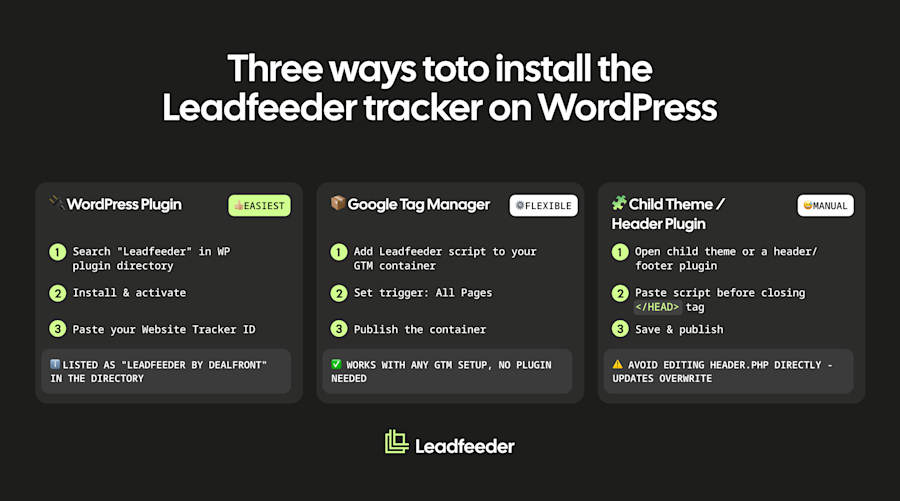
To identify the companies visiting your WordPress site, you add a small script, the Leadfeeder script, to your site. Once it is live, it matches each visit to the company behind it and enriches it with firmographics and the pages they viewed.
You can install it on WordPress in three ways. You’ll typically need Administrator access (on multisite setups, Super Admin access may be required):
The official WordPress plugin: install the official Leadfeeder plugin from the WordPress plugin directory, activate it, and paste your Website Tracker ID.
Google Tag Manager: add the tracking script through your GTM container.
Child theme or a header/footer plugin: paste the script before the closing </head> tag. Avoid editing header.php directly, as theme updates can overwrite it.
For the full click-by-click walkthrough, follow our WordPress install guide. It can take up to an hour for data to appear, so clear your WordPress cache if you do not see anything at first.
What visitor data you get
Once the tracker is running, each identified company comes with the company name and firmographics (industry, size, location), the pages they viewed and how long they stayed, the traffic source and medium, and the time of the visit. From there you can push companies into your CRM or Slack through Leadfeeder’s integrations and follow up while intent is fresh. It stays company-level throughout, so you are acting on the business, not tracking a named individual. This helps sales and marketing teams spot engaged accounts before they convert.
Tracking visitor IP addresses on WordPress
People often search for how to get a visitor’s IP address in WordPress. On its own, an IP is just a number. The value is matching that IP to the company it belongs to, which is exactly how company-level identification works: reverse-IP lookup plus a business database turn an anonymous visit into a named company. We break this down in how to find the company behind an IP address.
Is WordPress visitor tracking GDPR-compliant?
An IP address can be personal data, so GDPR still applies. Company-level identification points to the business behind a visit, not a named person, which makes it lower risk, but not outside GDPR. Whether legitimate interest applies is a question for your legal team, and GDPR and ePrivacy are separate questions. Even so, your GDPR obligations still depend on implementation, jurisdiction and legal review, so check your setup with your DPO or legal counsel. This is general information, not legal advice. We cover the detail in visitor identification and GDPR. Use a tool that is transparent about its data sources and honours objections.
Frequently Asked questions for WordPress Website Visitor Tracking
How do I see which companies visit my WordPress site?
To see which companies visit your WordPress site, add a website visitor identification tool. It reveals the companies behind your visits, even those who never fill out a form, along with the pages they viewed and where they came from.
Can I tell which companies visit my WordPress website?
Yes. A visitor identification tool reveals the company behind each visit at company level, so you can see which businesses are researching you and follow up, without needing them to submit a form.
How do I track a visitor’s IP address in WordPress?
You can log IP addresses with plugins, but on their own they are just numbers. A visitor identification tool matches the IP to the company it belongs to and adds firmographics, which is far more useful for B2B.
What is the best WordPress visitor tracking plugin?
It depends on the job. There are counter and analytics plugins for visit numbers, and company-identification plugins such as the Leadfeeder plugin for seeing which businesses visit your site.
Is WordPress visitor tracking GDPR-compliant?
An IP address can be personal data, so GDPR applies. Company-level identification points to the business behind a visit, not a named person, which makes it lower risk, but not outside GDPR. Your exact GDPR obligations still depend on implementation and jurisdiction, so involve legal for your setup. Choose a provider that is transparent about its data sources and honours objections. This is general information, not legal advice.
Ready to see which companies are visiting your WordPress site? Start with Leadfeeder’s free plan.