Website visitor identification is a category of B2B technology that reveals which companies are visiting your website, even when those visitors never fill out a form, start a chat, or identify themselves.
This matters, because most B2B website traffic is anonymous. Visitors research quietly, compare options, and leave without a trace in your CRM. For marketing teams under pressure to prove pipeline impact and maximise spend, that invisible demand is a problem.
This guide explains what website visitor identification is, how the technology works, what you can and cannot identify, whether it is legal, and how to set it up.
The anonymous traffic problem: who is visiting your website?
The vast majority of your B2B website visitors will never fill out a form. Gartner reports that B2B buyers spend only about 17% of the total buying journey meeting with potential suppliers, split across all vendors they are evaluating, and 61% of B2B buyers now prefer a rep-free buying experience entirely.
That means most of the buying research happening on your website is invisible. Prospects visit your pricing page, read case studies, and then they leave. They may come back three or four times before anyone on your team knows they exist.
Website visitor identification closes that gap. Instead of waiting for a form fill, you can see which companies are showing interest and act while intent is still warm. Leadfeeder’s tool is built for exactly this.
What is website visitor identification?
The website visitor identification definition in one sentence: a B2B technology that matches anonymous website traffic to known companies or, in some cases, individual contacts, by capturing data points from each visit (IP address, cookies, device signals) and matching them against databases of known business entities.
The output is a list of companies that have visited your site, along with firmographic data (industry, size, location) and behavioural data (pages viewed, session length, return frequency).
Website visitor identification vs website visitor tracking
These terms get used interchangeably, but they answer different questions.
Simply put: Tracking tells you what happened, while identification tells you who was behind it.
Website visitor identification vs web analytics
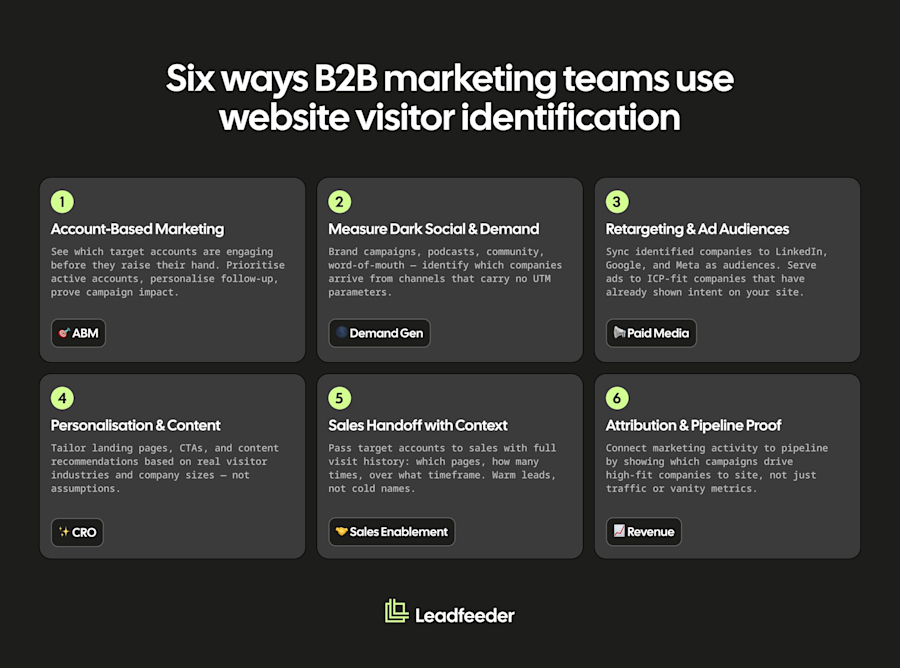
Web analytics platforms like Google Analytics provide aggregate behavioural metrics such as:
How many visitors you had, where they came from
Which pages they viewed
How they converted
They don’t tell you which specific companies were behind those visits. Identification fills that gap by resolving anonymous sessions to named organisations.
Here’s a breakdown:
Company-level vs person-level identification
Company-level identification reveals the organisation behind a visit. For example, "someone from Siemens visited your pricing page", along with that company's industry, size, location and the pages they viewed. This is the dependable core of website visitor identification, and for most B2B teams it is the signal that actually matters: buying decisions are made by accounts and buying groups, not by lone anonymous visitors. It resolves the majority of B2B traffic to a named company without ever profiling a named individual, which also makes it lower-risk under GDPR than person-level tracking (though, as the legality section below explains, it still involves personal data and needs a lawful basis).
Person-level identification attempts to resolve the individual behind the visit. Think "Sarah Doe, Director of Marketing at ACME Inc." It is narrower and more constrained: it works primarily for US traffic, relies on identity graphs or cookie matching, and in the EU almost always requires explicit consent. This is the higher-risk end of the category, and many privacy-conscious B2B tools stay company-level by design. Set your expectations accordingly.
How does website visitor identification work?
No single method of website visitor identification covers all traffic, which is why most tools combine several techniques.
Reverse IP-to-company lookup
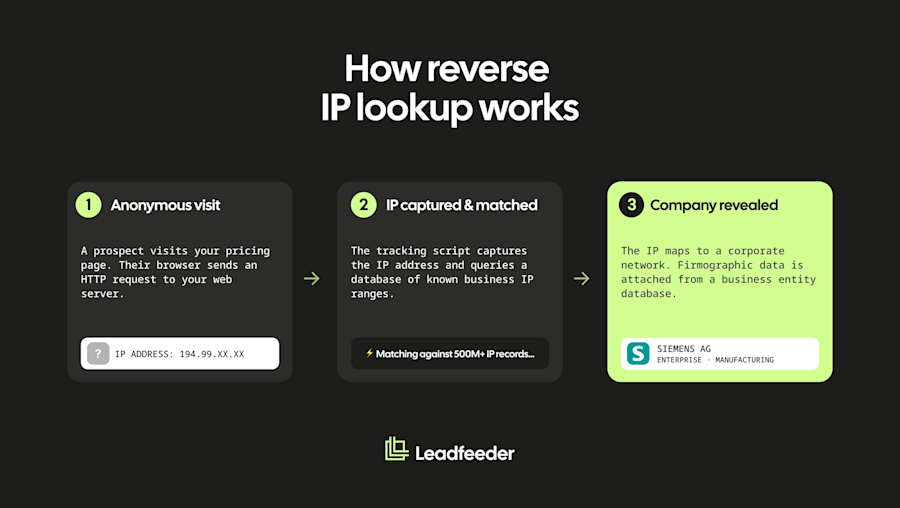
The most common method. When someone visits your website, their browser sends a request that includes an IP address. Identification tools match that IP against databases of known business IP ranges to reveal the company behind the visit.
This works well for visitors on corporate networks but degrades for remote workers using consumer ISPs, VPNs, or mobile networks.
Cookies and return-visit tracking
First-party cookies allow identification tools to stitch multiple sessions together and recognise returning visitors. If a visitor is identified on their first visit via IP or form fill, cookies can link future visits back to that known company or contact. This is true even if the IP address changes.
Identity graphs and person-level resolution
Some tools use cross-device identity graphs that combine email, cookie, device, and behavioural data to resolve individual visitors. This is how person-level identification works in the US market.
These graphs are powerful but have accuracy limitations, break down outside the US, and raise significant privacy considerations in GDPR-governed markets.
Where the data comes from: the waterfall model
No single data source identifies every visitor. Most tools use a "waterfall" approach, querying multiple data partners in sequence. If the first source cannot match a visitor, the system tries the next, then the next. This multi-source approach is what lifts coverage rates above what any single IP database could achieve alone.
How accurate is it? Typical match rates
Match rates vary significantly depending on your traffic mix, and any vendor claiming a single number without context is oversimplifying.
Company-level match rates typically reach up to 45% of B2B website traffic when using multi-source tools. Sites with more corporate, office-based traffic see higher rates. Sites with heavily remote, global, or consumer-ISP traffic see lower rates.
Person-level match rates are significantly lower and largely limited to US traffic.
Factors that reduce accuracy: remote work (consumer ISPs), VPNs, mobile traffic, shared office spaces, and geographic regions with thinner IP database coverage.
The only match rate that matters is the one a tool achieves on your traffic. Always run a trial before committing to see how effective any given platform is at identifying anonymous website visitors.
What can (and can't) you identify about your visitors?
When you set out to get website visitor information, honesty about scope matters. Here is what you can realistically expect.
Company and firmographic data you get
When a company is successfully identified, you typically receive:
Company name and domain
Industry and sub-industry
Employee count and revenue band
Headquarters location and geographic footprint
In some cases, tech stack and growth signals
Engagement and intent signals you get
Beyond firmographics, identification tools capture behavioural data that signals intent:
Which pages the company visited (pricing, case studies, integrations)
Time on site and session depth
Number of return visits and visit frequency
High-intent page hits that suggest active evaluation
Identifying anonymous visitors
Anonymous website visitor identification is the core capability here. It means resolving visitors who have not submitted a form, started a chat, or identified themselves in any way.
Company-level identification handles this reliably for a meaningful share of B2B traffic. Person-level identification of truly anonymous visitors is more limited and comes with privacy risks, particularly in the EU.
Identifying unique visitors
"Unique visitors" in an analytics context means distinct browser sessions, not identified people. Website visitor identification connects those sessions to real companies, but "unique" still means unique companies, not unique individuals, unless you are using person-level tools in supported markets.
Is website visitor identification legal? GDPR, privacy, and cookies
Legality depends on what you identify and where. This section is framed EU-first, because that’s where the strictest rules apply. It is for general information only and is not legal advice; consult a qualified legal professional for guidance specific to your organisation.
Company-level data vs personal data under GDPR
Start from the right premise: this involves personal data. When someone visits your site their browser sends an IP address, and under GDPR an IP address can be personal data. So visitor identification is not "outside GDPR"; it is personal data processing that can be carried out lawfully, with the right lawful basis and safeguards. The real distinction is not "company data is not personal data". It is the difference between identifying the company a visit came from (a business record: organisation, industry, size, pages viewed) and building a profile of an individual across sessions.
Company-level identification is lower-risk than person-level tracking because it identifies a business rather than an individual, but it still involves personal data at the point an IP address is processed, which is why a lawful basis is needed. For how Leadfeeder handles this, see our guide to website visitor tracking and GDPR.
Where the compliance questions sit
Two separate rulebooks apply: GDPR (do you have a lawful basis to process the data?) and ePrivacy (do you need consent before placing non-essential cookies?). They are independent questions. What that means for your privacy notice, lawful basis, cookie banner and data-subject requests is a determination for your own legal team. Our guide to website visitor tracking and GDPR sets out the questions to take to them.
Cookieless and privacy-first identification
As third-party cookies are phased out or deprecated across some platforms, IP-based and first-party identification approaches become more important.
Company-level identification via reverse IP lookup does not depend on third-party cookies at all, which makes it inherently more future-proof than methods that rely on cross-site tracking. This is one reason why company-level tools are well-positioned for a privacy-first web.
How to set up website visitor identification
If you are wondering how to identify website visitors in practice, most tools can be installed and returning data within hours. Here is what the setup process looks like.
1. Install the tracking tag
Add a lightweight JavaScript snippet to your website, similar to installing Google Analytics. Most tools provide a tag manager option (such as Google Tag Manager or Segment) or a direct embed. The tag starts capturing visitor data as soon as it is live.
2. Set it up on your platform
If you are on WordPress, most tools offer a plugin or a simple paste-into-header installation. Webflow, Squarespace, and other builders typically support tag manager or custom code injection. Setup usually takes under 30 minutes regardless of platform.
Before you go live, update your privacy notice (and cookie banner, if you use one) to reflect the data you are now collecting, and make sure your setup is compliant for the regions you operate in. If in doubt, have your legal or privacy team sign it off.
3. Connect it to your CRM, Slack, and marketing tools
The real value comes from connecting identification to your existing workflow:
Integrate with your CRM so identified companies appear alongside your existing accounts
Connect Slack for real-time alerts
Sync to ad platforms to build retargeting audiences from identified visitors
4. Configure your ICP filters and alerts
You do not want to see every visitor. Configure filters based on your ICP criteria (industry, company size, geography) and set up alerts for high-intent behaviour such as pricing page visits, return visits, and case study views. This ensures your team sees the visitors that matter, not a noisy list of every company that landed on your blog.
How B2B marketing teams use website visitor identification
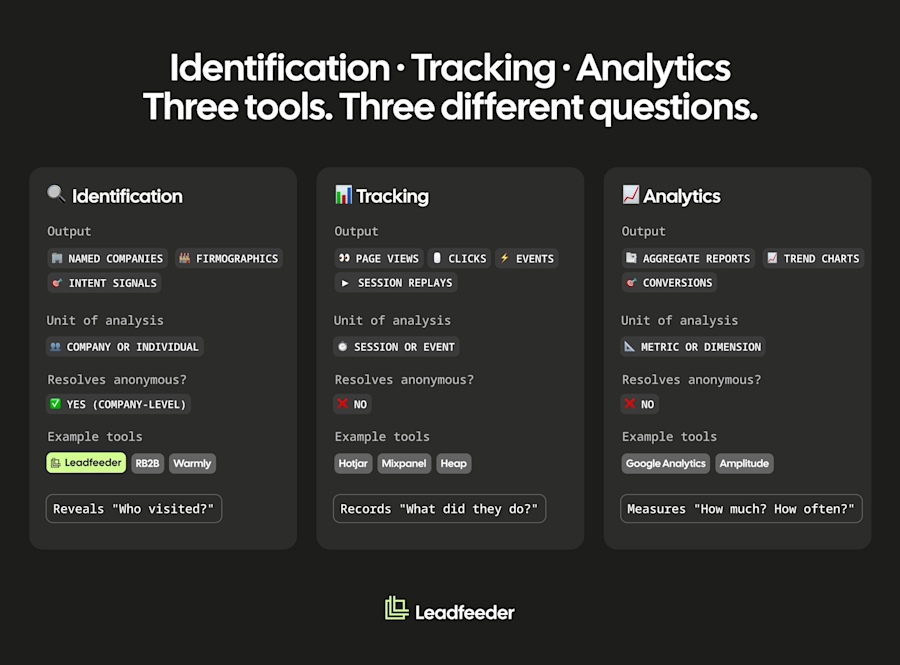
Identification is most valuable when it connects to a workflow. Here are the use cases that drive the most impact for marketing teams. Gartner reports that a complex B2B purchase involves a buying group of six to 10 decision makers. Identifying the account is the first step to reaching the whole group.
1. Account-based marketing (ABM)
Identification tells you which target accounts are engaging with your content before they raise their hand. This lets ABM teams prioritise active accounts, personalise follow-up, and prove that campaigns are driving the right companies to site.
2. Measuring hard-to-track demand
Brand campaigns, word of mouth, podcasts, dark social, and community activity all drive website visits that don’t carry UTM parameters. Identification gives you a way to see which company is visiting your site from these channels, even when attribution models can’t trace the source.
3. Retargeting and ad audiences
Identified companies can be synced to ad platforms like LinkedIn, Google, and Meta as retargeting audiences. Instead of broad retargeting, you serve ads specifically to companies that fit your ICP and have already shown interest.
4. Personalisation and content
When you know which industries and company sizes are visiting, you can tailor landing pages, CTAs, and content recommendations based on real visitor data rather than assumptions. This personalisation can help you stand out and close more deals.
5. Sales handoff with context
When a target account shows high-intent behaviour (repeated pricing page visits, return visits across multiple weeks), marketing can pass the account to sales with context: which pages they visited, how many times, and over what timeframe. Sales gets a warm lead with evidence, not a cold name from a list.
6. Attribution and pipeline
Identification connects marketing activity to pipeline by showing which campaigns drive high-fit companies to site, not just traffic. Leadfeeder helps teams tie visitor data back to campaigns so they can prove which channels drive the accounts that actually convert.
How to choose a website visitor identification tool
The tools vary more than the marketing pages suggest. Here is what to evaluate.
What to look for
Accuracy on your traffic: Run a trial and measure match rates on your own visitors, not vendor benchmarks
Integrations: Native connections to your CRM, ad platforms, Slack, and marketing automation
Privacy and GDPR posture: Especially important for EU-based teams or those with EU traffic
Activation capabilities: Does the tool just identify, or does it help you prioritise, enrich, route, and act?
Pricing transparency: Published pricing you can evaluate, not a sales conversation to get a quote
Website visitor identification tools compared
Leadfeeder is a great option for marketing teams that want company-level identification tied to activation and pipeline, with transparent pricing from EUR 79 per month and a 14-day free trial (see terms and conditions). But it is company-level only; if you need person-level identification for US traffic, other tools might be better suited.
For a detailed comparison of the leading tools (including pricing, match rates, and GDPR coverage), see our guide to the best website visitor identification software in 2026.
Website visitor identification trends for 2026
Four trends are shaping where the category is heading.
Cookieless and privacy-first identification: As third-party cookies face increasing restrictions, IP-based and first-party approaches are becoming the default. Tools that rely on cross-site tracking are losing ground.
AI-led intent scoring: Raw visitor lists are being replaced by intent scores that combine visit behaviour with firmographic fit, so teams focus on the accounts most likely to buy.
The account-level vs contact-level debate: Person-level identification is growing in the US but remains constrained in the EU. Most B2B marketing teams are finding that company-level identification, combined with good enrichment, covers their needs.
Buyers researching off-site: Buyers increasingly use G2, review sites, Reddit, and LLMs to evaluate products before ever visiting a vendor's website. Identification is expanding to include these off-site intent signals alongside on-site behaviour.
Frequently asked questions
What is website visitor identification?
Website visitor identification is a B2B technology that reveals which companies (and in some cases, which individuals) are visiting your website, even when they do not fill out a form. It works by matching visitor data against databases of known business entities.
Is website visitor identification legal?
Website visitor identification can be carried out lawfully when it is set up properly. It involves personal data, because an IP address can be personal data under GDPR, so it needs a lawful basis rather than sitting "outside" GDPR. Company-level identification is lower-risk than person-level tracking because it produces a business record rather than an individual profile. This is general information, not legal advice; confirm your setup with your legal team.
Can you identify visitors who don't fill out a form?
Yes, you can identify visitors who never fill out a form. That is the core purpose of website visitor identification. Company-level tools typically identify up to 45% of B2B traffic without requiring any form submission. Person-level identification of anonymous visitors is more limited.
What's the difference between account-level and contact-level identification?
Account-level (company-level) identification reveals which organisation visited your site. Contact-level (person-level) identification attempts to identify the specific individual.
Account-level is widely available and lower-risk under GDPR because it produces a business record rather than an individual profile, though it still involves personal data and needs a lawful basis. Contact-level is more constrained, primarily US-focused, and carries higher privacy requirements in the EU.
How accurate is website visitor identification, and what match rate is realistic?
Website visitor identification match rates typically go up to 45% for company-level tools on B2B traffic. Person-level match rates are significantly lower and largely limited to US traffic. Accuracy depends on your traffic mix: corporate network traffic matches more reliably than remote workers on consumer ISPs or VPNs. Always trial a tool on your own traffic before committing.
Can Google Analytics identify who is visiting my website?
Google Analytics cannot identify which companies or individuals are visiting your website. It provides aggregate behavioural data (page views, sessions, traffic sources) but does not resolve anonymous visitors to named companies. Website visitor identification tools fill that gap.
Website visitor identification vs tracking vs analytics: what's the difference?
Website visitor identification reveals which companies are visiting. Tracking records what visitors do on your site (clicks, page views, events). Analytics aggregates that tracking data into reports and metrics. Identification answers "who," tracking answers "what," and analytics answers "how much." Most B2B teams use all three together.
Want to see which companies are already visiting your website? Try Leadfeeder free for 14 days, no credit card required.